<?xml version="1.0" encoding="UTF-8"?><feed
	xmlns="http://www.w3.org/2005/Atom"
	xmlns:thr="http://purl.org/syndication/thread/1.0"
	xml:lang="vi"
	
	xmlns:georss="http://www.georss.org/georss"
	xmlns:geo="http://www.w3.org/2003/01/geo/wgs84_pos#"
	>
	<title type="text">nghiên cứu từ khóa &#8211; BlogAnChoi</title>
	<subtitle type="text">Blog giải trí về du lịch, làm đẹp, quán ngon dành cho giới trẻ.</subtitle>

	<updated>2021-08-24T03:04:29Z</updated>

	<link rel="alternate" type="text/html" href="https://bloganchoi.com" />
	<id>https://bloganchoi.com/feed/atom/</id>
	<link rel="self" type="application/atom+xml" href="https://bloganchoi.com/tag/nghien-cuu-tu-khoa/feed/atom/" />

	
	<entry>
		<author>
			<name>meokhonganca</name>
					</author>

		<title type="html"><![CDATA[Cách sử dụng extension Keyword Surfer để nghiên cứu từ khóa SEO hoàn toàn miễn phí]]></title>
		<link rel="alternate" type="text/html" href="https://bloganchoi.com/cach-su-dung-keyword-surfer-nghien-cuu-tu-khoa-seo-mien-phi/" />

		<id>https://bloganchoi.com/?p=413899</id>
		<updated>2021-08-24T03:04:29Z</updated>
		<published>2021-08-24T03:04:29Z</published>
		<category scheme="https://bloganchoi.com" term="Thủ thuật" /><category scheme="https://bloganchoi.com" term="cách tìm chủ đề seo" /><category scheme="https://bloganchoi.com" term="cách viết chuẩn seo" /><category scheme="https://bloganchoi.com" term="công cụ nghiên cứu từ khóa" /><category scheme="https://bloganchoi.com" term="extension chrome" /><category scheme="https://bloganchoi.com" term="keyword surfer" /><category scheme="https://bloganchoi.com" term="Miễn phí" /><category scheme="https://bloganchoi.com" term="nghiên cứu từ khóa" /><category scheme="https://bloganchoi.com" term="tiện ích mở rộng" /><category scheme="https://bloganchoi.com" term="tìm kiếm" /><category scheme="https://bloganchoi.com" term="tính năng" /><category scheme="https://bloganchoi.com" term="từ khóa" /><category scheme="https://bloganchoi.com" term="từ khóa Seo" />
		<summary type="html"><![CDATA[Nghiên cứu từ khóa là một việc rất quan trọng trước khi bạn bắt tay vào quá trình viết content sáng tạo nội dung. Trong khi có rất nhiều công cụ nghiên cứu từ khóa yêu cầu trả tiền hàng tháng thì vẫn có một vài tool miễn phí, dù hiệu năng không bằng tool]]></summary>

					<content type="html" xml:base="https://bloganchoi.com/cach-su-dung-keyword-surfer-nghien-cuu-tu-khoa-seo-mien-phi/"><![CDATA[<p><strong>Nghiên cứu từ khóa là một việc rất quan trọng trước khi bạn bắt tay vào quá trình viết content sáng tạo nội dung. Trong khi có rất nhiều công cụ nghiên cứu từ khóa yêu cầu trả tiền hàng tháng thì vẫn có một vài tool miễn phí, dù hiệu năng không bằng tool trả phí nhưng vẫn không khiến bạn thất vọng. Keyword Surfer là một plugin của Google cung cấp cho bạn các nguyên tắc nghiên cứu từ khóa và nội dung theo hướng dữ liệu toàn diện, hãy cùng BlogAnChoi khám phá nhé!</strong></p>
<p><span id="more-413899"></span></p>
<h2><strong>Extension là gì?</strong></h2>
<p>Extension hay còn gọi là Tiện ích mở rộng của Google Chrome là các chương trình có thể được cài đặt vào Chrome để thay đổi chức năng của trình duyệt, chẳng hạn như thêm các tính năng mới vào Chrome hoặc sửa đổi hành vi hiện có của chính chương trình để tạo thuận tiện hơn cho người dùng.</p>
<figure id="attachment_414536" aria-describedby="caption-attachment-414536" style="width: 750px" class="wp-caption aligncenter"><img loading="lazy" class="wp-image-414536 size-full" title="Extension giúp Chrome có thêm nhiều tính năng thú vị (Ảnh: Internet)." src="https://bloganchoi.com/wp-content/uploads/2021/08/extension-la-gi.jpg" alt="Extension giúp Chrome có thêm nhiều tính năng thú vị (Ảnh: Internet)." width="750" height="500" srcset="https://bloganchoi.com/wp-content/uploads/2021/08/extension-la-gi.jpg 750w, https://bloganchoi.com/wp-content/uploads/2021/08/extension-la-gi-300x200.jpg 300w, https://bloganchoi.com/wp-content/uploads/2021/08/extension-la-gi-696x464.jpg 696w, https://bloganchoi.com/wp-content/uploads/2021/08/extension-la-gi-630x420.jpg 630w" sizes="(max-width: 750px) 100vw, 750px" /><figcaption id="caption-attachment-414536" class="wp-caption-text">Extension giúp Chrome có thêm nhiều tính năng thú vị (Ảnh: Internet).</figcaption></figure>
<p>Ví dụ về một số loại chức năng mà tiện ích mở rộng của Google Chrome có thể thêm vào bao gồm:</p>
<ul>
<li>Chặn quảng cáo hiển thị</li>
<li>Tối ưu hóa việc sử dụng bộ nhớ để Chrome chạy hiệu quả hơn</li>
<li>Thêm danh sách công việc hoặc ghi chú vào Chrome</li>
<li>Quản lý mật khẩu</li>
<li>Giúp sao chép văn bản từ một trang web dễ dàng hơn</li>
<li>Bảo vệ quyền riêng tư của bạn và giúp duyệt web an toàn hơn.</li>
</ul>
<p>Như bạn có thể thấy, tiện ích mở rộng cung cấp nhiều chức năng bổ sung để bạn có thể thực hiện các tác vụ dễ dàng hoặc khai thác thông tin nhiều hơn từ các trang web bạn truy cập.</p>
<p>Phần lớn các tiện ích mở rộng đều hữu ích, nhưng đôi khi đi kèm với nó là những rủi ro khi sử dụng. Vì thế trước khi cài đặt một tiện ích mở rộng nào đó, bạn nên tìm hiểu kỹ về nhà phát triển cũng như đánh giá từ người dùng.</p>
<h2><strong>Keyword Surfer là gì?</strong></h2>
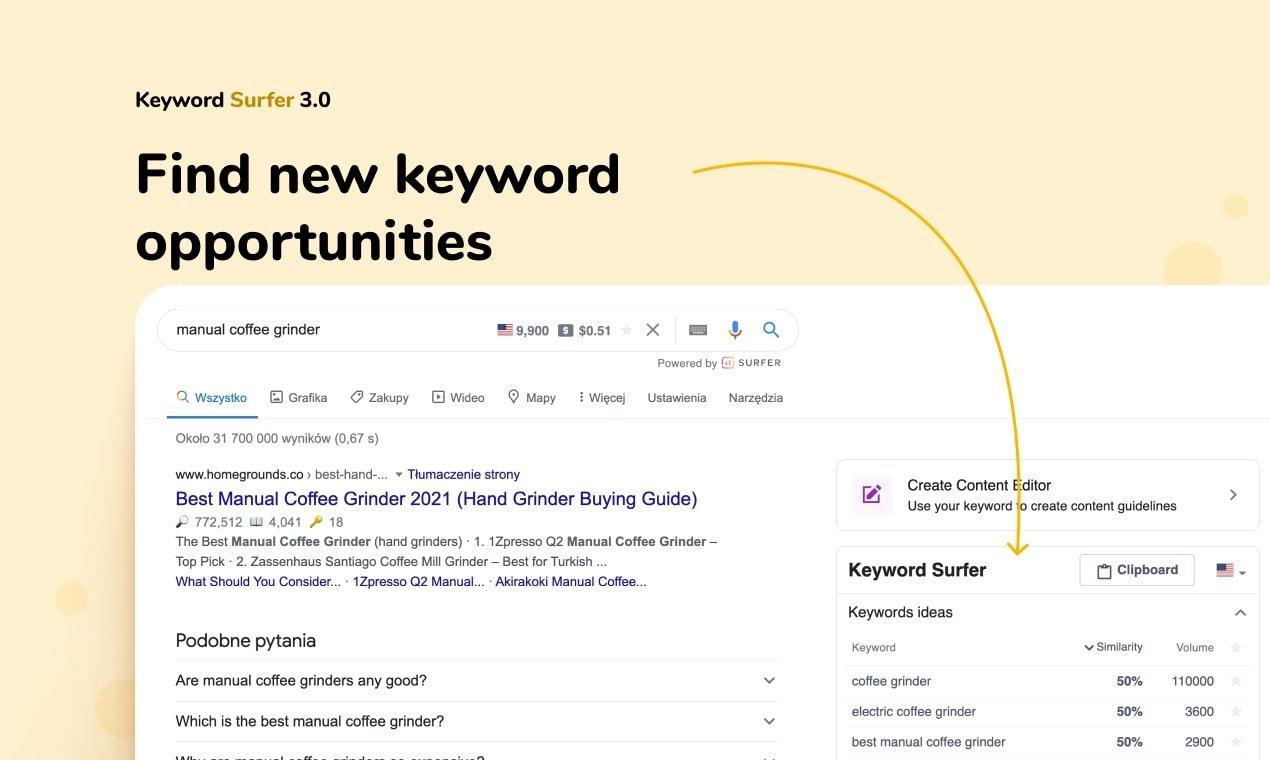
<figure id="attachment_413960" aria-describedby="caption-attachment-413960" style="width: 1270px" class="wp-caption aligncenter"><img loading="lazy" class="wp-image-413960 size-full" title="Keyword Surfer - extension nghiên cứu từ khóa SEO miễn phí (Ảnh: Internet)." src="https://bloganchoi.com/wp-content/uploads/2021/08/keyword-surfer-extension-nghien-cuu-tu-khoa-seo-mien-phi.jpg" alt="Keyword Surfer - extension nghiên cứu từ khóa SEO miễn phí (Ảnh: Internet)." width="1270" height="760" srcset="https://bloganchoi.com/wp-content/uploads/2021/08/keyword-surfer-extension-nghien-cuu-tu-khoa-seo-mien-phi.jpg 1270w, https://bloganchoi.com/wp-content/uploads/2021/08/keyword-surfer-extension-nghien-cuu-tu-khoa-seo-mien-phi-300x180.jpg 300w, https://bloganchoi.com/wp-content/uploads/2021/08/keyword-surfer-extension-nghien-cuu-tu-khoa-seo-mien-phi-1024x613.jpg 1024w, https://bloganchoi.com/wp-content/uploads/2021/08/keyword-surfer-extension-nghien-cuu-tu-khoa-seo-mien-phi-768x460.jpg 768w, https://bloganchoi.com/wp-content/uploads/2021/08/keyword-surfer-extension-nghien-cuu-tu-khoa-seo-mien-phi-696x417.jpg 696w, https://bloganchoi.com/wp-content/uploads/2021/08/keyword-surfer-extension-nghien-cuu-tu-khoa-seo-mien-phi-1068x639.jpg 1068w, https://bloganchoi.com/wp-content/uploads/2021/08/keyword-surfer-extension-nghien-cuu-tu-khoa-seo-mien-phi-702x420.jpg 702w" sizes="(max-width: 1270px) 100vw, 1270px" /><figcaption id="caption-attachment-413960" class="wp-caption-text">Keyword Surfer &#8211; extension nghiên cứu từ khóa SEO miễn phí (Ảnh: Internet).</figcaption></figure>
<p>Surfer giúp tối ưu hóa công cụ tìm kiếm dựa trên dữ liệu trên trang. Công cụ này hiện đang được sử dụng bởi hơn 10.000 doanh nghiệp. Công ty Surfer có trụ sở tại Wroclaw, Ba Lan, được thành lập vào năm 2008 bởi chủ sở hữu của công ty Slawek Czajkowski với mục tiêu tạo ra một công cụ nghiên cứu từ khóa SEO với dữ liệu có sẵn và tiết kiệm thời gian.</p>
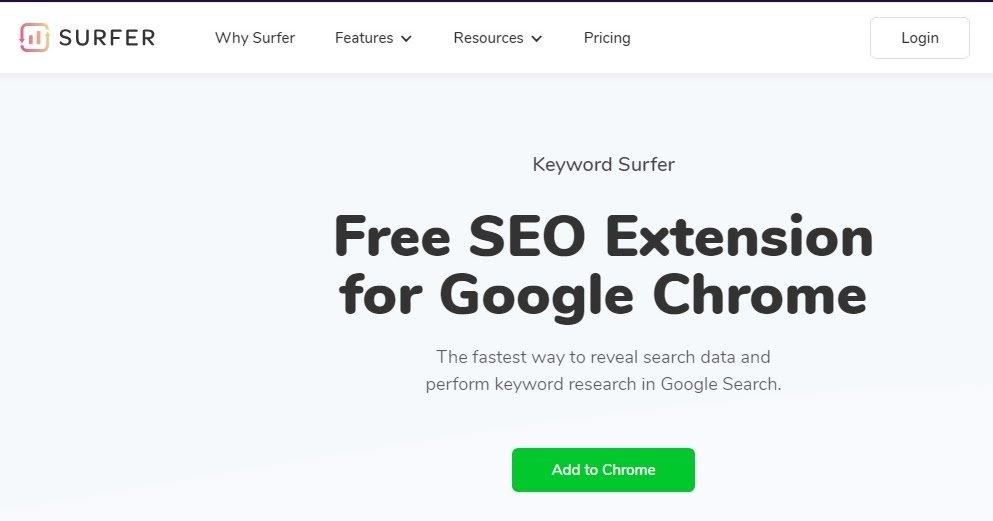
<p>Keyword Surfer là một tiện ích mở rộng của Chrome cho phép bạn xem lượt tìm kiếm trung bình hàng tháng trực tiếp trong kết quả của Google. Công cụ nghiên cứu từ khóa này có tính năng so sánh và hiển thị lượt tìm kiếm cho các từ khóa liên quan, từ khóa tương tự, khả năng hiển thị và backlink. Nhờ sự tối ưu hóa của Keyword Surfer, bạn có thể tăng cả chất lượng nội dung và cơ hội đạt thứ hạng cao.</p>
<p>Rất nhiều copywriter, nhà chiến lược nội dung, SEOer, dịch giả tự do và blogger phát triển nội dung của họ với Keyword Surfer nhờ vào chiến lược tiếp thị nội dung của nó thông qua việc tạo ra các hướng dẫn và thông tin chi tiết.</p>
<figure id="attachment_414541" aria-describedby="caption-attachment-414541" style="width: 993px" class="wp-caption aligncenter"><img loading="lazy" class="wp-image-414541 size-full" title="Keyword Surfer là tiện ích mở rộng cho Chrome (Ảnh: Internet)." src="https://bloganchoi.com/wp-content/uploads/2021/08/keyword-surfer.jpg" alt="Keyword Surfer là tiện ích mở rộng cho Chrome (Ảnh: Internet)." width="993" height="521" srcset="https://bloganchoi.com/wp-content/uploads/2021/08/keyword-surfer.jpg 993w, https://bloganchoi.com/wp-content/uploads/2021/08/keyword-surfer-300x157.jpg 300w, https://bloganchoi.com/wp-content/uploads/2021/08/keyword-surfer-768x403.jpg 768w, https://bloganchoi.com/wp-content/uploads/2021/08/keyword-surfer-696x365.jpg 696w, https://bloganchoi.com/wp-content/uploads/2021/08/keyword-surfer-800x420.jpg 800w" sizes="(max-width: 993px) 100vw, 993px" /><figcaption id="caption-attachment-414541" class="wp-caption-text">Keyword Surfer là tiện ích mở rộng cho Chrome (Ảnh: Internet).</figcaption></figure>
<h2><strong>Một số tính năng của Keyword Surfer</strong></h2>
<p>Một số tính năng miễn phí của Keyword Surfer Extension mà bạn không thể bỏ lỡ:</p>
<h3><strong>Hiển thị ý tưởng từ khoá dựa trên từ khóa tìm kiếm</strong></h3>
<figure id="attachment_413952" aria-describedby="caption-attachment-413952" style="width: 1900px" class="wp-caption aligncenter"><img loading="lazy" class="wp-image-413952 size-full" title="Hiển thị ý tưởng từ khoá dựa trên từ khóa tìm kiếm (Ảnh: Internet)." src="https://bloganchoi.com/wp-content/uploads/2021/08/keyword-surfer-extension-nghien-cuu-tu-khoa-seo-mien-phi-4-1.jpg" alt="Hiển thị ý tưởng từ khoá dựa trên từ khóa tìm kiếm (Ảnh: Internet)." width="1900" height="906" srcset="https://bloganchoi.com/wp-content/uploads/2021/08/keyword-surfer-extension-nghien-cuu-tu-khoa-seo-mien-phi-4-1.jpg 1900w, https://bloganchoi.com/wp-content/uploads/2021/08/keyword-surfer-extension-nghien-cuu-tu-khoa-seo-mien-phi-4-1-300x143.jpg 300w, https://bloganchoi.com/wp-content/uploads/2021/08/keyword-surfer-extension-nghien-cuu-tu-khoa-seo-mien-phi-4-1-1024x488.jpg 1024w, https://bloganchoi.com/wp-content/uploads/2021/08/keyword-surfer-extension-nghien-cuu-tu-khoa-seo-mien-phi-4-1-768x366.jpg 768w, https://bloganchoi.com/wp-content/uploads/2021/08/keyword-surfer-extension-nghien-cuu-tu-khoa-seo-mien-phi-4-1-1536x732.jpg 1536w, https://bloganchoi.com/wp-content/uploads/2021/08/keyword-surfer-extension-nghien-cuu-tu-khoa-seo-mien-phi-4-1-696x332.jpg 696w, https://bloganchoi.com/wp-content/uploads/2021/08/keyword-surfer-extension-nghien-cuu-tu-khoa-seo-mien-phi-4-1-1068x509.jpg 1068w, https://bloganchoi.com/wp-content/uploads/2021/08/keyword-surfer-extension-nghien-cuu-tu-khoa-seo-mien-phi-4-1-881x420.jpg 881w" sizes="(max-width: 1900px) 100vw, 1900px" /><figcaption id="caption-attachment-413952" class="wp-caption-text">Hiển thị ý tưởng từ khoá dựa trên từ khóa tìm kiếm (Ảnh: Internet).</figcaption></figure>
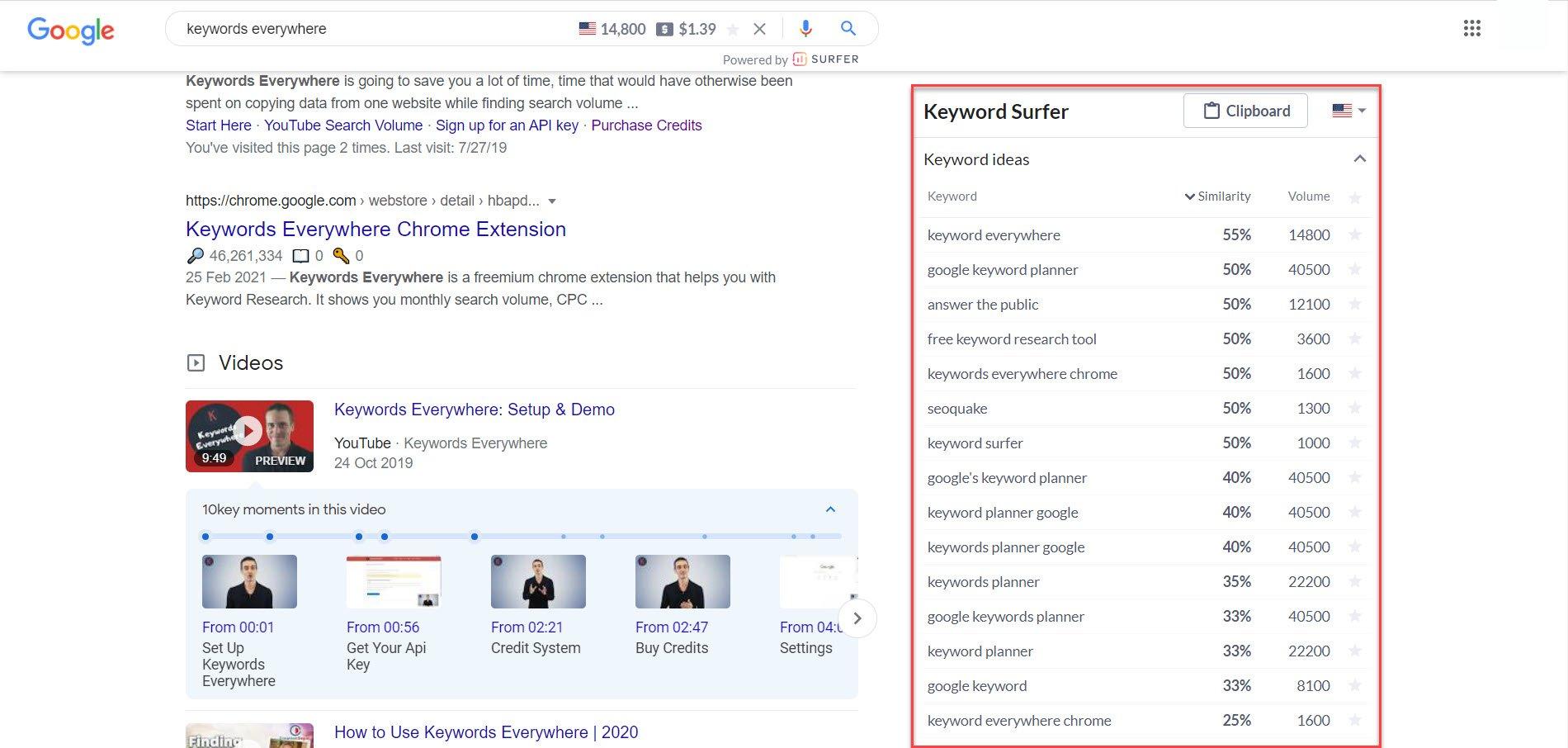
<p>Bất cứ khi nào bạn thực hiện tìm kiếm trong Google, tiện ích mở rộng sẽ hiển thị danh sách các ý tưởng từ khóa dựa trên cụm từ của bạn. Phía bên phải sẽ là list danh sách từ khóa có liên quan đến từ khóa mà bạn tìm kiếm, đồng thời hiển thị lượng tìm kiếm của các cụm từ đó cũng như điểm số tương tự.</p>
<p>Điều này có nghĩa là bạn có thể tìm thấy các cụm từ hay, có lượt tìm kiếm lớn có thể phù hợp với ý tưởng nội dung của bạn. Nhưng hãy nhớ rằng, số lượng lượt tìm kiếm càng cao thì bạn càng bị cạnh tranh nhiều với từ khóa đó.</p>
<figure id="attachment_414543" aria-describedby="caption-attachment-414543" style="width: 1024px" class="wp-caption aligncenter"><img loading="lazy" class="wp-image-414543 size-full" title="Nghiên cứu từ khóa là việc không đơn giản (Ảnh: Internet)." src="https://bloganchoi.com/wp-content/uploads/2021/08/tu-khoa.jpg" alt="Nghiên cứu từ khóa là việc không đơn giản (Ảnh: Internet)." width="1024" height="585" srcset="https://bloganchoi.com/wp-content/uploads/2021/08/tu-khoa.jpg 1024w, https://bloganchoi.com/wp-content/uploads/2021/08/tu-khoa-300x171.jpg 300w, https://bloganchoi.com/wp-content/uploads/2021/08/tu-khoa-768x439.jpg 768w, https://bloganchoi.com/wp-content/uploads/2021/08/tu-khoa-696x398.jpg 696w, https://bloganchoi.com/wp-content/uploads/2021/08/tu-khoa-735x420.jpg 735w" sizes="(max-width: 1024px) 100vw, 1024px" /><figcaption id="caption-attachment-414543" class="wp-caption-text">Nghiên cứu từ khóa là việc không đơn giản (Ảnh: Internet).</figcaption></figure>
<p>Vấn đề ở đây là chúng ta không biết Keyword Surfer đang lấy dữ liệu từ đâu. Ví dụ: khi nhập từ khóa &#8220;keyword Surfer&#8221; vào ô tìm kiếm, lượt tìm kiếm của nó lại hiển thị bằng 0. Nhưng theo Google Keyword Planner thì lượt tìm kiếm trung bình tháng là 100 &#8211; 1000 lượt.</p>
<p>Mặc dù các con số hơi lệch so với thống kê từ Google thì những ý tưởng từ khóa và lượt tìm kiếm mà nó cung cấp vẫn đáng được sử dụng. Về cơ bản, đôi khi chỉ cần một lượt tìm kiếm sẽ có thêm rất nhiều ý tưởng từ khóa cho những bài viết sau này.</p>
<h3><strong>Số lượng từ trong bài viết</strong></h3>
<figure id="attachment_413953" aria-describedby="caption-attachment-413953" style="width: 799px" class="wp-caption aligncenter"><img loading="lazy" class="wp-image-413953 size-full" title="Hiển thị số lượng từ trong bài viết (Ảnh: Internet)." src="https://bloganchoi.com/wp-content/uploads/2021/08/keyword-surfer-extension-nghien-cuu-tu-khoa-seo-mien-phi-1-1.jpg" alt="Hiển thị số lượng từ trong bài viết (Ảnh: Internet)." width="799" height="754" srcset="https://bloganchoi.com/wp-content/uploads/2021/08/keyword-surfer-extension-nghien-cuu-tu-khoa-seo-mien-phi-1-1.jpg 799w, https://bloganchoi.com/wp-content/uploads/2021/08/keyword-surfer-extension-nghien-cuu-tu-khoa-seo-mien-phi-1-1-300x283.jpg 300w, https://bloganchoi.com/wp-content/uploads/2021/08/keyword-surfer-extension-nghien-cuu-tu-khoa-seo-mien-phi-1-1-768x725.jpg 768w, https://bloganchoi.com/wp-content/uploads/2021/08/keyword-surfer-extension-nghien-cuu-tu-khoa-seo-mien-phi-1-1-696x657.jpg 696w, https://bloganchoi.com/wp-content/uploads/2021/08/keyword-surfer-extension-nghien-cuu-tu-khoa-seo-mien-phi-1-1-445x420.jpg 445w" sizes="(max-width: 799px) 100vw, 799px" /><figcaption id="caption-attachment-413953" class="wp-caption-text">Hiển thị số lượng từ trong bài viết (Ảnh: Internet).</figcaption></figure>
<p>Có một tính năng khá thú vị của tiện ích mở rộng này là đếm số từ của một bài viết được hiển thị trong kết quả tìm kiếm của Google. Đối với những nngười làm SEO và cần đong đếm số lượng từ của những bài viết trong top kết quả thì đây là một tính năng khá hữu ích.</p>
<p>Tuy nhiên cũng giống như thống kê lượt tìm kiếm, tính năng thống kê số lượng từ này đôi lúc cũng khá &#8220;chuối&#8221;. Ví dụ, một bài viết thực tế có hơn 1600 từ nhưng lại được thống kê lên đến hơn 2500 từ. Nhưng đôi lúc vẫn thống kê khá chính xác.</p>
<h3><strong>Chọn và sao chép từ khoá từ Google</strong></h3>
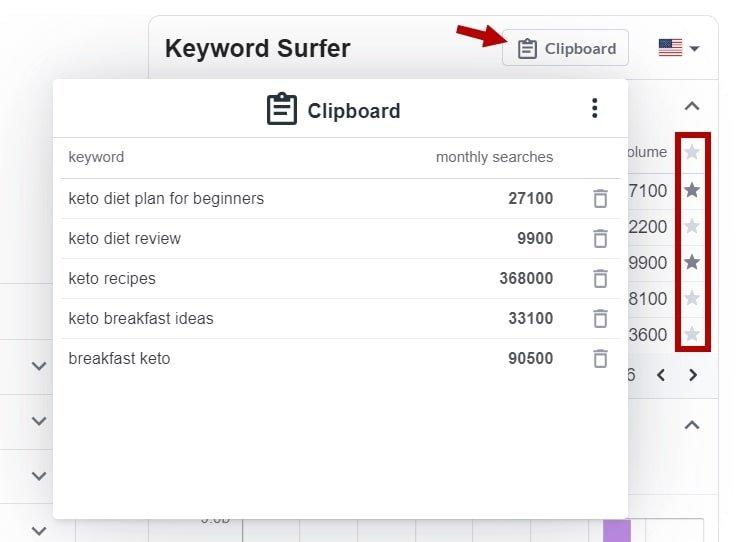
<figure id="attachment_413956" aria-describedby="caption-attachment-413956" style="width: 736px" class="wp-caption aligncenter"><img loading="lazy" class="wp-image-413956 size-full" title="Chọn và sao chép từ khoá từ Google (Ảnh: Internet)." src="https://bloganchoi.com/wp-content/uploads/2021/08/keyword-surfer-extension-nghien-cuu-tu-khoa-seo-mien-phi-3-1.jpg" alt="Chọn và sao chép từ khoá từ Google (Ảnh: Internet)." width="736" height="542" srcset="https://bloganchoi.com/wp-content/uploads/2021/08/keyword-surfer-extension-nghien-cuu-tu-khoa-seo-mien-phi-3-1.jpg 736w, https://bloganchoi.com/wp-content/uploads/2021/08/keyword-surfer-extension-nghien-cuu-tu-khoa-seo-mien-phi-3-1-300x221.jpg 300w, https://bloganchoi.com/wp-content/uploads/2021/08/keyword-surfer-extension-nghien-cuu-tu-khoa-seo-mien-phi-3-1-80x60.jpg 80w, https://bloganchoi.com/wp-content/uploads/2021/08/keyword-surfer-extension-nghien-cuu-tu-khoa-seo-mien-phi-3-1-696x513.jpg 696w, https://bloganchoi.com/wp-content/uploads/2021/08/keyword-surfer-extension-nghien-cuu-tu-khoa-seo-mien-phi-3-1-570x420.jpg 570w" sizes="(max-width: 736px) 100vw, 736px" /><figcaption id="caption-attachment-413956" class="wp-caption-text">Chọn và sao chép từ khoá từ Google (Ảnh: Internet).</figcaption></figure>
<p>Trái ngược với các công cụ tra cứu từ khóa khác, Keyword Surfer cung cấp khả năng chọn các cụm từ bạn muốn và sau đó copy chúng vào Clipboard có thể truy xuất được. Từ đây, bạn có thể dán chúng sang tệp doc hoặc xuất danh sách dưới dạng CSV.</p>
<p>Như vậy bạn có thể chọn các thuật ngữ muốn sử dụng cho nội dung trong tương lai bằng cách nhấp vào dấu sao nhỏ bên cạnh mỗi từ khóa.</p>
<p>Bạn có thể mở CSV trong bất kỳ phần mềm bảng tính nào, chẳng hạn như Excel hoặc LibreOffice Calc. Sau đó chúng ta có thể kết hợp với Công cụ lập kế hoạch từ khóa của Google để tìm chi phí giá thầu hoặc lượt tìm kiếm chính xác của mỗi từ khóa.</p>
<p>Đối với những người tạo chiến lược nội dung hàng ngày thì tính năng này khá tiện dụng. Bạn không cần phải nhập từng cụm từ một để đo lường lượt tìm kiếm của mỗi từ khóa muốn sử dụng trong các bài viết.</p>
<h2><strong>Cách tải và sử dụng Keyword Surfer</strong></h2>
<p>Tải và sử dụng Keyword Surfer rất đơn giản, bạn chỉ cần làm theo hướng dẫn sau:</p>
<h3><strong>Tải Keyword Surfer</strong></h3>
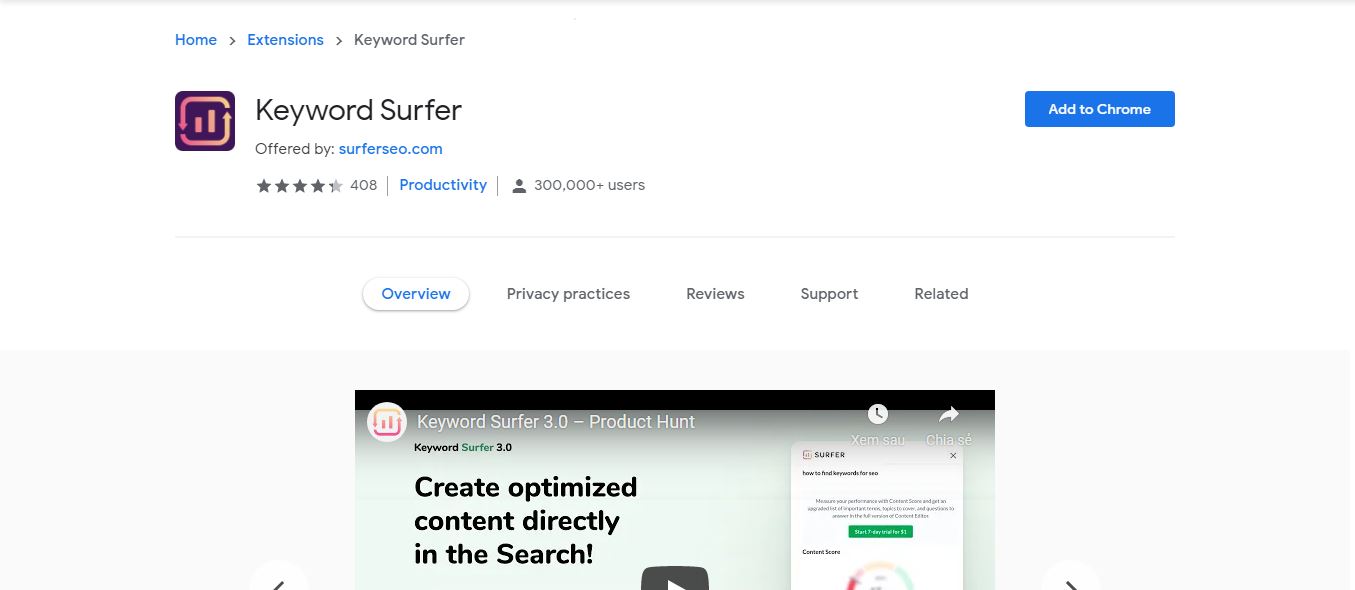
<figure id="attachment_413943" aria-describedby="caption-attachment-413943" style="width: 1355px" class="wp-caption aligncenter"><img loading="lazy" class="wp-image-413943 size-full" title="Tải Keyword Surfer Extension (Ảnh: Internet)." src="https://bloganchoi.com/wp-content/uploads/2021/08/keyword-surfer-extension-nghien-cuu-tu-khoa-seo-mien-phi-1.jpg" alt="Tải Keyword Surfer Extension (Ảnh: Internet)." width="1355" height="590" srcset="https://bloganchoi.com/wp-content/uploads/2021/08/keyword-surfer-extension-nghien-cuu-tu-khoa-seo-mien-phi-1.jpg 1355w, https://bloganchoi.com/wp-content/uploads/2021/08/keyword-surfer-extension-nghien-cuu-tu-khoa-seo-mien-phi-1-300x131.jpg 300w, https://bloganchoi.com/wp-content/uploads/2021/08/keyword-surfer-extension-nghien-cuu-tu-khoa-seo-mien-phi-1-1024x446.jpg 1024w, https://bloganchoi.com/wp-content/uploads/2021/08/keyword-surfer-extension-nghien-cuu-tu-khoa-seo-mien-phi-1-768x334.jpg 768w, https://bloganchoi.com/wp-content/uploads/2021/08/keyword-surfer-extension-nghien-cuu-tu-khoa-seo-mien-phi-1-696x303.jpg 696w, https://bloganchoi.com/wp-content/uploads/2021/08/keyword-surfer-extension-nghien-cuu-tu-khoa-seo-mien-phi-1-1068x465.jpg 1068w, https://bloganchoi.com/wp-content/uploads/2021/08/keyword-surfer-extension-nghien-cuu-tu-khoa-seo-mien-phi-1-965x420.jpg 965w" sizes="(max-width: 1355px) 100vw, 1355px" /><figcaption id="caption-attachment-413943" class="wp-caption-text">Tải Keyword Surfer Extension (Ảnh: Internet).</figcaption></figure>
<ol>
<li>Đầu tiên bạn vào cửa hàng Chrome và tìm Keyword Surfer</li>
<li>Nhấp vào Keyword Surfer rồi chọn <strong>Add to Chrome</strong> hoặc <strong>Thêm vào Chrome</strong></li>
<li>Chờ cho tiện ích được thêm vào Chrome là bạn đã hoàn tất</li>
</ol>
<h3><strong>Cách sử dụng Keyword Surfer </strong></h3>
<p>Thật ra để sử dụng Keyword Surfer không có gì là khó cả, sau khi tải về, bạn chỉ cần search từ khóa như bình thường. Nhưng trước đó chúng ta cần tinh chỉnh một chút.</p>
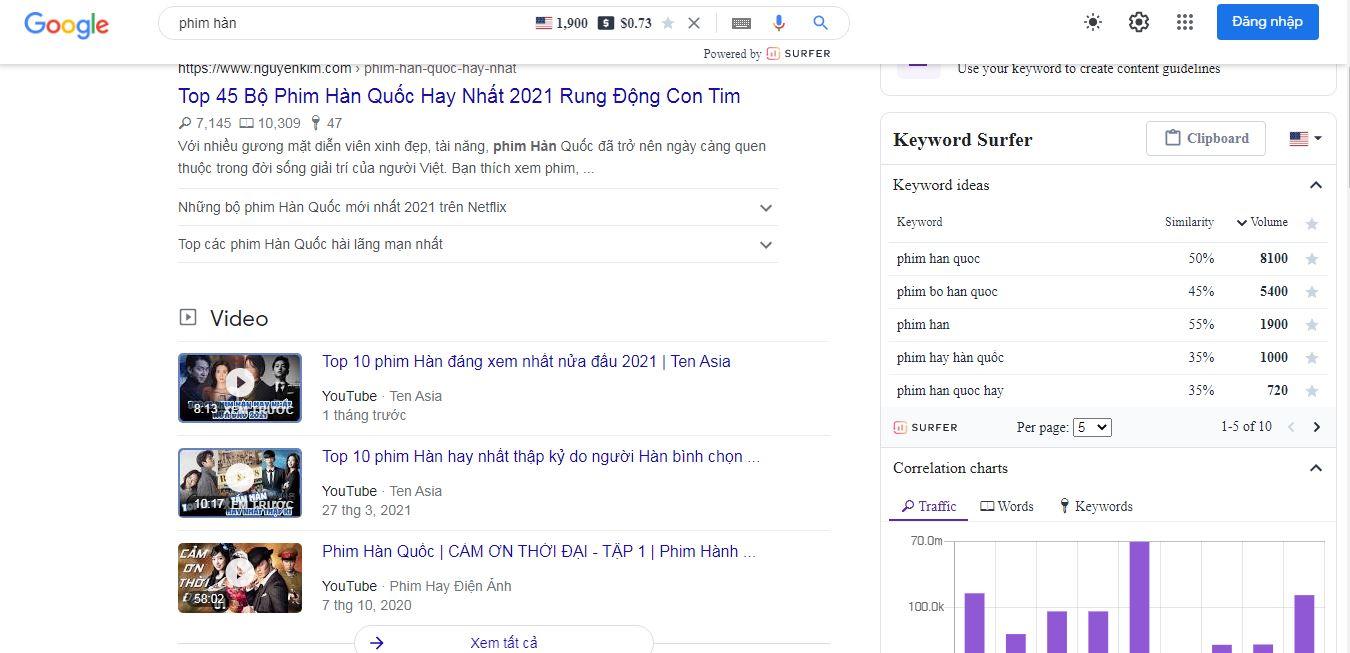
<p>Sau khi tải về, extension sẽ mặc định quốc gia là Mỹ, bạn cần đổi thành Việt Nam để hiển thị lượt tìm kiếm chính xác hơn. Để làm điều này, bạn nhấp vào lá cờ Mỹ bên phía tay phải và tiến hành đổi thành cờ Việt Nam như hình sau là được.</p>
<figure id="attachment_413944" aria-describedby="caption-attachment-413944" style="width: 1350px" class="wp-caption aligncenter"><img loading="lazy" class="wp-image-413944 size-full" title="Sau khi tải về, Extension sẽ mặc định quốc gia là Mỹ (Ảnh: Internet)." src="https://bloganchoi.com/wp-content/uploads/2021/08/keyword-surfer-extension-nghien-cuu-tu-khoa-seo-mien-phi-2.jpg" alt="Sau khi tải về, Extension sẽ mặc định quốc gia là Mỹ (Ảnh: Internet)." width="1350" height="653" srcset="https://bloganchoi.com/wp-content/uploads/2021/08/keyword-surfer-extension-nghien-cuu-tu-khoa-seo-mien-phi-2.jpg 1350w, https://bloganchoi.com/wp-content/uploads/2021/08/keyword-surfer-extension-nghien-cuu-tu-khoa-seo-mien-phi-2-300x145.jpg 300w, https://bloganchoi.com/wp-content/uploads/2021/08/keyword-surfer-extension-nghien-cuu-tu-khoa-seo-mien-phi-2-1024x495.jpg 1024w, https://bloganchoi.com/wp-content/uploads/2021/08/keyword-surfer-extension-nghien-cuu-tu-khoa-seo-mien-phi-2-768x371.jpg 768w, https://bloganchoi.com/wp-content/uploads/2021/08/keyword-surfer-extension-nghien-cuu-tu-khoa-seo-mien-phi-2-696x337.jpg 696w, https://bloganchoi.com/wp-content/uploads/2021/08/keyword-surfer-extension-nghien-cuu-tu-khoa-seo-mien-phi-2-1068x517.jpg 1068w, https://bloganchoi.com/wp-content/uploads/2021/08/keyword-surfer-extension-nghien-cuu-tu-khoa-seo-mien-phi-2-868x420.jpg 868w" sizes="(max-width: 1350px) 100vw, 1350px" /><figcaption id="caption-attachment-413944" class="wp-caption-text">Sau khi tải về, Extension sẽ mặc định quốc gia là Mỹ (Ảnh: Internet).</figcaption></figure>
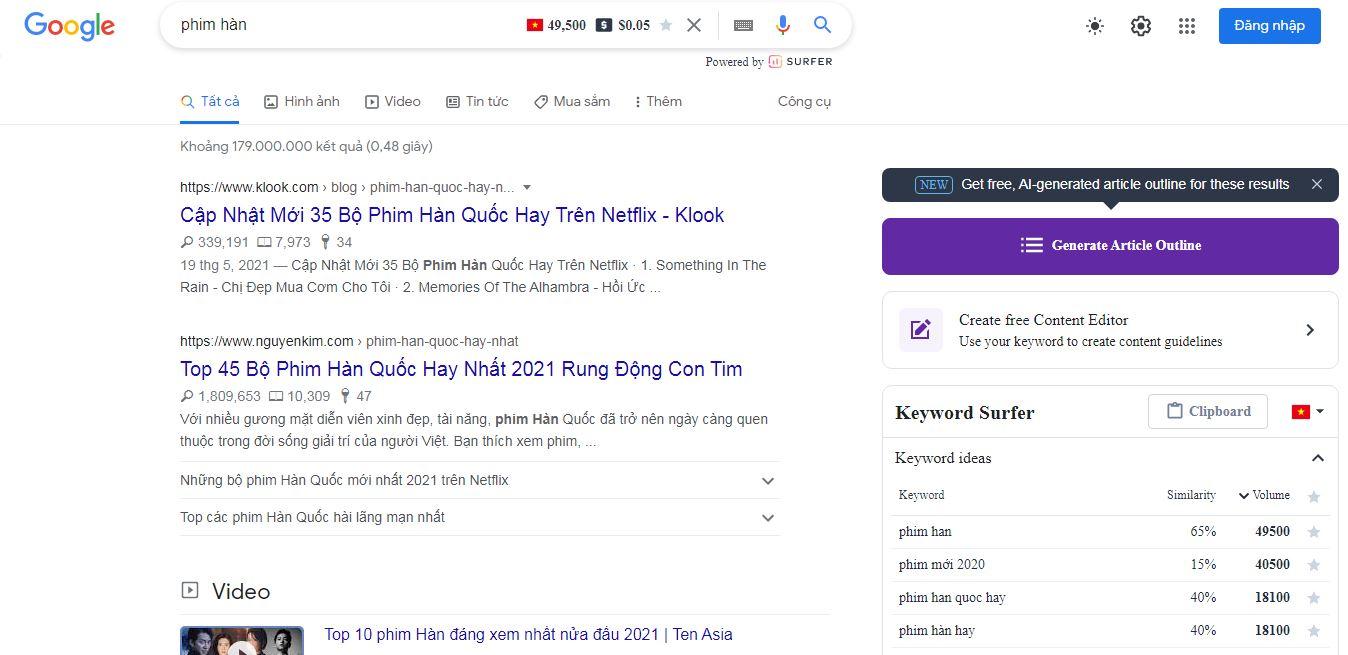
<p>Sau khi đổi thành cờ Việt Nam, giao diện tìm kiếm sẽ như thế này:</p>
<figure id="attachment_413945" aria-describedby="caption-attachment-413945" style="width: 1348px" class="wp-caption aligncenter"><img loading="lazy" class="wp-image-413945 size-full" title="Sau khi đổi thành cờ Việt Nam, giao diện tìm kiếm sẽ như thế này (Ảnh: Internet)." src="https://bloganchoi.com/wp-content/uploads/2021/08/keyword-surfer-extension-nghien-cuu-tu-khoa-seo-mien-phi-3.jpg" alt="Sau khi đổi thành cờ Việt Nam, giao diện tìm kiếm sẽ như thế này (Ảnh: Internet)." width="1348" height="655" srcset="https://bloganchoi.com/wp-content/uploads/2021/08/keyword-surfer-extension-nghien-cuu-tu-khoa-seo-mien-phi-3.jpg 1348w, https://bloganchoi.com/wp-content/uploads/2021/08/keyword-surfer-extension-nghien-cuu-tu-khoa-seo-mien-phi-3-300x146.jpg 300w, https://bloganchoi.com/wp-content/uploads/2021/08/keyword-surfer-extension-nghien-cuu-tu-khoa-seo-mien-phi-3-1024x498.jpg 1024w, https://bloganchoi.com/wp-content/uploads/2021/08/keyword-surfer-extension-nghien-cuu-tu-khoa-seo-mien-phi-3-768x373.jpg 768w, https://bloganchoi.com/wp-content/uploads/2021/08/keyword-surfer-extension-nghien-cuu-tu-khoa-seo-mien-phi-3-696x338.jpg 696w, https://bloganchoi.com/wp-content/uploads/2021/08/keyword-surfer-extension-nghien-cuu-tu-khoa-seo-mien-phi-3-1068x519.jpg 1068w, https://bloganchoi.com/wp-content/uploads/2021/08/keyword-surfer-extension-nghien-cuu-tu-khoa-seo-mien-phi-3-864x420.jpg 864w" sizes="(max-width: 1348px) 100vw, 1348px" /><figcaption id="caption-attachment-413945" class="wp-caption-text">Sau khi đổi thành cờ Việt Nam, giao diện tìm kiếm sẽ như thế này (Ảnh: Internet).</figcaption></figure>
<p><strong>Bạn có thể xem thêm về cách sử dụng Keyword Surfer trong video dưới đây:</strong></p>
<p><iframe loading="lazy" class="youtube-player" width="640" height="360" src="https://www.youtube.com/embed/pgNNAEzwJYY?version=3&#038;rel=1&#038;showsearch=0&#038;showinfo=1&#038;iv_load_policy=1&#038;fs=1&#038;hl=vi&#038;autohide=2&#038;wmode=transparent" allowfullscreen="true" style="border:0;" sandbox="allow-scripts allow-same-origin allow-popups allow-presentation"></iframe></p>
<p>Và bây giờ bạn đã có thể tra từ khóa với nhiều tính năng thú vị của Keyword Surfer rồi. Quá đơn giản đúng không? Đừng quên theo dõi BlogAnChoi để cập nhật những thủ thuật hay nhé!</p>
<p><strong>Mời bạn xem thêm các bài viết liên quan:</strong></p>
<ul>
<li><strong><a href="https://bloganchoi.com/app-hoc-tieng-han-mien-phi-tot-nhat-cho-nguoi-moi-bat-dau/">15 app học tiếng Hàn tốt nhất dành cho người mới bắt đầu: Tự học tiếng Hàn mọi lúc mọi nơi!</a></strong></li>
<li><strong><a href="https://bloganchoi.com/app-ve-tranh-tot-nhat-cho-android/">10 app vẽ tranh hàng đầu dành cho Android để bạn tha hồ sáng tạo nghệ thuật!</a></strong></li>
<li><strong><a href="https://bloganchoi.com/app-ma-cac-ban-gai-nen-su-dung-cham-soc-ban-than/">7 app mà các bạn gái nên sử dụng để chăm sóc bản thân tốt hơn</a></strong></li>
</ul>]]></content>
		
					<link rel="replies" type="text/html" href="https://bloganchoi.com/cach-su-dung-keyword-surfer-nghien-cuu-tu-khoa-seo-mien-phi/#comments" thr:count="0" />
			<link rel="replies" type="application/atom+xml" href="https://bloganchoi.com/cach-su-dung-keyword-surfer-nghien-cuu-tu-khoa-seo-mien-phi/feed/atom/" thr:count="0" />
			<thr:total>0</thr:total>
			</entry>
	</feed>