<?xml version="1.0" encoding="UTF-8"?><feed
	xmlns="http://www.w3.org/2005/Atom"
	xmlns:thr="http://purl.org/syndication/thread/1.0"
	xml:lang="vi"
	
	xmlns:georss="http://www.georss.org/georss"
	xmlns:geo="http://www.w3.org/2003/01/geo/wgs84_pos#"
	>
	<title type="text">iMovie &#8211; BlogAnChoi</title>
	<subtitle type="text">Blog giải trí về du lịch, làm đẹp, quán ngon dành cho giới trẻ.</subtitle>

	<updated>2024-06-23T16:23:36Z</updated>

	<link rel="alternate" type="text/html" href="https://bloganchoi.com" />
	<id>https://bloganchoi.com/feed/atom/</id>
	<link rel="self" type="application/atom+xml" href="https://bloganchoi.com/tag/imovie/feed/atom/" />

	
	<entry>
		<author>
			<name>aozora</name>
					</author>

		<title type="html"><![CDATA[So sánh Adobe Premiere Rush và iMovie: Ứng dụng nào tốt hơn để làm video trên điện thoại?]]></title>
		<link rel="alternate" type="text/html" href="https://bloganchoi.com/adobe-premiere-rush-imovie-ung-dung-lam-video-tren-dien-thoai/" />

		<id>https://bloganchoi.com/?p=862218</id>
		<updated>2024-06-23T16:23:36Z</updated>
		<published>2024-06-23T16:23:36Z</published>
		<category scheme="https://bloganchoi.com" term="Ứng dụng - Phần mềm" /><category scheme="https://bloganchoi.com" term="Adobe Premiere Rush" /><category scheme="https://bloganchoi.com" term="chỉnh sửa video trên điện thoại" /><category scheme="https://bloganchoi.com" term="iMovie" /><category scheme="https://bloganchoi.com" term="làm video trên điện thoại" /><category scheme="https://bloganchoi.com" term="ứng dụng làm video" />
		<summary type="html"><![CDATA[Bạn muốn làm video trên điện thoại nhưng không biết lựa chọn ứng dụng nào? Đối với chỉnh sửa video trên thiết bị di động thì iMovie và Adobe Premiere Rush là hai trong số những ứng dụng được nhiều người ưa thích nhất. Vậy đâu là ứng dụng phù hợp cho bạn? Hãy cùng]]></summary>

					<content type="html" xml:base="https://bloganchoi.com/adobe-premiere-rush-imovie-ung-dung-lam-video-tren-dien-thoai/"><![CDATA[<p><strong>Bạn muốn làm video trên <strong><a href="https://bloganchoi.com/tin/cong-nghe/dien-thoai/"  target="_bank"   title="điện thoại">điện thoại</a></strong> nhưng không biết lựa chọn ứng dụng nào? Đối với chỉnh sửa video trên thiết bị di động thì iMovie và Adobe Premiere Rush là hai trong số những ứng dụng được nhiều người ưa thích nhất. Vậy đâu là ứng dụng phù hợp cho bạn? Hãy cùng so sánh nhé!</strong></p>
<p><span id="more-862218"></span></p>
<h2><strong>Adobe Premiere Rush là gì?</strong></h2>
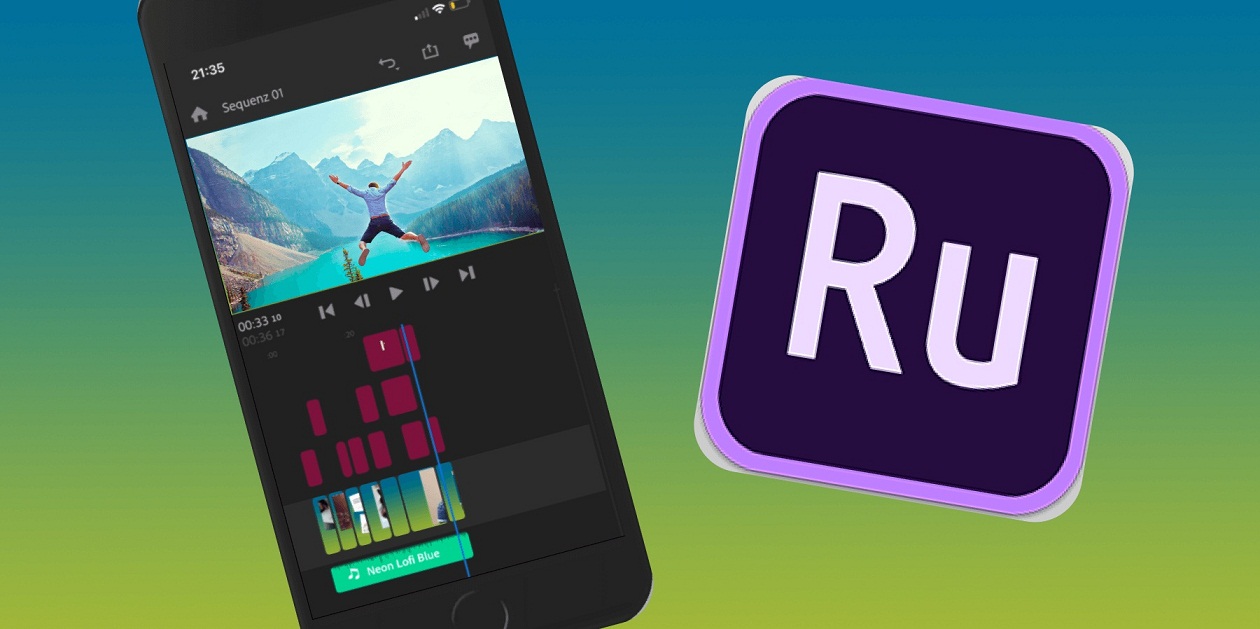
<p>Premiere Rush là ứng dụng của Adobe có chức năng chỉnh sửa video hoạt động trên nhiều thiết bị, với nhiều tính năng cơ bản giống với Premiere Pro – ứng dụng chỉnh sửa video hàng đầu của Adobe, nhưng điểm khác biệt của Premiere Rush là không cần đăng ký trọn gói Adobe Creative Cloud.</p>
<figure id="attachment_862783" aria-describedby="caption-attachment-862783" style="width: 1260px" class="wp-caption aligncenter"><img loading="lazy" class="wp-image-862783 size-full" title="Ứng dụng Adobe Premiere Rush trên điện thoại (Ảnh: Internet)" src="https://bloganchoi.com/wp-content/uploads/2024/06/lam-video-dien-thoai.jpg" alt="Ứng dụng Adobe Premiere Rush trên điện thoại (Ảnh: Internet)" width="1260" height="629" srcset="https://bloganchoi.com/wp-content/uploads/2024/06/lam-video-dien-thoai.jpg 1260w, https://bloganchoi.com/wp-content/uploads/2024/06/lam-video-dien-thoai-300x150.jpg 300w, https://bloganchoi.com/wp-content/uploads/2024/06/lam-video-dien-thoai-1024x511.jpg 1024w, https://bloganchoi.com/wp-content/uploads/2024/06/lam-video-dien-thoai-768x383.jpg 768w, https://bloganchoi.com/wp-content/uploads/2024/06/lam-video-dien-thoai-696x347.jpg 696w, https://bloganchoi.com/wp-content/uploads/2024/06/lam-video-dien-thoai-1068x533.jpg 1068w, https://bloganchoi.com/wp-content/uploads/2024/06/lam-video-dien-thoai-841x420.jpg 841w" sizes="(max-width: 1260px) 100vw, 1260px" /><figcaption id="caption-attachment-862783" class="wp-caption-text">Ứng dụng Adobe Premiere Rush trên điện thoại (Ảnh: Internet)</figcaption></figure>
<p>Để sử dụng Premiere Rush, trước tiên bạn phải đăng ký tài khoản và tải ứng dụng về máy – các bước này đều miễn phí. Ngoài ra có thể đăng ký gói Adobe Express để được sử dụng nhiều tính năng cao cấp hơn.</p>
<ul>
<li><strong><a href="https://bloganchoi.com/xredirect/?afflink=0&amp%3Bcjevent=09df1edb317a11ef833400b70a18b8f7&cjevent=09df1edb317a11ef833400b70a18b8f7&id=com.adobe.premiererush.videoeditor&nofollow=1&noindex=1&outlink=1&rdtp=header&utm_campaign=bloganchoi.com%7C%7Cbloganchoi.com%7C%7Cbloganchoi.com&utm_content=bloganchoi.com&utm_medium=%7C%7Chttps%3A%2F%2Fplay.google.com%2Fstore%2Fapps%2Fdetails%3Fid%3Dcom.adobe.premiererush.videoeditor%26amp%3Bcjevent%3D09df1edb317a11ef833400b70a18b8f7%7C%7C&utm_source=https%3A%2F%2Fbloganchoi.com%2Fadobe-premiere-rush-imovie-ung-dung-lam-video-tren-dien-thoai%2F&utm_term=bloganchoi.com&wafx=1&wpaflt=80c08a46&wpaflt_url_domain=google.com&wpaflt_url_host=play.google.com&wppepvndtecrv=WkLGCFUvxvE8JrDF0vfoMtxgycTMOlJ6WO1xYcYYBrXYAZtE8hvf0GL96ka9rDMJ5YxDdMrwQgFD9kUW3O0f5E_oR07PJKtBYaGUQtdkEYj5c86dlQ0wajx25sF8i5H4xD87i5cQdnc8EF75wV-mIwpVqeYU5afF4AHzIZsncZgAf6HocW86tuBFPBwV-s5DpM6HdN3kuVFsD3mXFIdy1NqxJ9Uk5uacGONA_HJIFCe9ANcGcXuDxhs_iKyFjaLiwY1FOcYGmp14wvkyvIxgnWndV6R5f7YmjW3sn8RUMEZabNU-81gwD-GDsppfH1VlaDz3EIzsRmeMAqwgk7tBa--97kE5ioGxv1HnBLQGKf_PTbvENt528xvZDe74Q4RX3a0lMEOp6YJWpfK3cmRdf2vut17MD7_eZbtbt6hfWvDYpiL_xyv5nuVdmX96LJ4Yl6KBU6cVruh2-B9TzGTTwb6sY8ZZSDh4KonpzDpvONlBw2IJcLaETc_4ASdKjNkDntY2Dw8InYPF8W35ItViyOVUXVBauVsoJPChZeMrL1eWzLt0H9TGsRmXxgSkpxcLyGO0kkFXiz4_IWHRRJRzGNsVQjm0JC6k6DFKZh8we1Tk8X3rlvnqa0hwt_oSugUFYNg0YpInXGZ6oIxXAo8AKTPIzSqYs_jVIfNfl_NPtmxRKIoJ0tmZIKc30qftjCqsH7y1CdM1iWRAz4YwHbOv26Y-lIPuTInG3LwhD-6Squ_ZLRPuuMcUE0h2RuGUx73ujw-zPha4kIdAz_DBZboNuwMJP4BNBnpTsYUS-KySrhxVCK6BtotvT5_eUTpjarFBi4TgqdXCLPhSd8YWxEmZ_o9SV4H1_Wraq1EZmYK2gN3KiQCHV83CCupr70vtYB6BuKvWNfw-unO0QrIktKAsnQuT4fu1inZHSGtzExiWeqU9RdsKRAJ2S3vNwaAIXhrFbV2xgNP6vpJxJYrmORotZ6AtZ8wcY1YrNAPsT86X2m6GRMvm05LZC7hM920x6NODjrvuaKpsEYYzEqCRjRujnoacVl_8bV66EEyxEXNVIgQNx1M-dIpcb5g9gqZqfm1QF33xKagFyDZ4vmHIXm0jTK7ENzSj74CqG1AE8NF942Aj-fFdgZGuwrkNrlI5podvLaNNhQOP" target="_blank" rel="nofollow">Tải Adobe Premiere Rush cho Android tại đây</a></strong></li>
<li><strong><a href="https://bloganchoi.com/xredirect/?afflink=0&nofollow=1&noindex=1&outlink=1&rdtp=header&utm_campaign=bloganchoi.com%7C%7Cbloganchoi.com%7C%7Cbloganchoi.com&utm_content=bloganchoi.com&utm_medium=%7C%7Chttps%3A%2F%2Fapps.apple.com%2Fus%2Fapp%2Fadobe-premiere-rush-edit-video%2Fid1188753863%7C%7C&utm_source=https%3A%2F%2Fbloganchoi.com%2Fadobe-premiere-rush-imovie-ung-dung-lam-video-tren-dien-thoai%2F&utm_term=bloganchoi.com&wafx=1&wpaflt=80c08a46&wpaflt_url_domain=apple.com&wpaflt_url_host=apps.apple.com&wppepvndtecrv=ANRM6En-lFNg0222paki3s9Oei59CbaX2fjuHlNOPRtFZdbv__V6k5EPOYouWkfDNHnJvnCJKPayNJBPbTttGVDMpHXT8Gja9gy_pPeSj4Ic0b3j6Z5UR4Y-BM0QPF79Smcv5_5qW8odd5wS08GXFyS5eARYUixeUeAHnwNiIAKtwwh1YPinifFvd9etvm0IykskQQJqb0K-RkKcGqF0NS0e4PF76DiSacBN7AT1MTfH9V0LzPFHjwJTd9Gs6aOgqqEKoLRwOHCnsu0p4-dWKb5bZR0Vq3GLRhKd0oRYtFJCF0j41StQKdGFX__q6T26048aLxZMcjs7NGhY1hlmOJYPHnS9NKA8ts-lsx6VmJbT0GWLUNpjc0e5U8PjLvjmXPy0Iu9qe3jdH5t9KO6bXugDK89i1_l2d-2lOF9QctAtyoUmgGs7hjIZjMWUyl-d4FrqJH4QKdi-Xg_--xew3zGTqpL06tx6OBikCrdHzLZE81ht6JC5Ndmt7IXu2fNicAoN5d8S2rfVLt6X_Et7maQmMPStpLLl4nHeUovgL8OPrmja-7GR4ecSqKbJPYohS8pesUNDuwpEqo13TcPoyOnD6KZBrqMpaxqQUSMNTFnesTofOMeSvTlTDCbGWoO310UwIVnHTYW64xytexZoO7kBfTHMZWneN3SnpqWoKApUXrDQe2CUxGqEcMpmlivORjSzsKV70TqkWj9tMkeJs3uh7RmiAXL0gdPYnMy6uS1EpJJBWJoAICE1YF6M3IBwZORwDP99nmpFIcGEPGsIFL0FtS6dzrnGkOcxXp5b8LvNDtoBZFkqCMsrr73e82ZxsvhQoemprzbI3R8ebV1OFlr-qILlaz-NY95Vxn0Ut0bP8sM1XXC7gQrWwjLj7xErBJyf4-7mjJu_U01SpFbNpjQ3Mb--R6pz2Mnsg1Efjp0dmothlZPC0uOS" target="_blank" rel="nofollow">Tải Adobe Premiere Rush cho iOS tại đây</a></strong></li>
</ul>
<h2><strong>iMovie là gì?</strong></h2>
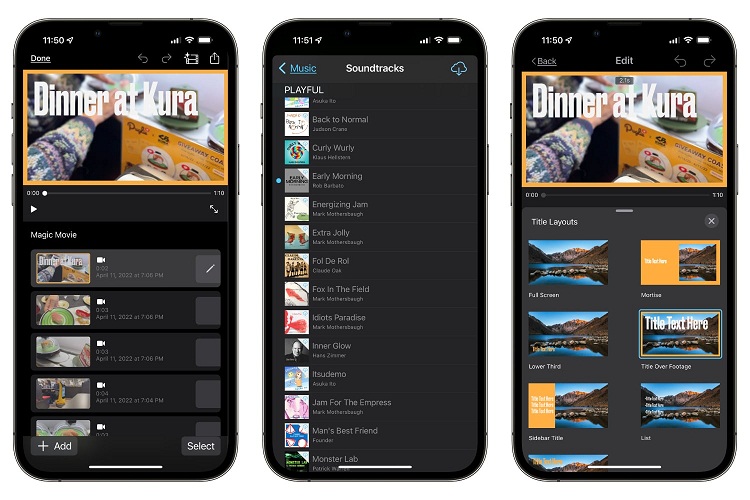
<p>Nếu bạn mới bắt đầu làm video trên điện thoại và chưa muốn trả tiền mua các ứng dụng cao cấp thì có thể chọn các ứng dụng miễn phí như DaVinci Resolve hay iMovie. Giống như Premiere Rush được coi là phiên bản thu gọn của Premiere Pro, ứng dụng iMovie được coi là giống với Final Cut Pro.</p>
<figure id="attachment_862784" aria-describedby="caption-attachment-862784" style="width: 750px" class="wp-caption aligncenter"><img loading="lazy" class="wp-image-862784 size-full" title="Ứng dụng iMovie trên điện thoại (Ảnh: Internet)" src="https://bloganchoi.com/wp-content/uploads/2024/06/lam-video-dien-thoai-1.jpg" alt="Ứng dụng iMovie trên điện thoại (Ảnh: Internet)" width="750" height="500" srcset="https://bloganchoi.com/wp-content/uploads/2024/06/lam-video-dien-thoai-1.jpg 750w, https://bloganchoi.com/wp-content/uploads/2024/06/lam-video-dien-thoai-1-300x200.jpg 300w, https://bloganchoi.com/wp-content/uploads/2024/06/lam-video-dien-thoai-1-696x464.jpg 696w, https://bloganchoi.com/wp-content/uploads/2024/06/lam-video-dien-thoai-1-630x420.jpg 630w" sizes="(max-width: 750px) 100vw, 750px" /><figcaption id="caption-attachment-862784" class="wp-caption-text">Ứng dụng iMovie trên điện thoại (Ảnh: Internet)</figcaption></figure>
<p>iMovie được phát hành lần đầu tiên vào năm 1999, lúc đó iPhone vẫn chưa xuất hiện nên mọi người chỉ có thể sử dụng nó để chỉnh sửa video trên máy Mac của Apple. Nhưng hiện nay ứng dụng iMovie đã được tối ưu hóa phù hợp cho các thiết bị di động của Apple.</p>
<h2><strong>So sánh iMovie và Adobe Premiere Rush khi làm video</strong></h2>
<h3><strong>Sử dụng trên nhiều thiết bị khác nhau</strong></h3>
<p>Nếu bạn muốn chỉnh sửa video bằng Premiere Rush thì không bắt buộc phải sử dụng điện thoại iPhone và <strong><a href="https://bloganchoi.com/tin/cong-nghe/may-tinh-bang/"  target="_bank"   title="máy tính bảng">máy tính bảng</a></strong> iPad của Apple, bởi vì ứng dụng này cũng tương thích với bất kỳ thiết bị Android nào. Thậm chí bạn cũng có thể sử dụng Premiere Rush trên máy tính.</p>
<p>Ngược lại, iMovie không hoạt động được trên thiết bị Android mà chỉ tương thích với thiết bị của Apple như iPhone và iPad. Ngoài ra bạn cũng có thể dùng phiên bản phần mềm iMovie trên máy Mac của Apple.</p>
<p>Ứng dụng iMovie thường được cài sẵn trong các thiết bị của Apple, hoặc bạn có thể tự cài đặt bằng cách truy cập App Store.</p>
<h3><strong>Tính năng tạo video mới</strong></h3>
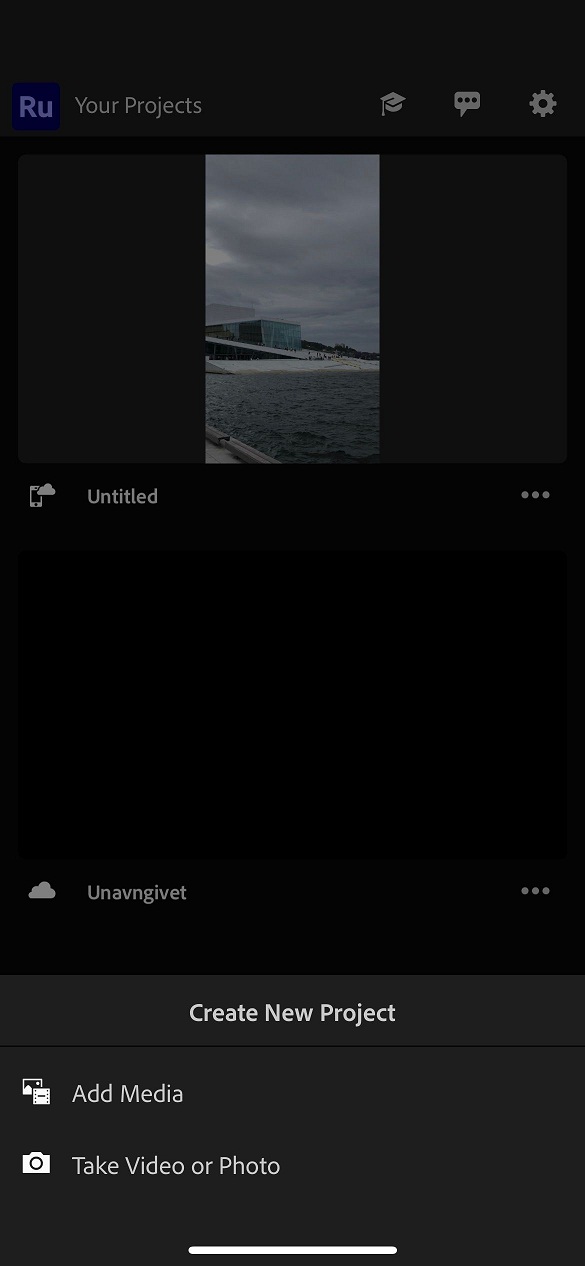
<p>Premiere Rush và iMovie có nhiều điểm khác nhau về tính năng tạo video mới. Đối với Premiere Rush, bạn nhấn biểu tượng dấu <strong>+</strong> để hiện cửa sổ <strong>Create New Project</strong> (Tạo dự án mới), tiếp theo chọn video và hình ảnh đã lưu trong máy hoặc quay video mới trực tiếp. Sau đó bạn sẽ phải tự thực hiện các bước chỉnh sửa video.</p>
<figure id="attachment_862786" aria-describedby="caption-attachment-862786" style="width: 585px" class="wp-caption aligncenter"><img loading="lazy" class="wp-image-862786 size-full" title="Tạo dự án video trong ứng dụng iMovie (Ảnh: Internet)" src="https://bloganchoi.com/wp-content/uploads/2024/06/lam-video-dien-thoai-2.jpg" alt="Tạo dự án video trong ứng dụng iMovie (Ảnh: Internet)" width="585" height="1266" srcset="https://bloganchoi.com/wp-content/uploads/2024/06/lam-video-dien-thoai-2.jpg 585w, https://bloganchoi.com/wp-content/uploads/2024/06/lam-video-dien-thoai-2-139x300.jpg 139w, https://bloganchoi.com/wp-content/uploads/2024/06/lam-video-dien-thoai-2-473x1024.jpg 473w, https://bloganchoi.com/wp-content/uploads/2024/06/lam-video-dien-thoai-2-194x420.jpg 194w" sizes="(max-width: 585px) 100vw, 585px" /><figcaption id="caption-attachment-862786" class="wp-caption-text">Tạo dự án video trong ứng dụng iMovie (Ảnh: Internet)</figcaption></figure>
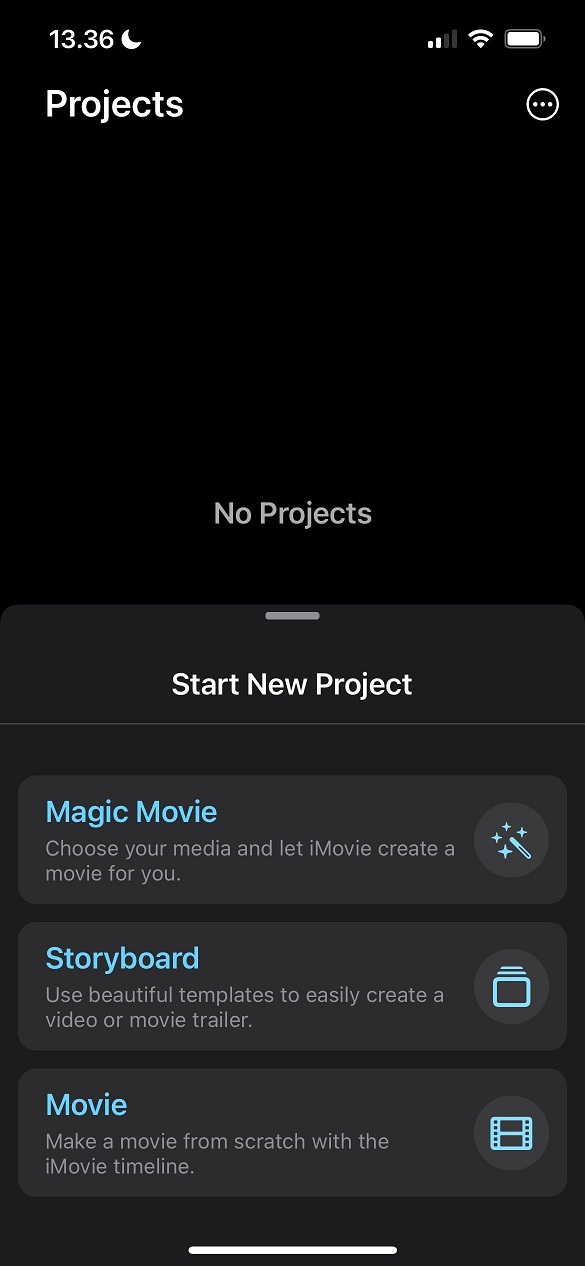
<p>Trong khi đó iMovie cho phép bạn sử dụng linh hoạt hơn: tạo dự án mới bằng cách nhấn vào tab <strong>Movie</strong> và tạo đoạn video ngắn kiểu trailer trong phần <strong>Storyboard</strong>. Ngoài ra có thể nhấn vào <strong>Magic Movie</strong> để tạo video tự động bằng các hình ảnh và clip mà bạn lựa chọn.</p>
<figure id="attachment_862787" aria-describedby="caption-attachment-862787" style="width: 585px" class="wp-caption aligncenter"><img loading="lazy" class="wp-image-862787 size-full" title="Tạo dự án video trong ứng dụng Premiere Rush (Ảnh: Internet)" src="https://bloganchoi.com/wp-content/uploads/2024/06/lam-video-dien-thoai-3.jpg" alt="Tạo dự án video trong ứng dụng Premiere Rush (Ảnh: Internet)" width="585" height="1266" srcset="https://bloganchoi.com/wp-content/uploads/2024/06/lam-video-dien-thoai-3.jpg 585w, https://bloganchoi.com/wp-content/uploads/2024/06/lam-video-dien-thoai-3-139x300.jpg 139w, https://bloganchoi.com/wp-content/uploads/2024/06/lam-video-dien-thoai-3-473x1024.jpg 473w, https://bloganchoi.com/wp-content/uploads/2024/06/lam-video-dien-thoai-3-194x420.jpg 194w" sizes="(max-width: 585px) 100vw, 585px" /><figcaption id="caption-attachment-862787" class="wp-caption-text">Tạo dự án video trong ứng dụng Premiere Rush (Ảnh: Internet)</figcaption></figure>
<h3><strong>Giao diện chỉnh sửa video</strong></h3>
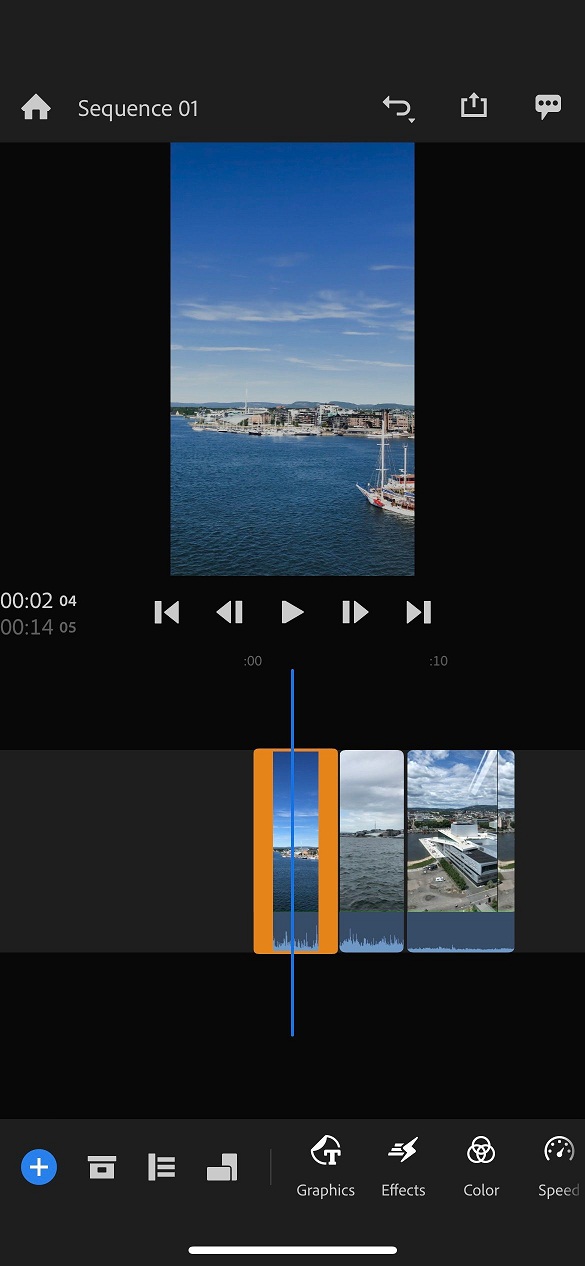
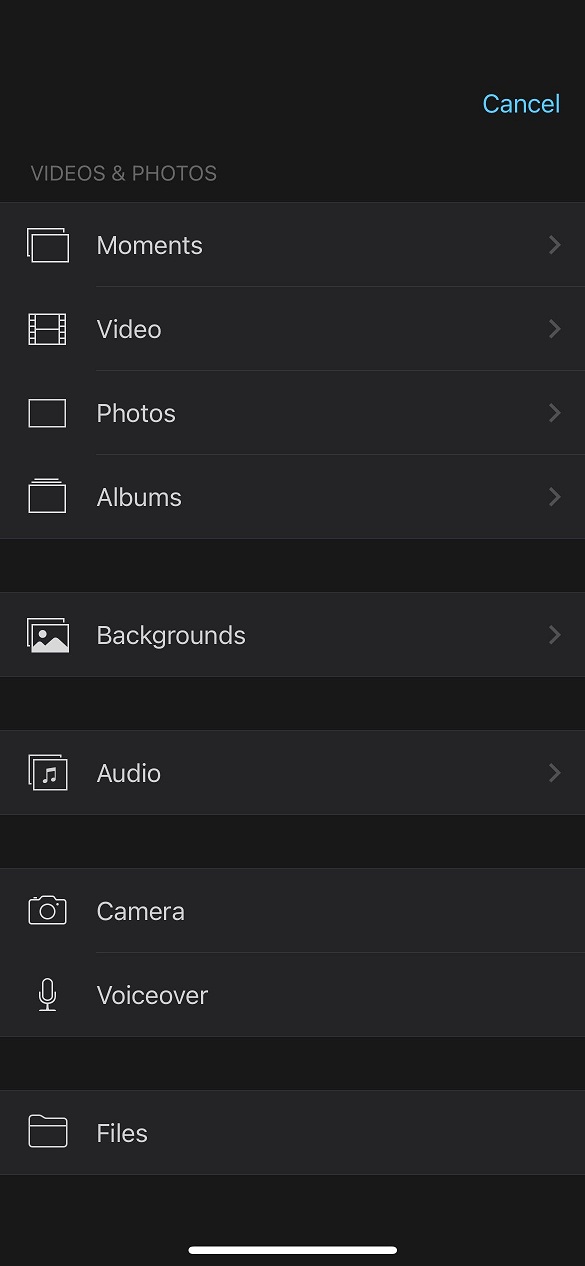
<p>Giao diện dễ sử dụng là yếu tố quan trọng đối với bất kỳ ứng dụng chỉnh sửa video nào. Cả Premiere Rush và iMovie đều được thiết kế giúp người dùng điều hướng khá dễ dàng, giao diện được trình bày gọn gàng và các tính năng được sắp xếp thuận tiện.</p>
<figure id="attachment_862788" aria-describedby="caption-attachment-862788" style="width: 585px" class="wp-caption aligncenter"><img loading="lazy" class="wp-image-862788 size-full" title="Giao diện của ứng dụng Premiere Rush (Ảnh: Internet)" src="https://bloganchoi.com/wp-content/uploads/2024/06/lam-video-dien-thoai-4.jpg" alt="Giao diện của ứng dụng Premiere Rush (Ảnh: Internet)" width="585" height="1266" srcset="https://bloganchoi.com/wp-content/uploads/2024/06/lam-video-dien-thoai-4.jpg 585w, https://bloganchoi.com/wp-content/uploads/2024/06/lam-video-dien-thoai-4-139x300.jpg 139w, https://bloganchoi.com/wp-content/uploads/2024/06/lam-video-dien-thoai-4-473x1024.jpg 473w, https://bloganchoi.com/wp-content/uploads/2024/06/lam-video-dien-thoai-4-194x420.jpg 194w" sizes="(max-width: 585px) 100vw, 585px" /><figcaption id="caption-attachment-862788" class="wp-caption-text">Giao diện của ứng dụng Premiere Rush (Ảnh: Internet)</figcaption></figure>
<p>Bạn có thể nhấn nút <strong>+</strong> trong iMovie để xem đầy đủ các tính năng chỉnh sửa video của ứng dụng này, ví dụ như chỉnh sửa âm thanh, nhập thêm video và đặt hình nền.</p>
<figure id="attachment_862790" aria-describedby="caption-attachment-862790" style="width: 585px" class="wp-caption aligncenter"><img loading="lazy" class="wp-image-862790 size-full" title="Các tính năng chỉnh sửa video của iMovie (Ảnh: Internet)" src="https://bloganchoi.com/wp-content/uploads/2024/06/lam-video-dien-thoai-5.jpg" alt="Các tính năng chỉnh sửa video của iMovie (Ảnh: Internet)" width="585" height="1266" srcset="https://bloganchoi.com/wp-content/uploads/2024/06/lam-video-dien-thoai-5.jpg 585w, https://bloganchoi.com/wp-content/uploads/2024/06/lam-video-dien-thoai-5-139x300.jpg 139w, https://bloganchoi.com/wp-content/uploads/2024/06/lam-video-dien-thoai-5-473x1024.jpg 473w, https://bloganchoi.com/wp-content/uploads/2024/06/lam-video-dien-thoai-5-194x420.jpg 194w" sizes="(max-width: 585px) 100vw, 585px" /><figcaption id="caption-attachment-862790" class="wp-caption-text">Các tính năng chỉnh sửa video của iMovie (Ảnh: Internet)</figcaption></figure>
<p>Trong khi đó các tính năng của Premiere Rush nằm ở phía dưới của màn hình, bạn có thể nhấn vào biểu tượng của từng mục để xem đầy đủ các tính năng trong mục đó. Ngoài ra có thể xem menu để tìm các mục cần thiết.</p>
<h3><strong>Chỉnh sửa màu sắc</strong></h3>
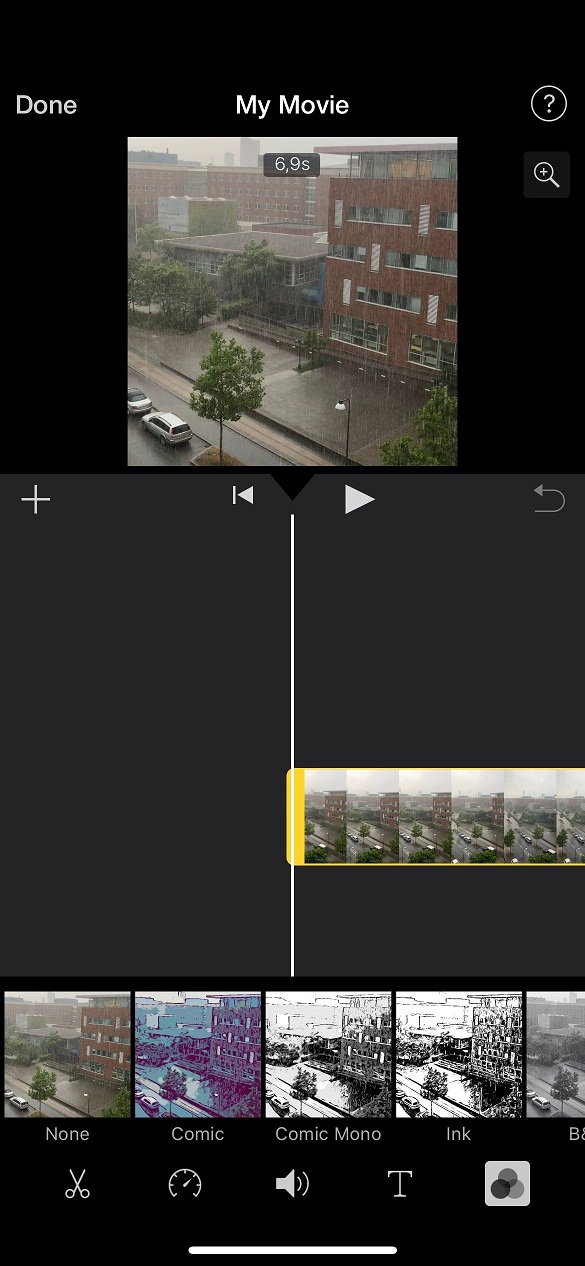
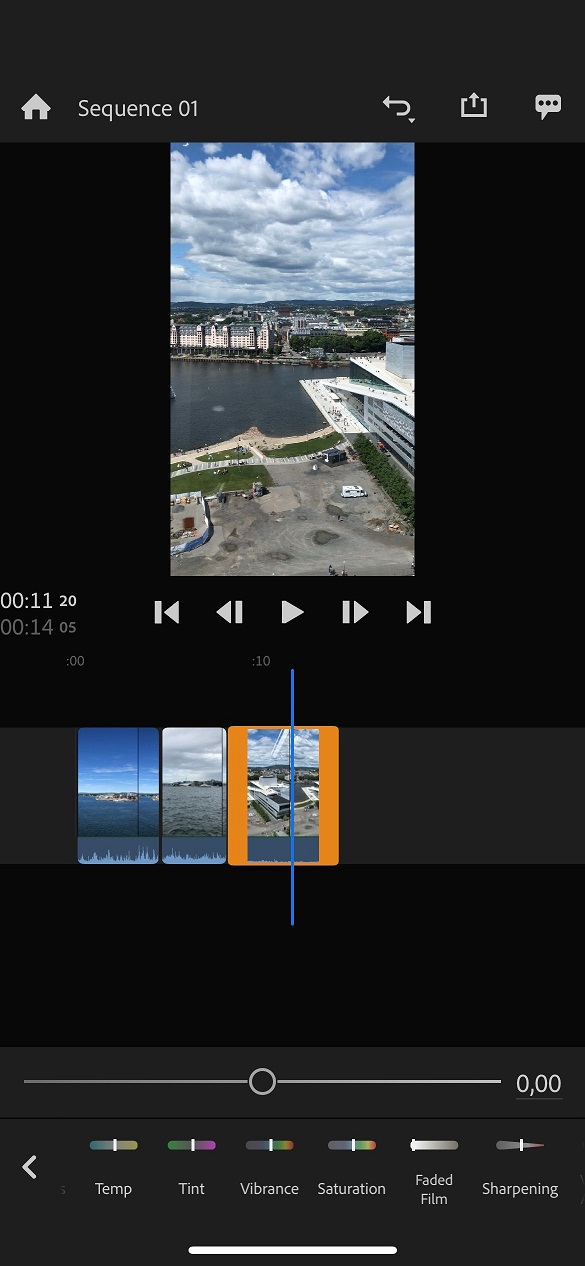
<p>Chỉnh sửa màu và chia độ màu sắc là 2 phương pháp được sử dụng phổ biến để làm cho video trở nên đẹp hơn. Các tính năng này của Premiere Rush và iMovie đều kém hơn so với Premiere Pro và Final Cut Pro, nhưng vẫn đáp ứng được chỉnh sửa video ở mức cơ bản.</p>
<figure id="attachment_862792" aria-describedby="caption-attachment-862792" style="width: 585px" class="wp-caption aligncenter"><img loading="lazy" class="wp-image-862792 size-full" title="Chỉnh sửa màu trong ứng dụng iMovie (Ảnh: Internet)" src="https://bloganchoi.com/wp-content/uploads/2024/06/lam-video-dien-thoai-6.jpg" alt="Chỉnh sửa màu trong ứng dụng iMovie (Ảnh: Internet)" width="585" height="1266" srcset="https://bloganchoi.com/wp-content/uploads/2024/06/lam-video-dien-thoai-6.jpg 585w, https://bloganchoi.com/wp-content/uploads/2024/06/lam-video-dien-thoai-6-139x300.jpg 139w, https://bloganchoi.com/wp-content/uploads/2024/06/lam-video-dien-thoai-6-473x1024.jpg 473w, https://bloganchoi.com/wp-content/uploads/2024/06/lam-video-dien-thoai-6-194x420.jpg 194w" sizes="(max-width: 585px) 100vw, 585px" /><figcaption id="caption-attachment-862792" class="wp-caption-text">Chỉnh sửa màu trong ứng dụng iMovie (Ảnh: Internet)</figcaption></figure>
<p>Premiere Rush có nhiều tính năng chỉnh sửa màu sắc hơn, ví dụ như các chế độ màu sắc được chỉnh sẵn và phân chia tông màu. Ngoài ra ứng dụng này cũng cho phép điều chỉnh độ tương phản, độ phơi sáng, vùng sáng và vùng tối trong hình ảnh. Các tính năng chỉnh sửa màu khác bao gồm nhiệt độ màu, độ bão hòa màu, độ rung, pha màu.</p>
<figure id="attachment_862793" aria-describedby="caption-attachment-862793" style="width: 585px" class="wp-caption aligncenter"><img loading="lazy" class="wp-image-862793 size-full" title="Chỉnh sửa màu trong Premiere Rush (Ảnh: Internet)" src="https://bloganchoi.com/wp-content/uploads/2024/06/lam-video-dien-thoai-7.jpg" alt="Chỉnh sửa màu trong Premiere Rush (Ảnh: Internet)" width="585" height="1266" srcset="https://bloganchoi.com/wp-content/uploads/2024/06/lam-video-dien-thoai-7.jpg 585w, https://bloganchoi.com/wp-content/uploads/2024/06/lam-video-dien-thoai-7-139x300.jpg 139w, https://bloganchoi.com/wp-content/uploads/2024/06/lam-video-dien-thoai-7-473x1024.jpg 473w, https://bloganchoi.com/wp-content/uploads/2024/06/lam-video-dien-thoai-7-194x420.jpg 194w" sizes="(max-width: 585px) 100vw, 585px" /><figcaption id="caption-attachment-862793" class="wp-caption-text">Chỉnh sửa màu trong Premiere Rush (Ảnh: Internet)</figcaption></figure>
<p>Trong khi đó iMovie có tính năng đặc biệt là áp dụng bộ lọc cho video, cũng có các chế độ màu sắc và đơn sắc được cài sẵn – ngoài ra phiên bản di động của iMovie không có tính năng khác.</p>
<h3><strong>Chỉnh sửa âm thanh</strong></h3>
<p>Âm thanh cũng là thành phần quan trọng khi làm video. Cả Premiere Rush và iMovie đều có nhiều tính năng tiện ích về mặt này.</p>
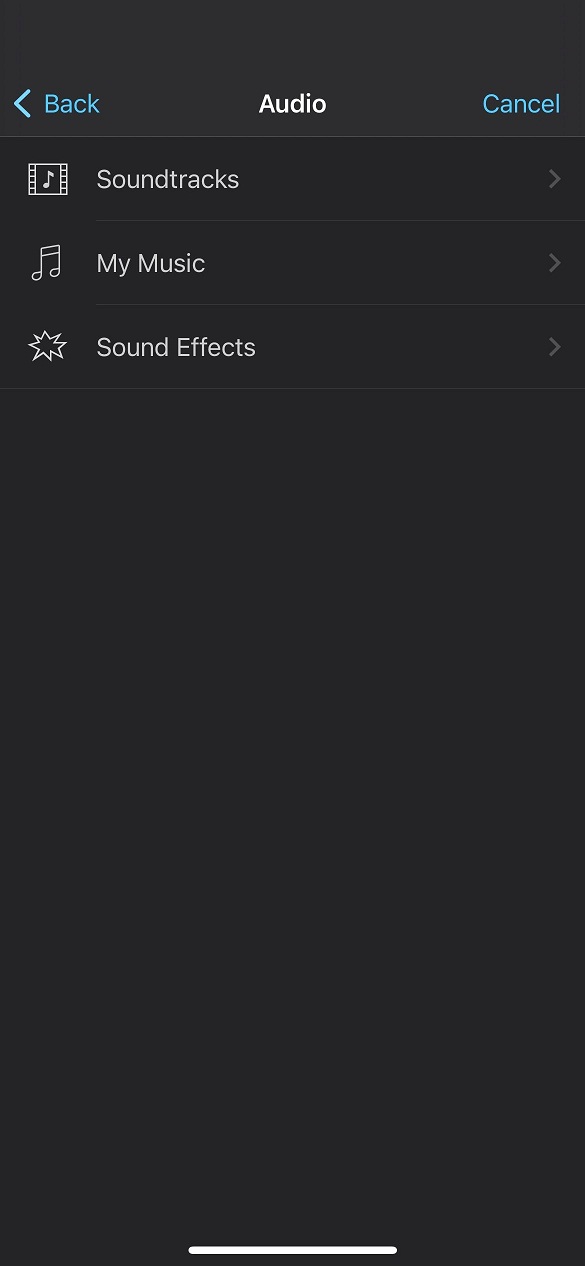
<figure id="attachment_862794" aria-describedby="caption-attachment-862794" style="width: 585px" class="wp-caption aligncenter"><img loading="lazy" class="wp-image-862794 size-full" title="Các tính năng chỉnh sửa âm thanh của iMovie (Ảnh: Internet)" src="https://bloganchoi.com/wp-content/uploads/2024/06/lam-video-dien-thoai-8.jpg" alt="Các tính năng chỉnh sửa âm thanh của iMovie (Ảnh: Internet)" width="585" height="1266" srcset="https://bloganchoi.com/wp-content/uploads/2024/06/lam-video-dien-thoai-8.jpg 585w, https://bloganchoi.com/wp-content/uploads/2024/06/lam-video-dien-thoai-8-139x300.jpg 139w, https://bloganchoi.com/wp-content/uploads/2024/06/lam-video-dien-thoai-8-473x1024.jpg 473w, https://bloganchoi.com/wp-content/uploads/2024/06/lam-video-dien-thoai-8-194x420.jpg 194w" sizes="(max-width: 585px) 100vw, 585px" /><figcaption id="caption-attachment-862794" class="wp-caption-text">Các tính năng chỉnh sửa âm thanh của iMovie (Ảnh: Internet)</figcaption></figure>
<p>Trong iMovie, tính năng âm thanh hấp dẫn nhất có lẽ là ghi âm giọng nói, đặc biệt rất hữu ích trong một số trường hợp như khi bạn muốn giải thích nội dung video cho người xem hoặc thực hiện các xu hướng trên mạng. Ngoài ra ứng dụng cung cấp nhiều hiệu ứng âm thanh độc đáo để thêm vào video, bên cạnh tính năng nhập file âm thanh. Nếu bạn không có sẵn file nhạc trong máy để sử dụng thì có thể chọn nhạc trong phần <strong>Soundtracks</strong> của ứng dụng.</p>
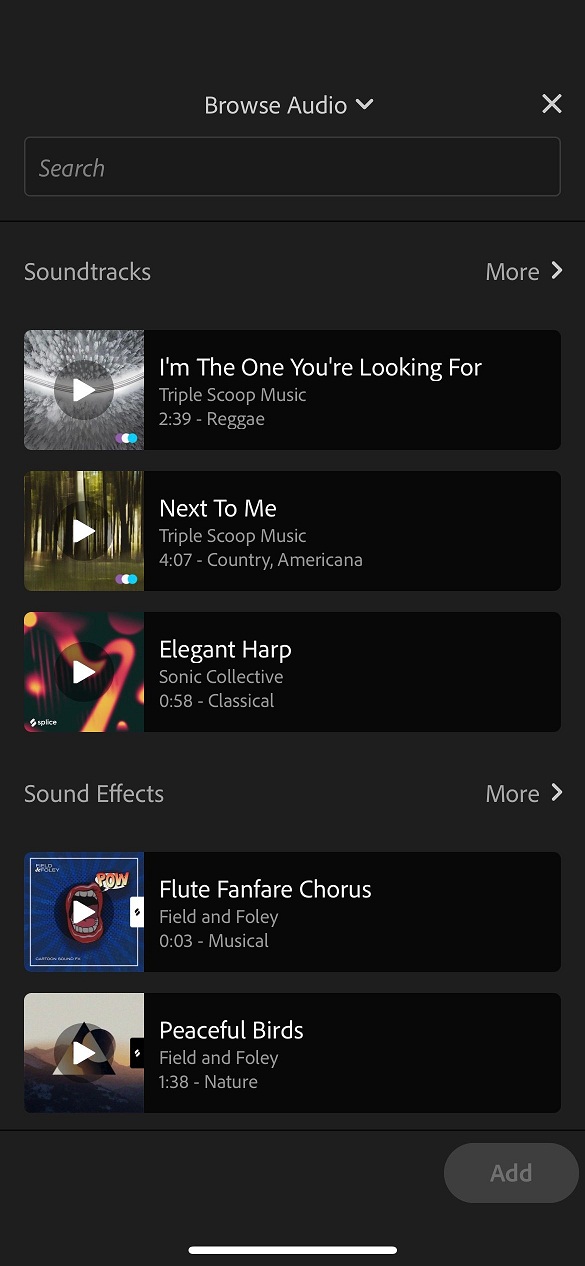
<figure id="attachment_862795" aria-describedby="caption-attachment-862795" style="width: 585px" class="wp-caption aligncenter"><img loading="lazy" class="wp-image-862795 size-full" title="Chèn nhạc cho video trong Premiere Rush (Ảnh: Internet)" src="https://bloganchoi.com/wp-content/uploads/2024/06/lam-video-dien-thoai-9.jpg" alt="Chèn nhạc cho video trong Premiere Rush (Ảnh: Internet)" width="585" height="1266" srcset="https://bloganchoi.com/wp-content/uploads/2024/06/lam-video-dien-thoai-9.jpg 585w, https://bloganchoi.com/wp-content/uploads/2024/06/lam-video-dien-thoai-9-139x300.jpg 139w, https://bloganchoi.com/wp-content/uploads/2024/06/lam-video-dien-thoai-9-473x1024.jpg 473w, https://bloganchoi.com/wp-content/uploads/2024/06/lam-video-dien-thoai-9-194x420.jpg 194w" sizes="(max-width: 585px) 100vw, 585px" /><figcaption id="caption-attachment-862795" class="wp-caption-text">Chèn nhạc cho video trong Premiere Rush (Ảnh: Internet)</figcaption></figure>
<p>Trong khi đó Premiere Rush có tính năng chọn âm thanh trong video là giọng nói hoặc nhạc, và có thể tăng giảm âm lượng cho âm thanh đó. Ngoài ra còn có tính năng điều chỉnh âm lượng tự động cùng với nhiều hiệu ứng âm thanh thú vị để đưa vào video.</p>
<h2><strong>Tóm lại: Nên sử dụng iMovie và Premiere Rush để chỉnh sửa video di động?</strong></h2>
<p>Cả hai ứng dụng iMovie và Premiere Rush đều giúp bạn tạo ra video hấp dẫn. Premiere Rush có nhiều tính năng hơn iMovie nên phù hợp cho những người muốn chỉnh sửa video chuyên nghiêpk. Ngoài ra ứng dụng này có ưu điểm là dùng được trên cả thiết bị Apple và Android, vì vậy nếu bạn không sở hữu iPhone hay iPad của Apple thì lựa chọn phù hợp nhất là Premiere Rush.</p>
<p>Ngược lại, nếu bạn đang sử dụng thiết bị của Apple và chỉ cần chỉnh sửa video đơn giản thì có thể chọn iMovie. Vì cả hai ứng dụng này đều miễn phí nên bạn có thể trải nghiệm cả hai để đánh giá chính xác nhất.</p>
<p><iframe loading="lazy" class="youtube-player" width="640" height="360" src="https://www.youtube.com/embed/IjCJ1y5wC5U?version=3&#038;rel=1&#038;showsearch=0&#038;showinfo=1&#038;iv_load_policy=1&#038;fs=1&#038;hl=vi&#038;autohide=2&#038;wmode=transparent" allowfullscreen="true" style="border:0;" sandbox="allow-scripts allow-same-origin allow-popups allow-presentation"></iframe></p>
<p><strong>Mời bạn xem thêm các bài liên quan:</strong></p>
<ul>
<li><strong><a href="https://bloganchoi.com/cong-cu-dall-e-3-chinh-sua-tao-hinh-anh-ai-dep/">Công cụ DALL-E 3 có thêm các tính năng chỉnh sửa giúp tạo hình ảnh AI đẹp hơn</a></strong></li>
<li><strong><a href="https://bloganchoi.com/tinh-nang-ai-photoshop-va-lightroom-phan-mem-chinh-sua-anh/">So sánh các tính năng AI của Photoshop và Lightroom: Phần mềm chỉnh sửa ảnh nào tốt hơn?</a></strong></li>
</ul>
<p>Hãy theo dõi BlogAnChoi để cập nhật nhiều thông tin bổ ích nhé!</p>]]></content>
		
					<link rel="replies" type="text/html" href="https://bloganchoi.com/adobe-premiere-rush-imovie-ung-dung-lam-video-tren-dien-thoai/#comments" thr:count="1" />
			<link rel="replies" type="application/atom+xml" href="https://bloganchoi.com/adobe-premiere-rush-imovie-ung-dung-lam-video-tren-dien-thoai/feed/atom/" thr:count="1" />
			<thr:total>1</thr:total>
			</entry>
	</feed>