<?xml version="1.0" encoding="UTF-8"?><feed
	xmlns="http://www.w3.org/2005/Atom"
	xmlns:thr="http://purl.org/syndication/thread/1.0"
	xml:lang="vi"
	
	xmlns:georss="http://www.georss.org/georss"
	xmlns:geo="http://www.w3.org/2003/01/geo/wgs84_pos#"
	>
	<title type="text">Web Note &#8211; BlogAnChoi</title>
	<subtitle type="text">Blog giải trí về du lịch, làm đẹp, quán ngon dành cho giới trẻ.</subtitle>

	<updated>2017-03-09T04:09:16Z</updated>

	<link rel="alternate" type="text/html" href="https://bloganchoi.com" />
	<id>https://bloganchoi.com/feed/atom/</id>
	<link rel="self" type="application/atom+xml" href="https://bloganchoi.com/tag/web-note/feed/atom/" />

	
	<entry>
		<author>
			<name>Quangsumi</name>
					</author>

		<title type="html"><![CDATA[Bỏ Google Chrome đi, trình duyệt Microsoft Edge mới là tốt nhất]]></title>
		<link rel="alternate" type="text/html" href="https://bloganchoi.com/bo-google-chrome-di-trinh-duyet-microsoft-edge-moi-la-tot-nhat/" />

		<id>https://bloganchoi.com/?p=38555</id>
		<updated>2017-03-09T04:09:16Z</updated>
		<published>2017-03-06T03:48:41Z</published>
		<category scheme="https://bloganchoi.com" term="Ứng dụng - Phần mềm" /><category scheme="https://bloganchoi.com" term="Cortana" /><category scheme="https://bloganchoi.com" term="Extention" /><category scheme="https://bloganchoi.com" term="Google" /><category scheme="https://bloganchoi.com" term="Google Chrome" /><category scheme="https://bloganchoi.com" term="Microsoft" /><category scheme="https://bloganchoi.com" term="Microsoft Edge" /><category scheme="https://bloganchoi.com" term="trình duyệt" /><category scheme="https://bloganchoi.com" term="trình duyệt Google Chrome" /><category scheme="https://bloganchoi.com" term="trình duyệt Microsoft Edge" /><category scheme="https://bloganchoi.com" term="Web Note" />
		<summary type="html"><![CDATA[Thị phần tăng nhanh, được đánh giá cao, thiết kế đơn giản, hợp xu hướng, trình duyệt Microsoft Edge của ông lớn Microsoft xứng đáng trở thành trình duyệt đáng dùng của tương lai. Mới đây, ngay sau khi hệ hiều hành Windows 10 chính thức phát hành thì cái tên Microsoft Edge cũng được]]></summary>

					<content type="html" xml:base="https://bloganchoi.com/bo-google-chrome-di-trinh-duyet-microsoft-edge-moi-la-tot-nhat/"><![CDATA[<p><strong>Thị phần tăng nhanh, được đánh giá cao, thiết kế đơn giản, hợp xu hướng, trình duyệt Microsoft Edge của ông lớn Microsoft xứng đáng trở thành trình duyệt đáng dùng của tương lai.</strong></p>
<p><span id="more-38555"></span></p>
<figure id="attachment_38550" aria-describedby="caption-attachment-38550" style="width: 1024px" class="wp-caption aligncenter"><img loading="lazy" class="size-full wp-image-38550" src="https://bloganchoi.com/wp-content/uploads/2017/03/trinh-duyet-microsoft-edge-2-2.jpg" alt="Trình duyệt Microsoft Edge" width="1024" height="768" srcset="https://bloganchoi.com/wp-content/uploads/2017/03/trinh-duyet-microsoft-edge-2-2.jpg 1024w, https://bloganchoi.com/wp-content/uploads/2017/03/trinh-duyet-microsoft-edge-2-2-300x225.jpg 300w, https://bloganchoi.com/wp-content/uploads/2017/03/trinh-duyet-microsoft-edge-2-2-768x576.jpg 768w, https://bloganchoi.com/wp-content/uploads/2017/03/trinh-duyet-microsoft-edge-2-2-80x60.jpg 80w, https://bloganchoi.com/wp-content/uploads/2017/03/trinh-duyet-microsoft-edge-2-2-265x198.jpg 265w, https://bloganchoi.com/wp-content/uploads/2017/03/trinh-duyet-microsoft-edge-2-2-696x522.jpg 696w, https://bloganchoi.com/wp-content/uploads/2017/03/trinh-duyet-microsoft-edge-2-2-560x420.jpg 560w" sizes="(max-width: 1024px) 100vw, 1024px" /><figcaption id="caption-attachment-38550" class="wp-caption-text">Trình duyệt Microsoft Edge trên Window 10 (ảnh: Internet)</figcaption></figure>
<p><span style="font-weight: 400;">Mới đây, ngay sau khi hệ hiều hành Windows 10 chính thức phát hành thì cái tên Microsoft Edge cũng được nhiều người biết đến. Hãng Microsoft mặc định cài đặt trình duyệt này ngay trên hệ điều hành của mình, với mong muốn trở lại “sân chơi” sau khi đứa con Microsoft Explorer đang dần bị người dùng lãng quên.</span></p>
<figure id="attachment_38549" aria-describedby="caption-attachment-38549" style="width: 640px" class="wp-caption aligncenter"><img loading="lazy" class="size-full wp-image-38549" src="https://bloganchoi.com/wp-content/uploads/2017/03/trinh-duyet-microsoft-edge-2-1.jpg" alt="Trình duyệt Microsoft Edge" width="640" height="480" srcset="https://bloganchoi.com/wp-content/uploads/2017/03/trinh-duyet-microsoft-edge-2-1.jpg 640w, https://bloganchoi.com/wp-content/uploads/2017/03/trinh-duyet-microsoft-edge-2-1-300x225.jpg 300w, https://bloganchoi.com/wp-content/uploads/2017/03/trinh-duyet-microsoft-edge-2-1-80x60.jpg 80w, https://bloganchoi.com/wp-content/uploads/2017/03/trinh-duyet-microsoft-edge-2-1-265x198.jpg 265w, https://bloganchoi.com/wp-content/uploads/2017/03/trinh-duyet-microsoft-edge-2-1-560x420.jpg 560w" sizes="(max-width: 640px) 100vw, 640px" /><figcaption id="caption-attachment-38549" class="wp-caption-text">Điểm số của trình duyệt Microsoft Edge (ảnh: Internet)</figcaption></figure>
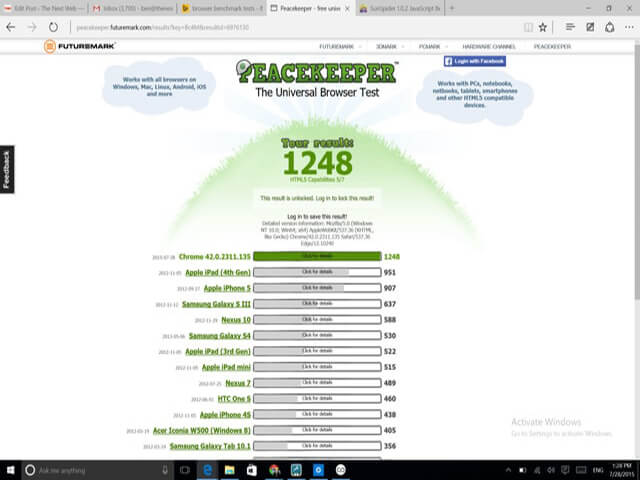
<p><span style="font-weight: 400;">Với những tính năng và hiệu quả vượt trội, Microsoft Edge đã chinh phục nhiều người ngay từ lần trải nghiệm đầu tiên. Trên trình đánh giá Futuremark Peacekeeper, Microsoft Edge đã đạt tổng số điểm là 1248, trong khi trình duyệt Google Chrome chỉ vỏn vẹn 447 điểm. Cũng như thế, trên trình đánh giá Benchmark SunSpider JavaScript, số điểm mà Microsoft Edge ghi được còn gấp đôi đối thủ.</span></p>
<p><span style="font-weight: 400;">Trong lần ra mắt này, Microsoft Edge còn được Microsoft “trang bị” những tính năng vô cùng tiện lợi đi kèm làm tăng trải nghiệm người dùng mà có lẽ người dùng còn lâu mới thấy được điều đó trên Google Chrome:</span></p>
<h2><strong>Chế độ đọc sách</strong></h2>
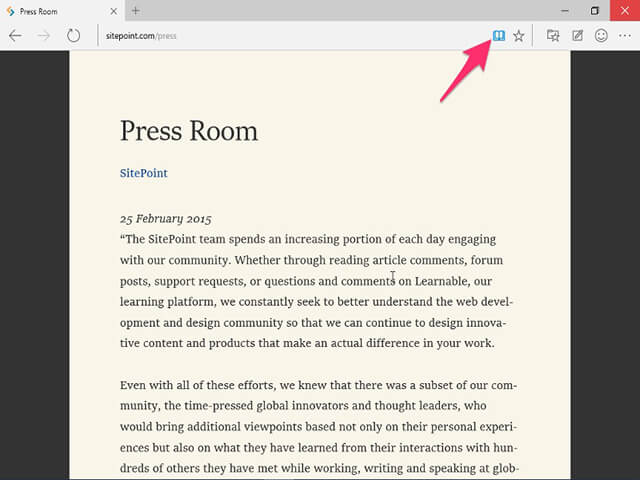
<p><span style="font-weight: 400;">Chỉ cần với một nút Icon trên thanh công cụ, người dùng có thể chuyển một trang web bình thường sang chế độ đọc sách của Microsoft Edge. Qua đó, những hình ảnh không liên quan, quảng cáo,&#8230; sẽ được loại bỏ. Còn phần nội dung chính mà người dùng muốn đọc sẽ được trình bày một cách rõ ràng trên màu nền sẫm.</span></p>
<figure id="attachment_38551" aria-describedby="caption-attachment-38551" style="width: 640px" class="wp-caption aligncenter"><img loading="lazy" class="size-full wp-image-38551" src="https://bloganchoi.com/wp-content/uploads/2017/03/trinh-duyet-microsoft-edge-3.jpg" alt="Chế độ đọc sách trên trình duyệt Microsoft Edge" width="640" height="480" srcset="https://bloganchoi.com/wp-content/uploads/2017/03/trinh-duyet-microsoft-edge-3.jpg 640w, https://bloganchoi.com/wp-content/uploads/2017/03/trinh-duyet-microsoft-edge-3-300x225.jpg 300w, https://bloganchoi.com/wp-content/uploads/2017/03/trinh-duyet-microsoft-edge-3-80x60.jpg 80w, https://bloganchoi.com/wp-content/uploads/2017/03/trinh-duyet-microsoft-edge-3-265x198.jpg 265w, https://bloganchoi.com/wp-content/uploads/2017/03/trinh-duyet-microsoft-edge-3-560x420.jpg 560w" sizes="(max-width: 640px) 100vw, 640px" /><figcaption id="caption-attachment-38551" class="wp-caption-text">Chế độ đọc sách trên trình duyệt Microsoft Edge (ảnh: Internet)</figcaption></figure>
<h2><strong>Trợ lý ảo Cortana</strong></h2>
<p><span style="font-weight: 400;">Trợ lý ảo Cortana là một công cụ rất thú vị được Microsoft tích hợp trên Windows 10, đặc biệt là nó còn có thể sử dụng được ngay trên Microsoft Edge. Được biết đến như một công cụ tìm kiếm bằng giọng nói, Trợ lý ảo Cortana có khả năng phân tích và nhận diện giọng nói của người dùng rồi trả kết quả tìm kiếm được lên trang kết quả của trình duyệt Microsoft Edge. Ngoài ra người dùng còn có thể sử dụng Trợ lý ảo Cortana để xem dự báo thời tiết, hỏi đáp, địa điểm, hẹn giờ,&#8230; và rất nhiều tính năng hữu ích khác.</span></p>
<figure id="attachment_38557" aria-describedby="caption-attachment-38557" style="width: 640px" class="wp-caption aligncenter"><img loading="lazy" class="size-full wp-image-38557" src="https://bloganchoi.com/wp-content/uploads/2017/03/trinh-duyet-microsoft-edge-4.jpg" alt="trình duyệt Microsoft Edge" width="640" height="480" srcset="https://bloganchoi.com/wp-content/uploads/2017/03/trinh-duyet-microsoft-edge-4.jpg 640w, https://bloganchoi.com/wp-content/uploads/2017/03/trinh-duyet-microsoft-edge-4-300x225.jpg 300w, https://bloganchoi.com/wp-content/uploads/2017/03/trinh-duyet-microsoft-edge-4-80x60.jpg 80w, https://bloganchoi.com/wp-content/uploads/2017/03/trinh-duyet-microsoft-edge-4-265x198.jpg 265w, https://bloganchoi.com/wp-content/uploads/2017/03/trinh-duyet-microsoft-edge-4-560x420.jpg 560w" sizes="(max-width: 640px) 100vw, 640px" /><figcaption id="caption-attachment-38557" class="wp-caption-text">Trợ lý ảo Cortana trên trình duyệt Microsoft Edge (ảnh: Internet)</figcaption></figure>
<h2><strong>Tính năng Web Note</strong></h2>
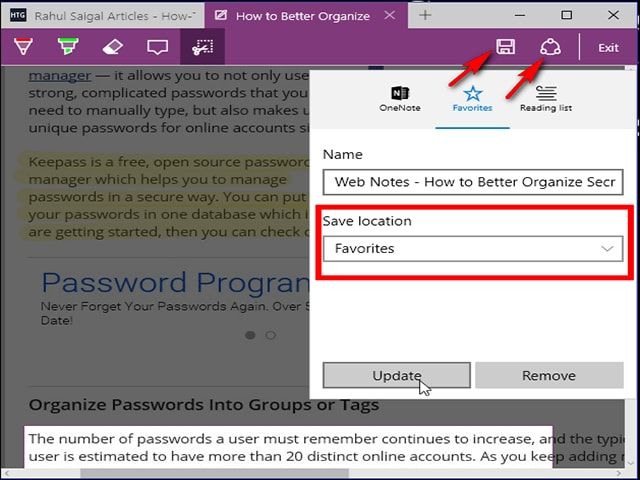
<p><span style="font-weight: 400;">Tính năng này cho phép người dùng tạo một tấm ảnh màn hình bằng cách nhấn nút chụp màn hình trên thanh cộng cụ, ghi chú, cắt, xoay, sửa theo ý mình một cách nhanh chóng. </span></p>
<figure id="attachment_38558" aria-describedby="caption-attachment-38558" style="width: 640px" class="wp-caption aligncenter"><img loading="lazy" class="size-full wp-image-38558" src="https://bloganchoi.com/wp-content/uploads/2017/03/trinh-duyet-microsoft-edge-5.jpg" alt="Trình duyệt Microsoft Edge" width="640" height="480" srcset="https://bloganchoi.com/wp-content/uploads/2017/03/trinh-duyet-microsoft-edge-5.jpg 640w, https://bloganchoi.com/wp-content/uploads/2017/03/trinh-duyet-microsoft-edge-5-300x225.jpg 300w, https://bloganchoi.com/wp-content/uploads/2017/03/trinh-duyet-microsoft-edge-5-80x60.jpg 80w, https://bloganchoi.com/wp-content/uploads/2017/03/trinh-duyet-microsoft-edge-5-265x198.jpg 265w, https://bloganchoi.com/wp-content/uploads/2017/03/trinh-duyet-microsoft-edge-5-560x420.jpg 560w" sizes="(max-width: 640px) 100vw, 640px" /><figcaption id="caption-attachment-38558" class="wp-caption-text">Tính năng Web Note trên trình duyệt Microsoft Edge (ảnh: Internet)</figcaption></figure>
<p>Để sử dụng tính năng này, bạn cần truy cập vào trang web mình cần bằng Microsoft Edge, sau đó nhấp vào biểu tượng &#8220;Make a Web Note&#8221;. Trình duyệt Microsoft Edge sẽ tiến hành chụp và hiển thị hình ảnh của trang web mà bạn muốn. Tại đây, bạn hãy sử dụng các công cụ chỉnh sửa để tạo ra nội dung mình cần.</p>
<h2><strong>Phần mở rộng (Extention)</strong></h2>
<p><span style="font-weight: 400;">Theo những rò rỉ từ Microsoft thì có thể nhiều khả năng trong tương lai, trình duyệt Microsoft Edge sẽ hỗ trợ thêm các </span><i><span style="font-weight: 400;">phần mở rộng (Extention)</span></i><span style="font-weight: 400;"> hiện đang có trên trình duyệt Firefox hoặc Chrome. Nếu điều này là có thật thì Microsoft đã giúp Microsoft Edge đi tắt một chặng đường dài khi mà không phải phát triển các Extention phù hợp với nền tảng của mình mà lại dựa luôn vào của đối thủ để biến thành của mình.</span></p>
<figure id="attachment_38552" aria-describedby="caption-attachment-38552" style="width: 640px" class="wp-caption aligncenter"><img loading="lazy" class="size-full wp-image-38552" src="https://bloganchoi.com/wp-content/uploads/2017/03/trinh-duyet-microsoft-edge-6.jpg" alt="Trình duyệt Microsoft Edge" width="640" height="480" srcset="https://bloganchoi.com/wp-content/uploads/2017/03/trinh-duyet-microsoft-edge-6.jpg 640w, https://bloganchoi.com/wp-content/uploads/2017/03/trinh-duyet-microsoft-edge-6-300x225.jpg 300w, https://bloganchoi.com/wp-content/uploads/2017/03/trinh-duyet-microsoft-edge-6-80x60.jpg 80w, https://bloganchoi.com/wp-content/uploads/2017/03/trinh-duyet-microsoft-edge-6-265x198.jpg 265w, https://bloganchoi.com/wp-content/uploads/2017/03/trinh-duyet-microsoft-edge-6-560x420.jpg 560w" sizes="(max-width: 640px) 100vw, 640px" /><figcaption id="caption-attachment-38552" class="wp-caption-text">Cuộc chiến của Microsoft Edge và Google Chrome (ảnh: Technewtoday)</figcaption></figure>
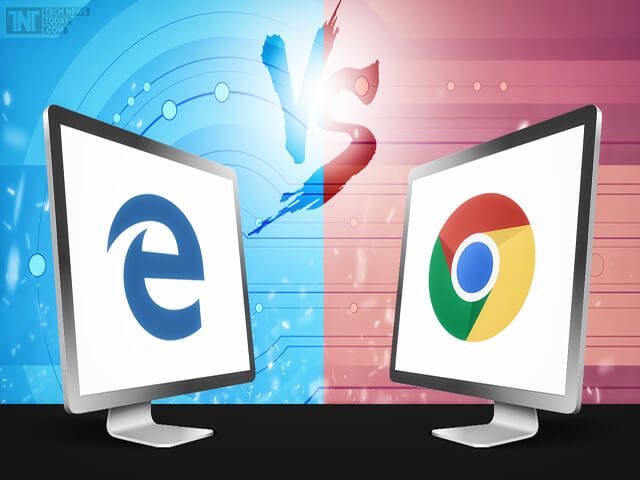
<p><span style="font-weight: 400;">Mặc dù hiện tại trình duyệt Google Chrome đang được nhiều người sử dụng nhất. Nhưng trong tương lại điều này liệu còn đúng nữa hay không khi mà Microsoft đang tích cực biến đứa con cưng “lỗi mốt” một thời của mình trở thành một đối thủ đáng gờm với rất nhiều ưu điểm hơn Google?</span></p>
<p><span style="font-weight: 400;">Hãy tiếp tục theo dõi BlogAnChoi để cập nhập những tin tức mới nhất về cuộc chiến này nhé!</span></p>
<p><em><strong>Video giới thiệu trình duyệt Microsoft Edge của Microsoft:</strong></em></p>
<p><iframe loading="lazy" class="youtube-player" width="640" height="360" src="https://www.youtube.com/embed/iH1D31YHsgY?version=3&#038;rel=1&#038;showsearch=0&#038;showinfo=1&#038;iv_load_policy=1&#038;fs=1&#038;hl=vi&#038;autohide=2&#038;wmode=transparent" allowfullscreen="true" style="border:0;" sandbox="allow-scripts allow-same-origin allow-popups allow-presentation"></iframe></p>]]></content>
		
					<link rel="replies" type="text/html" href="https://bloganchoi.com/bo-google-chrome-di-trinh-duyet-microsoft-edge-moi-la-tot-nhat/#comments" thr:count="0" />
			<link rel="replies" type="application/atom+xml" href="https://bloganchoi.com/bo-google-chrome-di-trinh-duyet-microsoft-edge-moi-la-tot-nhat/feed/atom/" thr:count="0" />
			<thr:total>0</thr:total>
			</entry>
	</feed>