<?xml version="1.0" encoding="UTF-8"?><feed
	xmlns="http://www.w3.org/2005/Atom"
	xmlns:thr="http://purl.org/syndication/thread/1.0"
	xml:lang="vi"
	
	xmlns:georss="http://www.georss.org/georss"
	xmlns:geo="http://www.w3.org/2003/01/geo/wgs84_pos#"
	>
	<title type="text">kiểm tra imei &#8211; BlogAnChoi</title>
	<subtitle type="text">Blog giải trí về du lịch, làm đẹp, quán ngon dành cho giới trẻ.</subtitle>

	<updated>2020-11-16T03:51:24Z</updated>

	<link rel="alternate" type="text/html" href="https://bloganchoi.com" />
	<id>https://bloganchoi.com/feed/atom/</id>
	<link rel="self" type="application/atom+xml" href="https://bloganchoi.com/tag/kiem-tra-imei/feed/atom/" />

	
	<entry>
		<author>
			<name>Cong</name>
					</author>

		<title type="html"><![CDATA[Check IMEI: Thủ thuật ưu việt giúp kiểm tra điện thoại chính hãng]]></title>
		<link rel="alternate" type="text/html" href="https://bloganchoi.com/check-imei-kiem-tra-dien-thoai-chinh-hang/" />

		<id>https://bloganchoi.com/?p=314933</id>
		<updated>2020-11-16T03:51:24Z</updated>
		<published>2020-11-16T03:51:24Z</published>
		<category scheme="https://bloganchoi.com" term="Thủ thuật" /><category scheme="https://bloganchoi.com" term="bàn phím" /><category scheme="https://bloganchoi.com" term="check imei" /><category scheme="https://bloganchoi.com" term="chính hãng" /><category scheme="https://bloganchoi.com" term="công dụng" /><category scheme="https://bloganchoi.com" term="điện thoại" /><category scheme="https://bloganchoi.com" term="điện thoại chính hãng" /><category scheme="https://bloganchoi.com" term="điện thoại Oppo" /><category scheme="https://bloganchoi.com" term="điện thoại Samsung" /><category scheme="https://bloganchoi.com" term="điện thoại Samsung Galaxy" /><category scheme="https://bloganchoi.com" term="điện thoại xiaomi" /><category scheme="https://bloganchoi.com" term="imei" /><category scheme="https://bloganchoi.com" term="imei điện thoại" /><category scheme="https://bloganchoi.com" term="imei smartphone" /><category scheme="https://bloganchoi.com" term="kiểm tra" /><category scheme="https://bloganchoi.com" term="kiểm tra điện thoại" /><category scheme="https://bloganchoi.com" term="kiểm tra điện thoại chính hãng" /><category scheme="https://bloganchoi.com" term="kiểm tra imei" /><category scheme="https://bloganchoi.com" term="samsung galaxy" /><category scheme="https://bloganchoi.com" term="smartphone" /><category scheme="https://bloganchoi.com" term="smartphone chính hãng" /><category scheme="https://bloganchoi.com" term="thủ thuật" /><category scheme="https://bloganchoi.com" term="thủ thuật tiện ích" /><category scheme="https://bloganchoi.com" term="thủ thuật trên điện thoại" />
		<summary type="html"><![CDATA[Các bạn có biết rằng, trên mỗi chiếc smartphone điều sở hữu riêng các con số IMEI khác nhau. Vậy, bạn có biết số IMEI dùng để làm gì hay không? Nếu chưa biết hãy cùng BlogAnChoi tìm hiểu qua bài viết hướng dẫn lấy và check IMEI nhé! IMEI là gì? Công dụng của]]></summary>

					<content type="html" xml:base="https://bloganchoi.com/check-imei-kiem-tra-dien-thoai-chinh-hang/"><![CDATA[<p><strong>Các bạn có biết rằng, trên mỗi chiếc smartphone điều sở hữu riêng các con số IMEI khác nhau. Vậy, bạn có biết số IMEI dùng để làm gì hay không? Nếu chưa biết hãy cùng BlogAnChoi tìm hiểu qua bài viết hướng dẫn lấy và check IMEI nhé!</strong><span id="more-314933"></span></p>
<h2><strong>IMEI là gì? Công dụng của IMEI</strong></h2>
<p>IMEI (International Mobile Equipment Identity) là một dãy số được cung cấp từ nhà sản xuất gồm 15 số được dùng nhận dạng hay phân biệt từng <strong><a href="https://bloganchoi.com/tin/cong-nghe/dien-thoai/"  target="_bank"   title="điện thoại">điện thoại</a></strong> trên thị trường. Bạn cũng có thể hiểu đơn giản như một số “chứng minh nhân dân” của điện thoại.</p>
<h3><strong>Công dụng của IMEI</strong></h3>
<ul>
<li>Kiểm tra về nguồn gốc của điện thoại có chính hãng hay không, nơi sản xuất từ đâu.</li>
<li>Giúp người dùng phân biệt từng chiếc điện thoại, vì số IMEI không thể trùng lặp với nhau.</li>
<li>Xác định những thông tin quan trọng trên điện thoại: kiểm tra thời gian bảo hành của máy, thời gian kích hoạt, kiểm tra thông tin về phần cứng của máy,&#8230;</li>
<li>IMEI còn giúp cho điện thoại có thể đọc được sim và nghe gọi được.</li>
</ul>
<p>Muốn sử dụng số IMEI để kiểm tra xem điện thoại của bạn có chính hãng hay không, trước hết bạn cần lấy được số IMEI của chiếc điện thoại đó. Dưới đây, BlogAnChoi sẽ hướng dẫn bạn 4 cách đơn giản để lấy số IMEI đối với các hãng điện thoại phổ biển trên thị trường: iPhone, Samsung, OPPO và Xiaomi.</p>
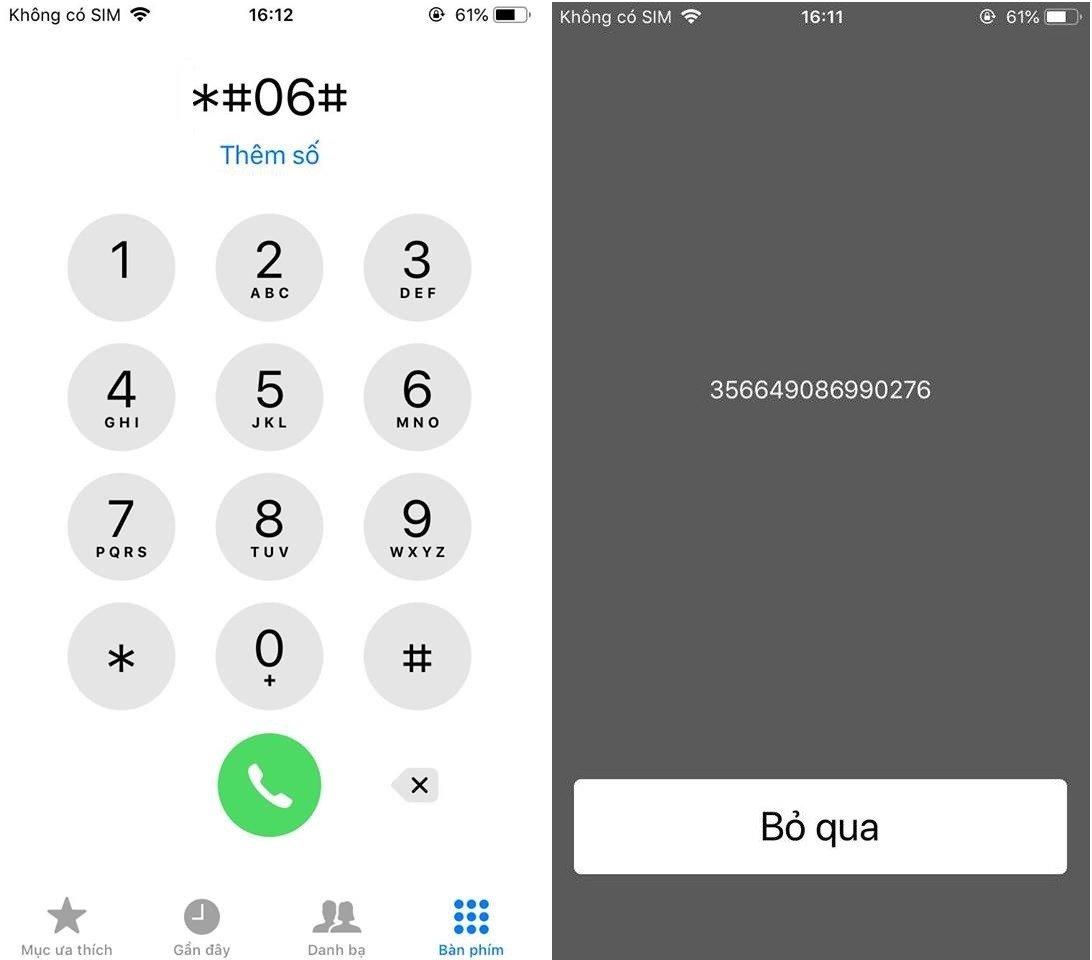
<h2><strong>1. Kiểm tra số IMEI qua cú pháp từ bàn phím cuộc gọi</strong></h2>
<p>Để có thể lấy được số IMEI thì bạn cần thực hiện cú pháp từ bàn phím cuộc gọi: Bấm “*#06#”, sau đó nhấn gọi trên màn hình sẽ xuất hiện một dãy số chính là IMEI.</p>
<figure id="attachment_314941" aria-describedby="caption-attachment-314941" style="width: 1092px" class="wp-caption aligncenter"><img loading="lazy" class="size-full wp-image-314941" src="https://bloganchoi.com/wp-content/uploads/2020/11/check-imei-2.jpg" alt="Kiểm tra số IMEI qua cú pháp điện thoại" width="1092" height="960" srcset="https://bloganchoi.com/wp-content/uploads/2020/11/check-imei-2.jpg 1092w, https://bloganchoi.com/wp-content/uploads/2020/11/check-imei-2-300x264.jpg 300w, https://bloganchoi.com/wp-content/uploads/2020/11/check-imei-2-1024x900.jpg 1024w, https://bloganchoi.com/wp-content/uploads/2020/11/check-imei-2-768x675.jpg 768w, https://bloganchoi.com/wp-content/uploads/2020/11/check-imei-2-696x612.jpg 696w, https://bloganchoi.com/wp-content/uploads/2020/11/check-imei-2-1068x939.jpg 1068w, https://bloganchoi.com/wp-content/uploads/2020/11/check-imei-2-478x420.jpg 478w" sizes="(max-width: 1092px) 100vw, 1092px" /><figcaption id="caption-attachment-314941" class="wp-caption-text">Kiểm tra số IMEI qua cú pháp điện thoại (Ảnh: internet)</figcaption></figure>
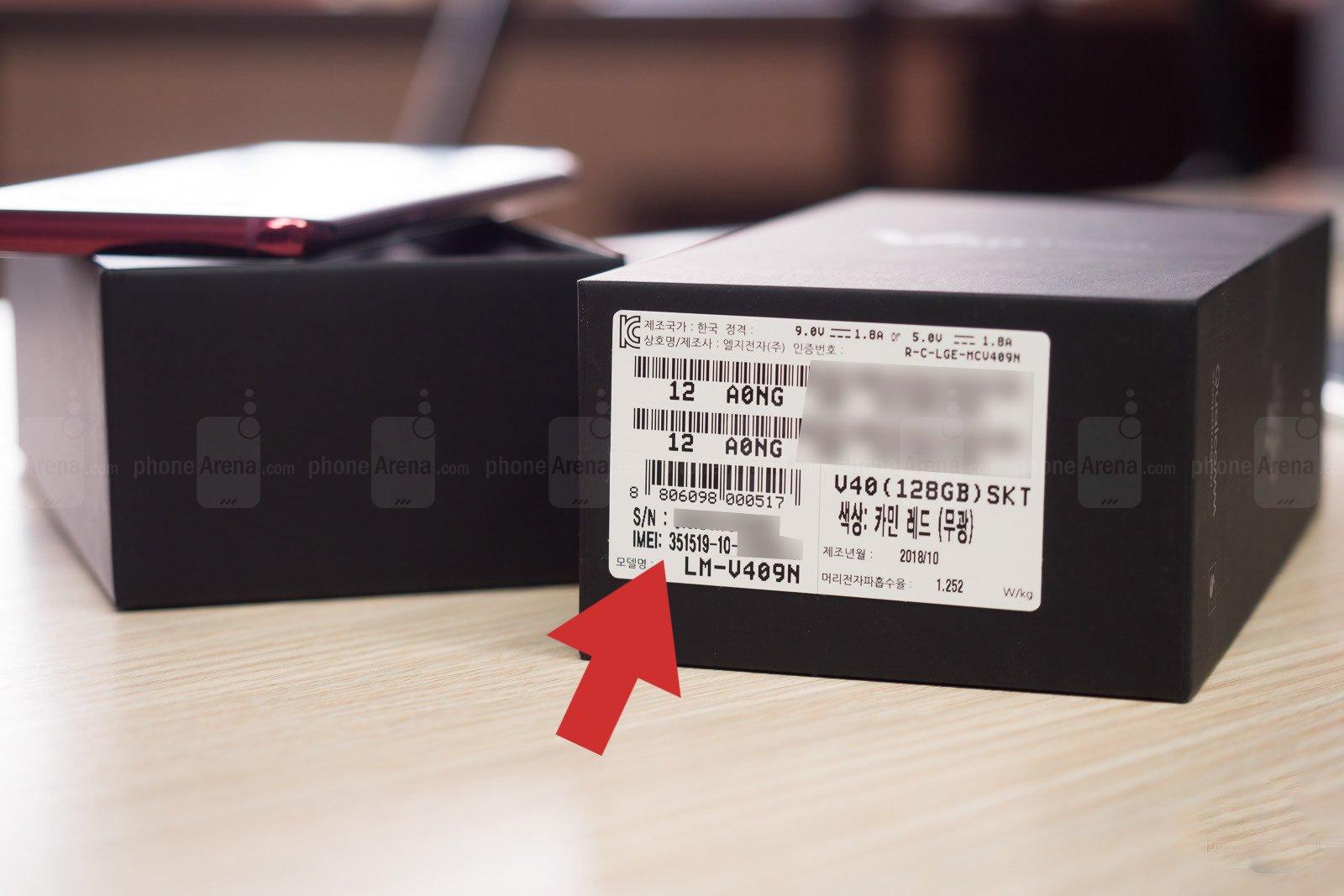
<h2><strong>2. Kiểm tra IMEI trên hộp điện thoại</strong></h2>
<p>Ngoài ra bạn cũng có thể kiểm tra số IMEI trên hộp điện thoại, nơi mà chúng ta thường ít khi để ý đến trên chiếc hộp điện thoại ghi các thông gì. Đây cũng là cách kiểm tra số IMEI đơn giản nhất. Cách này cũng có thể áp dụng trên cả laptop, tai nghe,&#8230;</p>
<figure id="attachment_315036" aria-describedby="caption-attachment-315036" style="width: 1600px" class="wp-caption aligncenter"><img loading="lazy" class="size-full wp-image-315036" src="https://bloganchoi.com/wp-content/uploads/2020/11/check-imei-1-1.jpg" alt="Kiểm tra số IMEI qua hộp điện thoại" width="1600" height="1067" srcset="https://bloganchoi.com/wp-content/uploads/2020/11/check-imei-1-1.jpg 1600w, https://bloganchoi.com/wp-content/uploads/2020/11/check-imei-1-1-300x200.jpg 300w, https://bloganchoi.com/wp-content/uploads/2020/11/check-imei-1-1-1024x683.jpg 1024w, https://bloganchoi.com/wp-content/uploads/2020/11/check-imei-1-1-768x512.jpg 768w, https://bloganchoi.com/wp-content/uploads/2020/11/check-imei-1-1-1536x1024.jpg 1536w, https://bloganchoi.com/wp-content/uploads/2020/11/check-imei-1-1-696x464.jpg 696w, https://bloganchoi.com/wp-content/uploads/2020/11/check-imei-1-1-1068x712.jpg 1068w, https://bloganchoi.com/wp-content/uploads/2020/11/check-imei-1-1-630x420.jpg 630w" sizes="(max-width: 1600px) 100vw, 1600px" /><figcaption id="caption-attachment-315036" class="wp-caption-text">Kiểm tra số IMEI qua hộp điện thoại (Ảnh: internet)</figcaption></figure>
<h2><strong>3. Kiểm tra IMEI qua phần cài đặt của máy</strong></h2>
<p>Nếu không thể kiểm tra số IMEI từ cú pháp từ bàn phím cuộc gọi hoặc hộp máy thì bạn còn một lựa chọn nữa: lấy số IMEI được lưu ở phần cài đặt của mỗi chiếc điện thoại, thường thì nằm trong mục thông tin của máy.</p>
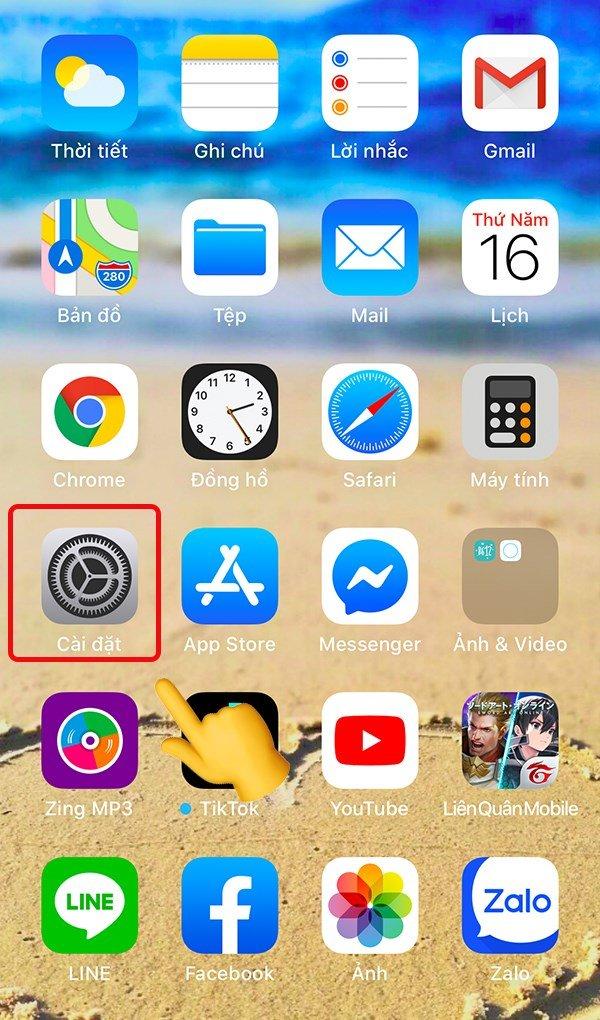
<h3><strong>Cách lấy số IMEI trên iPhone</strong></h3>
<p><strong>Bước 1:</strong> Đầu tiên bạn vào mục cài đặt của điện thoại</p>
<figure id="attachment_314946" aria-describedby="caption-attachment-314946" style="width: 600px" class="wp-caption aligncenter"><img loading="lazy" class="size-full wp-image-314946" src="https://bloganchoi.com/wp-content/uploads/2020/11/check-imei-iphone-2.jpg" alt="Chọn cài đặt" width="600" height="1020" srcset="https://bloganchoi.com/wp-content/uploads/2020/11/check-imei-iphone-2.jpg 600w, https://bloganchoi.com/wp-content/uploads/2020/11/check-imei-iphone-2-176x300.jpg 176w, https://bloganchoi.com/wp-content/uploads/2020/11/check-imei-iphone-2-247x420.jpg 247w" sizes="(max-width: 600px) 100vw, 600px" /><figcaption id="caption-attachment-314946" class="wp-caption-text">Chọn cài đặt (Ảnh: internet)</figcaption></figure>
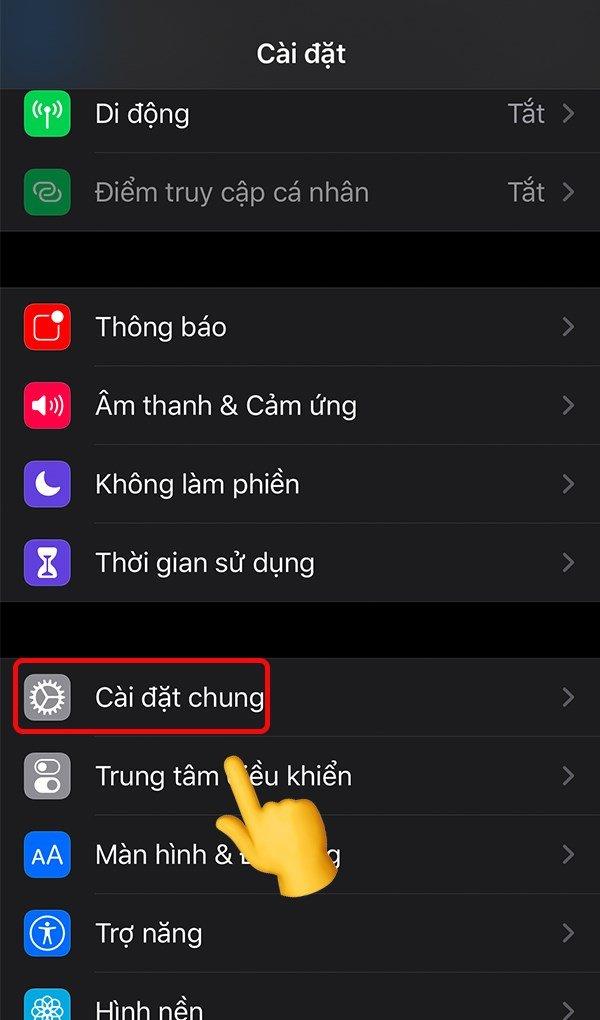
<p><strong>Bước 2</strong>: Tiếp theo chọn vào phần cài đặt chung</p>
<figure id="attachment_314945" aria-describedby="caption-attachment-314945" style="width: 600px" class="wp-caption aligncenter"><img loading="lazy" class="size-full wp-image-314945" src="https://bloganchoi.com/wp-content/uploads/2020/11/check-imei-iphone-3.jpg" alt="Vào phần cài đặt chung" width="600" height="1020" srcset="https://bloganchoi.com/wp-content/uploads/2020/11/check-imei-iphone-3.jpg 600w, https://bloganchoi.com/wp-content/uploads/2020/11/check-imei-iphone-3-176x300.jpg 176w, https://bloganchoi.com/wp-content/uploads/2020/11/check-imei-iphone-3-247x420.jpg 247w" sizes="(max-width: 600px) 100vw, 600px" /><figcaption id="caption-attachment-314945" class="wp-caption-text">Vào phần cài đặt chung (Ảnh: internet)</figcaption></figure>
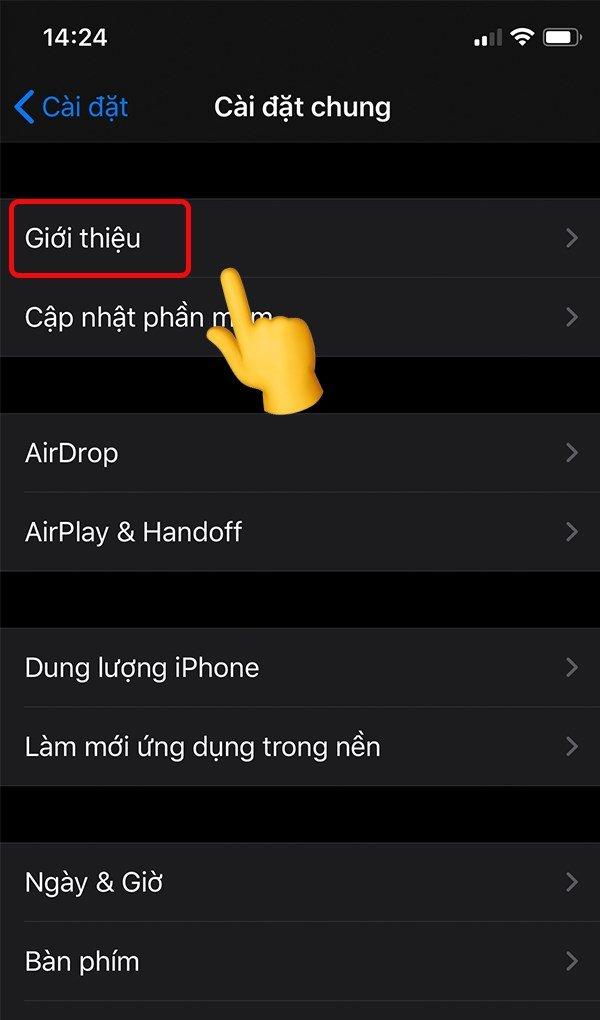
<p><strong>Bước 3</strong>: Chọn mục giới thiệu</p>
<figure id="attachment_314944" aria-describedby="caption-attachment-314944" style="width: 600px" class="wp-caption aligncenter"><img loading="lazy" class="size-full wp-image-314944" src="https://bloganchoi.com/wp-content/uploads/2020/11/check-imei-iphone-4.jpg" alt="Chọn mục giới thiệu" width="600" height="1020" srcset="https://bloganchoi.com/wp-content/uploads/2020/11/check-imei-iphone-4.jpg 600w, https://bloganchoi.com/wp-content/uploads/2020/11/check-imei-iphone-4-176x300.jpg 176w, https://bloganchoi.com/wp-content/uploads/2020/11/check-imei-iphone-4-247x420.jpg 247w" sizes="(max-width: 600px) 100vw, 600px" /><figcaption id="caption-attachment-314944" class="wp-caption-text">Chọn mục giới thiệu (Ảnh: internet)</figcaption></figure>
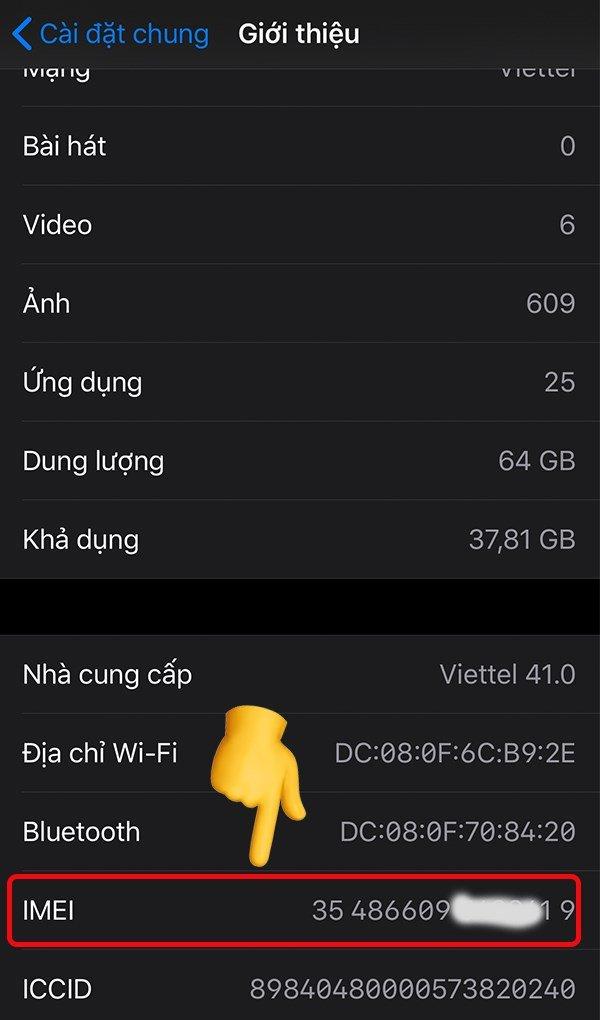
<p><strong>Bước 4</strong>: Trong phần giới thiệu sẽ hiển thị các thông tin của điện thoại, trong đó bao gồm số IMEI</p>
<figure id="attachment_314943" aria-describedby="caption-attachment-314943" style="width: 600px" class="wp-caption aligncenter"><img loading="lazy" class="size-full wp-image-314943" src="https://bloganchoi.com/wp-content/uploads/2020/11/check-imei-iphone-1.jpg" alt="Lấy số IMEI" width="600" height="1020" srcset="https://bloganchoi.com/wp-content/uploads/2020/11/check-imei-iphone-1.jpg 600w, https://bloganchoi.com/wp-content/uploads/2020/11/check-imei-iphone-1-176x300.jpg 176w, https://bloganchoi.com/wp-content/uploads/2020/11/check-imei-iphone-1-247x420.jpg 247w" sizes="(max-width: 600px) 100vw, 600px" /><figcaption id="caption-attachment-314943" class="wp-caption-text">Lấy số IMEI (Ảnh: internet)</figcaption></figure>
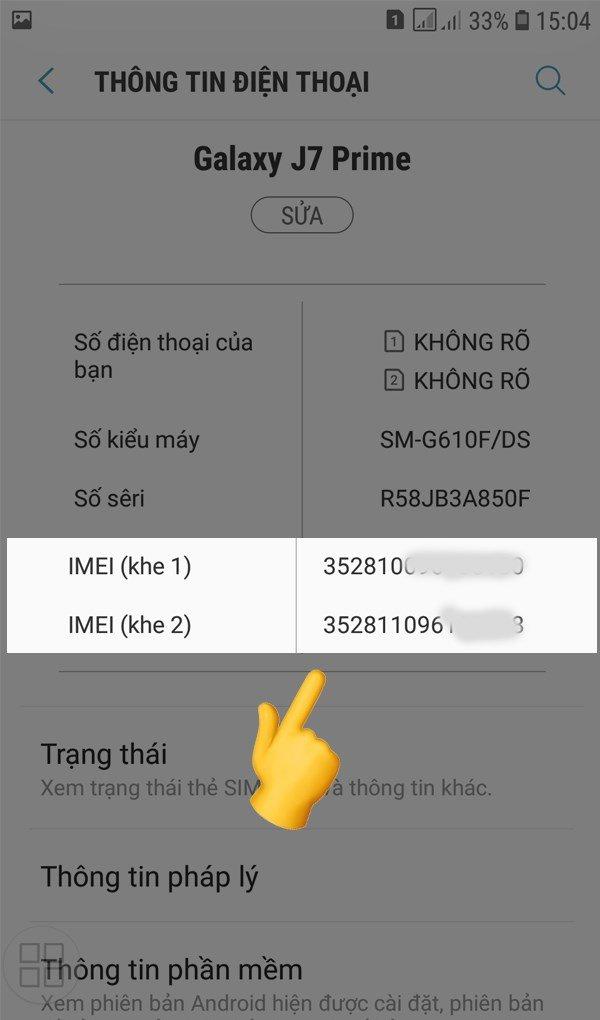
<h3><strong>Cách lấy số IMEI trên điện thoại Samsung Galaxy</strong></h3>
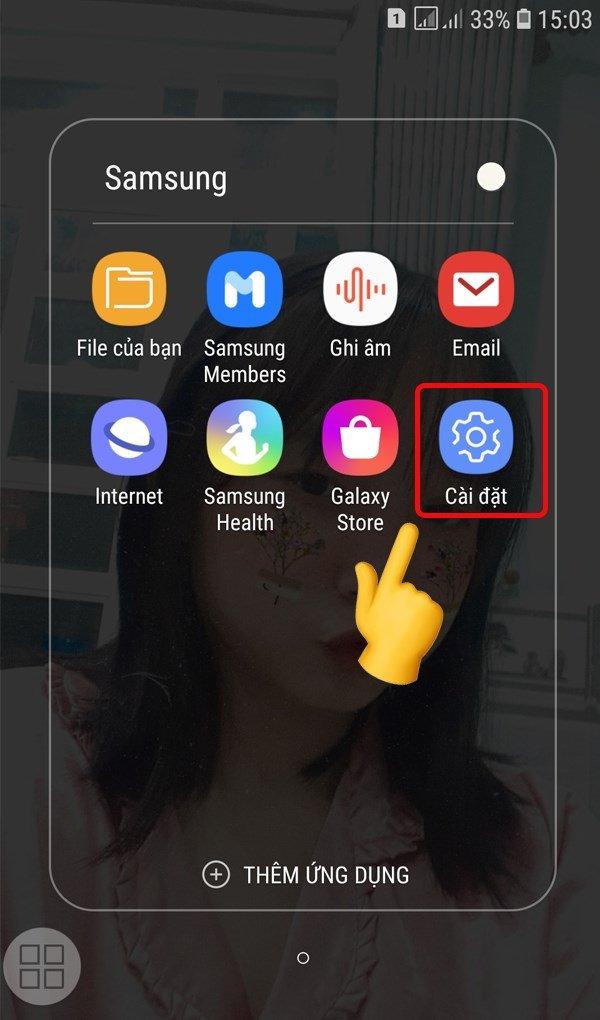
<p><strong>Bước 1:</strong> Đầu tiên bạn vào mục cài đặt của điện thoại</p>
<figure id="attachment_314950" aria-describedby="caption-attachment-314950" style="width: 600px" class="wp-caption aligncenter"><img loading="lazy" class="size-full wp-image-314950" src="https://bloganchoi.com/wp-content/uploads/2020/11/check-imei-samsung-2.jpg" alt="Vào cài đặt" width="600" height="1020" srcset="https://bloganchoi.com/wp-content/uploads/2020/11/check-imei-samsung-2.jpg 600w, https://bloganchoi.com/wp-content/uploads/2020/11/check-imei-samsung-2-176x300.jpg 176w, https://bloganchoi.com/wp-content/uploads/2020/11/check-imei-samsung-2-247x420.jpg 247w" sizes="(max-width: 600px) 100vw, 600px" /><figcaption id="caption-attachment-314950" class="wp-caption-text">Vào cài đặt (Ảnh: internet)</figcaption></figure>
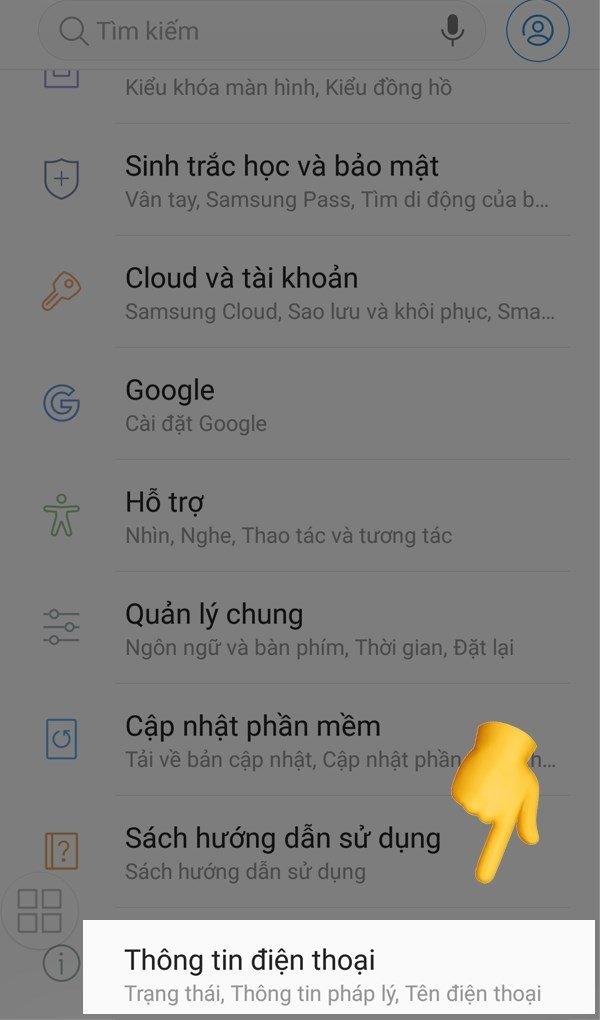
<p><strong>Bước 2:</strong> Chọn mục thông tin điện thoại</p>
<figure id="attachment_314949" aria-describedby="caption-attachment-314949" style="width: 600px" class="wp-caption aligncenter"><img loading="lazy" class="size-full wp-image-314949" src="https://bloganchoi.com/wp-content/uploads/2020/11/check-imei-samsung-3.jpg" alt="Chọn mục thông tin điện thoại" width="600" height="1020" srcset="https://bloganchoi.com/wp-content/uploads/2020/11/check-imei-samsung-3.jpg 600w, https://bloganchoi.com/wp-content/uploads/2020/11/check-imei-samsung-3-176x300.jpg 176w, https://bloganchoi.com/wp-content/uploads/2020/11/check-imei-samsung-3-247x420.jpg 247w" sizes="(max-width: 600px) 100vw, 600px" /><figcaption id="caption-attachment-314949" class="wp-caption-text">Chọn mục thông tin điện thoại (Ảnh: internet)</figcaption></figure>
<p><strong>Bước 3:</strong> Tìm số IMEI trong mục</p>
<figure id="attachment_314948" aria-describedby="caption-attachment-314948" style="width: 600px" class="wp-caption aligncenter"><img loading="lazy" class="size-full wp-image-314948" src="https://bloganchoi.com/wp-content/uploads/2020/11/check-imei-samsung-1.jpg" alt="Tìm số IMEI" width="600" height="1020" srcset="https://bloganchoi.com/wp-content/uploads/2020/11/check-imei-samsung-1.jpg 600w, https://bloganchoi.com/wp-content/uploads/2020/11/check-imei-samsung-1-176x300.jpg 176w, https://bloganchoi.com/wp-content/uploads/2020/11/check-imei-samsung-1-247x420.jpg 247w" sizes="(max-width: 600px) 100vw, 600px" /><figcaption id="caption-attachment-314948" class="wp-caption-text">Tìm số IMEI (Ảnh: internet)</figcaption></figure>
<h3><strong>Cách lấy số IMEI trên điện thoại OPPO</strong></h3>
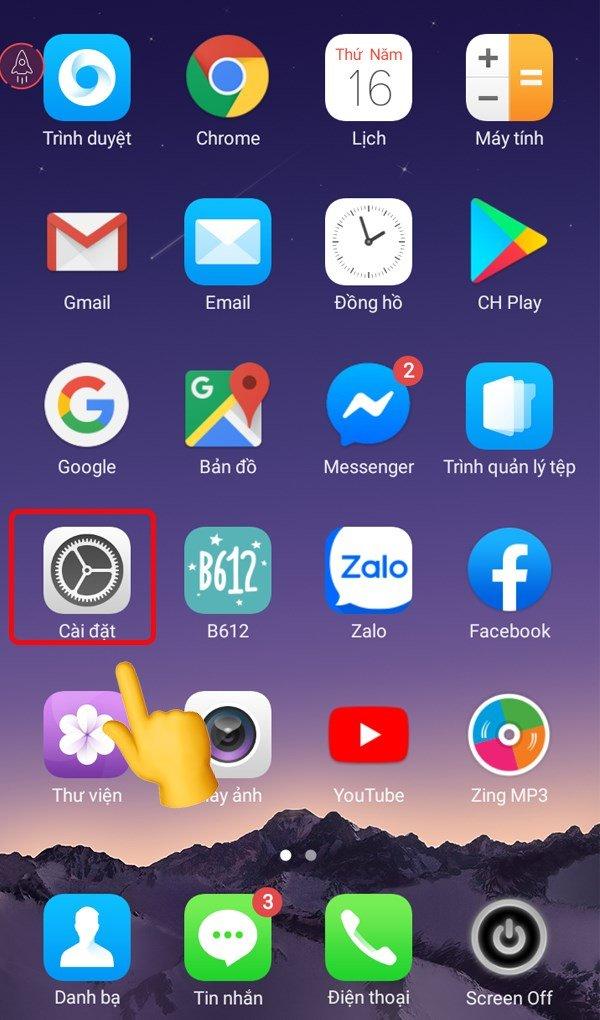
<p><strong>Bước 1:</strong> Chọn phần cài đặt trên màn hình chính</p>
<figure id="attachment_314954" aria-describedby="caption-attachment-314954" style="width: 600px" class="wp-caption aligncenter"><img loading="lazy" class="size-full wp-image-314954" src="https://bloganchoi.com/wp-content/uploads/2020/11/check-imei-oppo-2.jpg" alt="Chọn phần cài đặt" width="600" height="1020" srcset="https://bloganchoi.com/wp-content/uploads/2020/11/check-imei-oppo-2.jpg 600w, https://bloganchoi.com/wp-content/uploads/2020/11/check-imei-oppo-2-176x300.jpg 176w, https://bloganchoi.com/wp-content/uploads/2020/11/check-imei-oppo-2-247x420.jpg 247w" sizes="(max-width: 600px) 100vw, 600px" /><figcaption id="caption-attachment-314954" class="wp-caption-text">Chọn phần cài đặt (Ảnh: internet)</figcaption></figure>
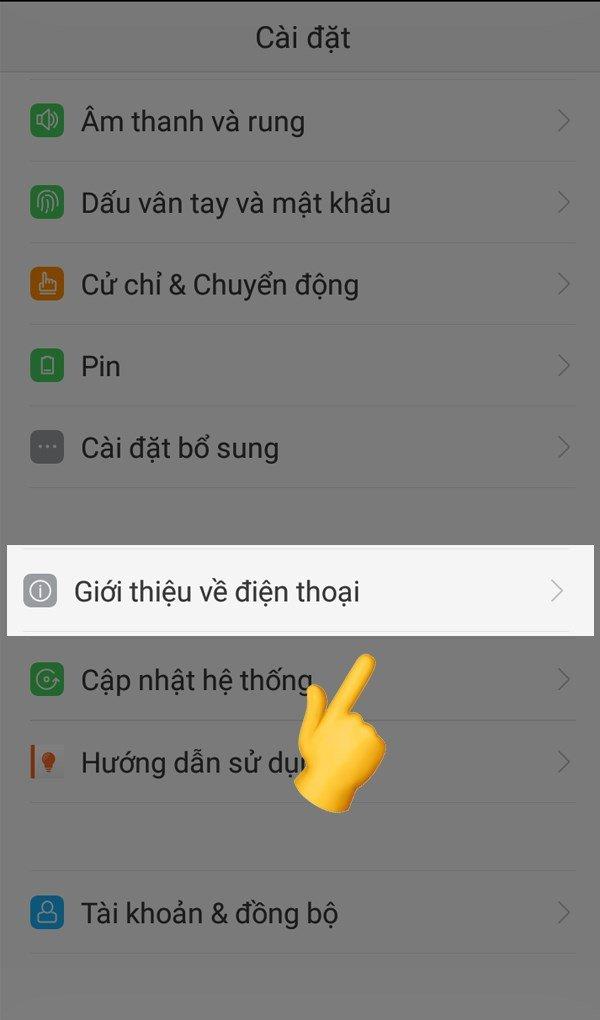
<p><strong>Bước 2</strong>: Tìm chọn mục giới thiệu về điện thoại</p>
<figure id="attachment_314953" aria-describedby="caption-attachment-314953" style="width: 600px" class="wp-caption aligncenter"><img loading="lazy" class="size-full wp-image-314953" src="https://bloganchoi.com/wp-content/uploads/2020/11/check-imei-oppo-3.jpg" alt="Vào phần giới thiệu điện thoại" width="600" height="1020" srcset="https://bloganchoi.com/wp-content/uploads/2020/11/check-imei-oppo-3.jpg 600w, https://bloganchoi.com/wp-content/uploads/2020/11/check-imei-oppo-3-176x300.jpg 176w, https://bloganchoi.com/wp-content/uploads/2020/11/check-imei-oppo-3-247x420.jpg 247w" sizes="(max-width: 600px) 100vw, 600px" /><figcaption id="caption-attachment-314953" class="wp-caption-text">Vào phần giới thiệu điện thoại (Ảnh: internet)</figcaption></figure>
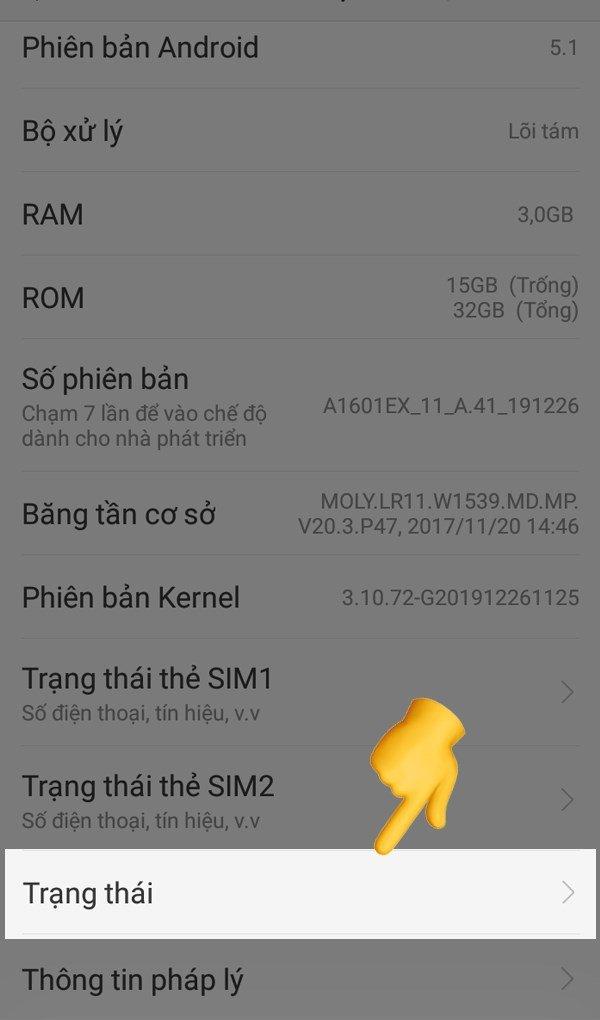
<p><strong>Bước 3</strong>: Chọn phần trạng thái</p>
<figure id="attachment_314952" aria-describedby="caption-attachment-314952" style="width: 600px" class="wp-caption aligncenter"><img loading="lazy" class="size-full wp-image-314952" src="https://bloganchoi.com/wp-content/uploads/2020/11/check-imei-oppo-4.jpg" alt="Bấm vào phần trạng thái" width="600" height="1020" srcset="https://bloganchoi.com/wp-content/uploads/2020/11/check-imei-oppo-4.jpg 600w, https://bloganchoi.com/wp-content/uploads/2020/11/check-imei-oppo-4-176x300.jpg 176w, https://bloganchoi.com/wp-content/uploads/2020/11/check-imei-oppo-4-247x420.jpg 247w" sizes="(max-width: 600px) 100vw, 600px" /><figcaption id="caption-attachment-314952" class="wp-caption-text">Bấm vào phần trạng thái (Ảnh: internet)</figcaption></figure>
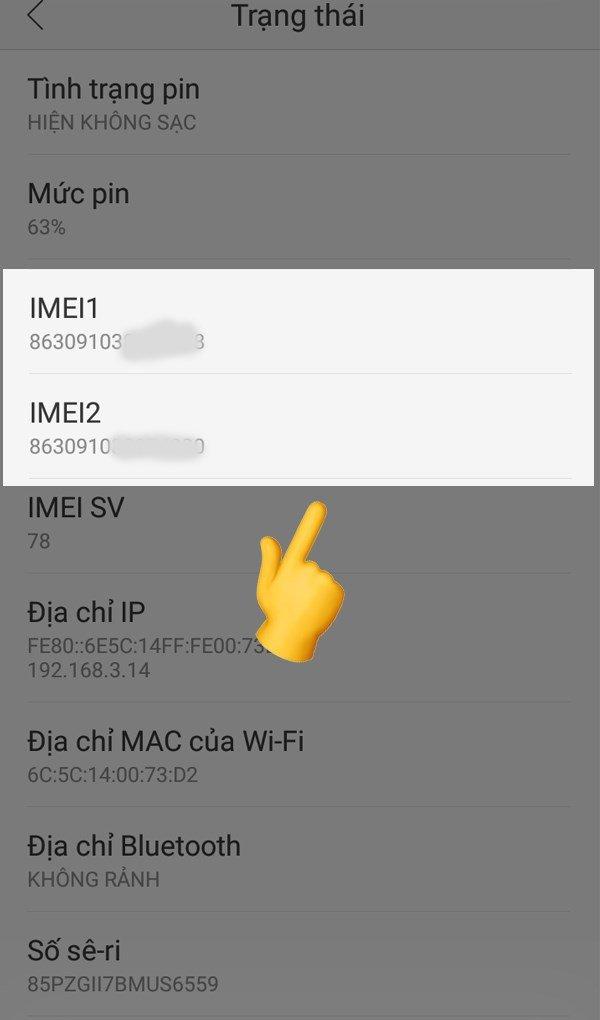
<p><strong>Bước 4</strong>: Tìm mục IMEI để xem</p>
<figure id="attachment_314951" aria-describedby="caption-attachment-314951" style="width: 600px" class="wp-caption aligncenter"><img loading="lazy" class="size-full wp-image-314951" src="https://bloganchoi.com/wp-content/uploads/2020/11/check-imei-oppo-1.jpg" alt="Kiểm tra số IMEI" width="600" height="1020" srcset="https://bloganchoi.com/wp-content/uploads/2020/11/check-imei-oppo-1.jpg 600w, https://bloganchoi.com/wp-content/uploads/2020/11/check-imei-oppo-1-176x300.jpg 176w, https://bloganchoi.com/wp-content/uploads/2020/11/check-imei-oppo-1-247x420.jpg 247w" sizes="(max-width: 600px) 100vw, 600px" /><figcaption id="caption-attachment-314951" class="wp-caption-text">Kiểm tra số IMEI (Ảnh: internet)</figcaption></figure>
<h3><strong>Cách lấy số trên IMEI trên điện thoại Xiaomi</strong></h3>
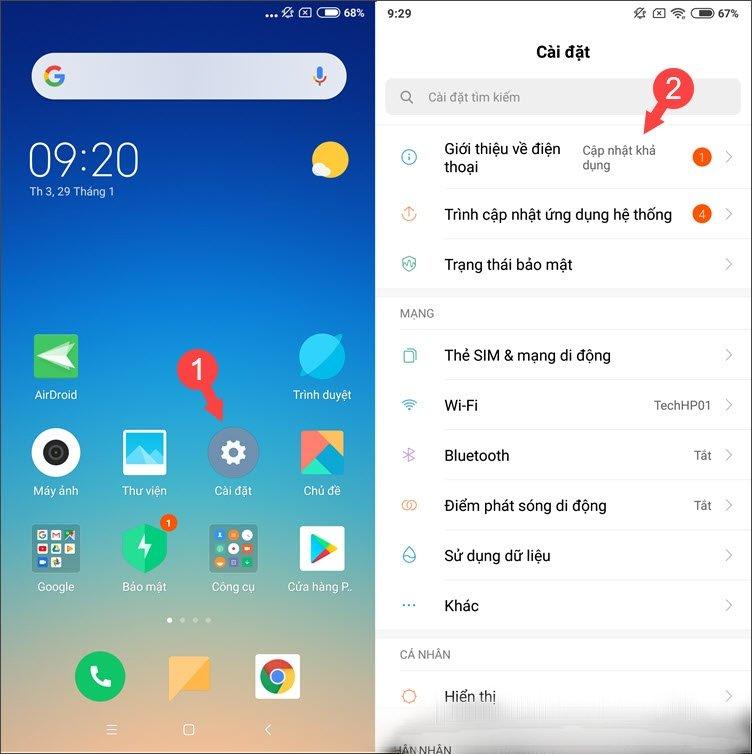
<p><strong>Bước 1:</strong> Vào phần cài đặt trên màn hình chính, chọn mục giới thiệu điện thoại</p>
<figure id="attachment_314961" aria-describedby="caption-attachment-314961" style="width: 752px" class="wp-caption aligncenter"><img loading="lazy" class="size-full wp-image-314961" src="https://bloganchoi.com/wp-content/uploads/2020/11/check-imei-xiaomi-2-1.jpg" alt="Vào cài đặt, chọn giới thiệu chung" width="752" height="754" srcset="https://bloganchoi.com/wp-content/uploads/2020/11/check-imei-xiaomi-2-1.jpg 752w, https://bloganchoi.com/wp-content/uploads/2020/11/check-imei-xiaomi-2-1-300x300.jpg 300w, https://bloganchoi.com/wp-content/uploads/2020/11/check-imei-xiaomi-2-1-150x150.jpg 150w, https://bloganchoi.com/wp-content/uploads/2020/11/check-imei-xiaomi-2-1-696x698.jpg 696w, https://bloganchoi.com/wp-content/uploads/2020/11/check-imei-xiaomi-2-1-419x420.jpg 419w" sizes="(max-width: 752px) 100vw, 752px" /><figcaption id="caption-attachment-314961" class="wp-caption-text">Vào cài đặt, chọn giới thiệu chung (Ảnh: internet)</figcaption></figure>
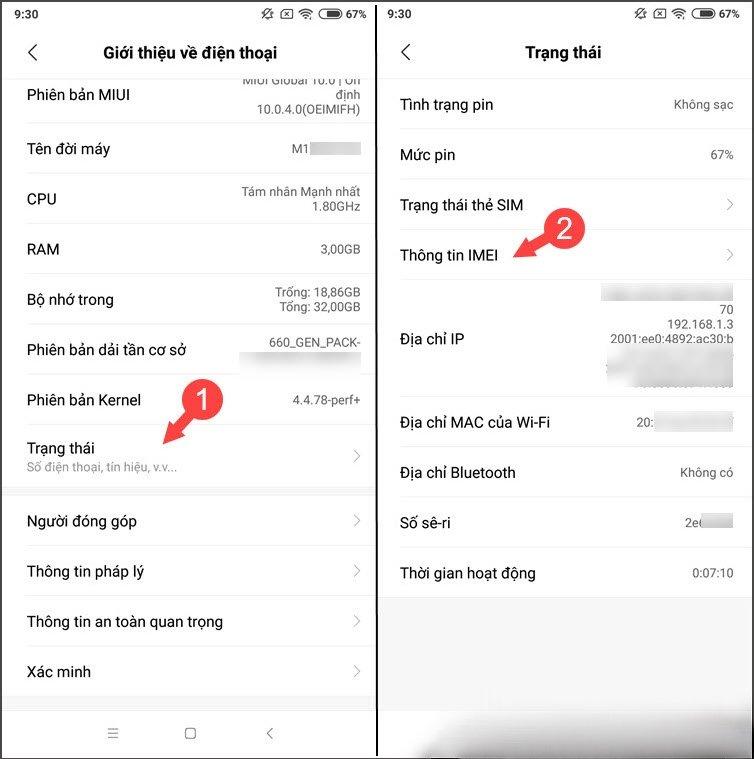
<p><strong>Bước 2:</strong> Vào phần trạng thái</p>
<figure id="attachment_314960" aria-describedby="caption-attachment-314960" style="width: 754px" class="wp-caption aligncenter"><img loading="lazy" class="size-full wp-image-314960" src="https://bloganchoi.com/wp-content/uploads/2020/11/check-imei-xiaomi-3-1.jpg" alt="Chọn phần trạng thái" width="754" height="759" srcset="https://bloganchoi.com/wp-content/uploads/2020/11/check-imei-xiaomi-3-1.jpg 754w, https://bloganchoi.com/wp-content/uploads/2020/11/check-imei-xiaomi-3-1-298x300.jpg 298w, https://bloganchoi.com/wp-content/uploads/2020/11/check-imei-xiaomi-3-1-150x150.jpg 150w, https://bloganchoi.com/wp-content/uploads/2020/11/check-imei-xiaomi-3-1-696x701.jpg 696w, https://bloganchoi.com/wp-content/uploads/2020/11/check-imei-xiaomi-3-1-417x420.jpg 417w" sizes="(max-width: 754px) 100vw, 754px" /><figcaption id="caption-attachment-314960" class="wp-caption-text">Chọn phần trạng thái (Ảnh: internet)</figcaption></figure>
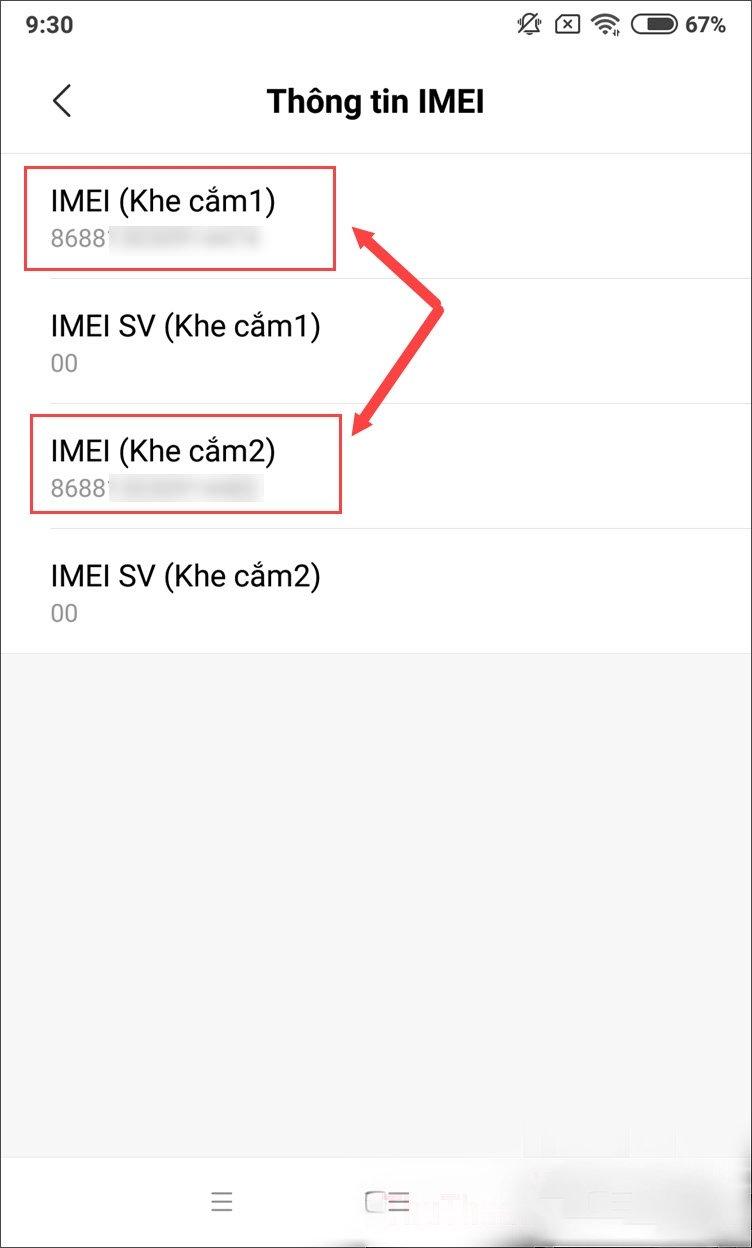
<p><strong>Bước 3:</strong> Vào mục IMEI lấy số</p>
<figure id="attachment_314962" aria-describedby="caption-attachment-314962" style="width: 752px" class="wp-caption aligncenter"><img loading="lazy" class="size-full wp-image-314962" src="https://bloganchoi.com/wp-content/uploads/2020/11/check-imei-xiaomi-1-1.jpg" alt="Vào mục IMEI lấy số" width="752" height="1248" srcset="https://bloganchoi.com/wp-content/uploads/2020/11/check-imei-xiaomi-1-1.jpg 752w, https://bloganchoi.com/wp-content/uploads/2020/11/check-imei-xiaomi-1-1-181x300.jpg 181w, https://bloganchoi.com/wp-content/uploads/2020/11/check-imei-xiaomi-1-1-617x1024.jpg 617w, https://bloganchoi.com/wp-content/uploads/2020/11/check-imei-xiaomi-1-1-696x1155.jpg 696w, https://bloganchoi.com/wp-content/uploads/2020/11/check-imei-xiaomi-1-1-253x420.jpg 253w" sizes="(max-width: 752px) 100vw, 752px" /><figcaption id="caption-attachment-314962" class="wp-caption-text">Vào mục IMEI lấy số (Ảnh: internet)</figcaption></figure>
<p><b>Lưu</b> <b>ý:</b> nếu điện thoại bạn sử dụng có 2 sim thì máy sẽ có 2 số IMEI nhé.</p>
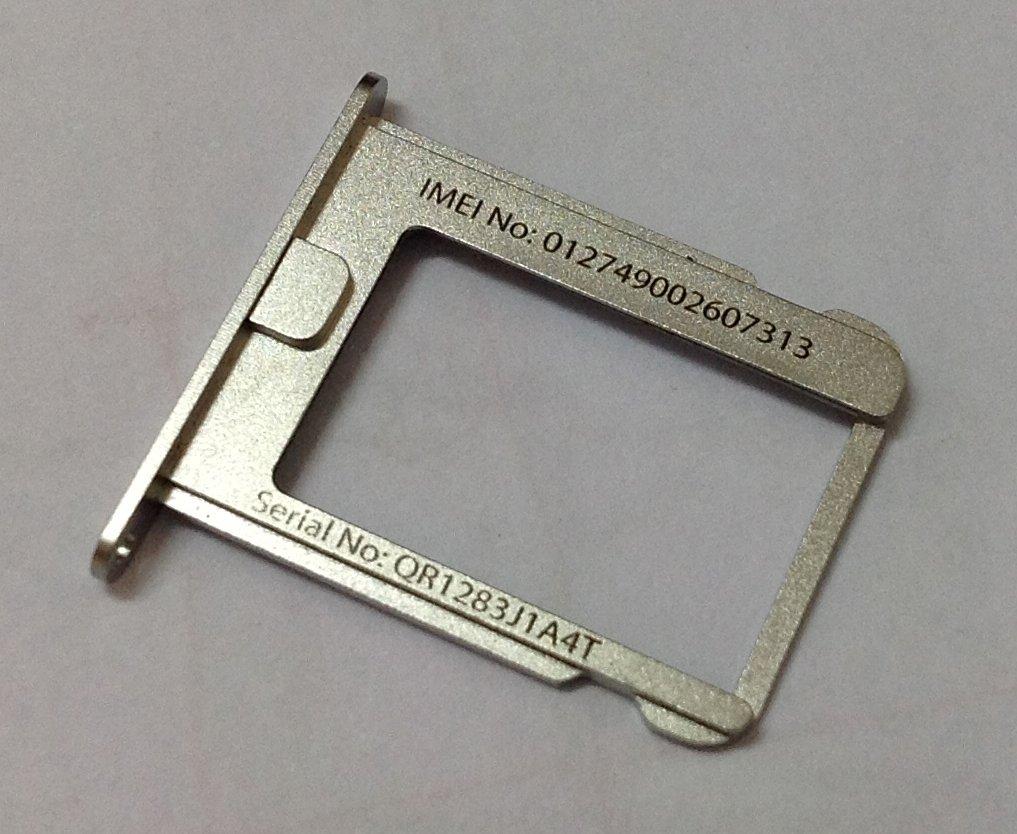
<h2><strong>4. Kiểm tra số IMEI trên khay chứa sim, mặt lưng của điện thoại</strong></h2>
<p>Bạn cũng có thể lấy số IMEI qua khay sim của điện thoại. Ngoài ra, trên một số điện thoại hiện nay số IMEI còn được hiển thị ngày trên mặt lưng của máy, nhưng nó khá mờ và nhỏ. Muốn xem được bạn cần phải sử dụng một số thiết bị phóng to.</p>
<figure id="attachment_314958" aria-describedby="caption-attachment-314958" style="width: 1017px" class="wp-caption aligncenter"><img loading="lazy" class="size-full wp-image-314958" src="https://bloganchoi.com/wp-content/uploads/2020/11/check-imei-khay-sim.jpg" alt="Xem số IMEI qua khay sim" width="1017" height="834" srcset="https://bloganchoi.com/wp-content/uploads/2020/11/check-imei-khay-sim.jpg 1017w, https://bloganchoi.com/wp-content/uploads/2020/11/check-imei-khay-sim-300x246.jpg 300w, https://bloganchoi.com/wp-content/uploads/2020/11/check-imei-khay-sim-768x630.jpg 768w, https://bloganchoi.com/wp-content/uploads/2020/11/check-imei-khay-sim-696x571.jpg 696w, https://bloganchoi.com/wp-content/uploads/2020/11/check-imei-khay-sim-512x420.jpg 512w" sizes="(max-width: 1017px) 100vw, 1017px" /><figcaption id="caption-attachment-314958" class="wp-caption-text">Xem số IMEI qua khay sim (Ảnh: internet)</figcaption></figure>
<p><strong>Bạn cũng có thể xem hướng dẫn kiểm tra số IMEI qua video dưới đây:</strong></p>
<p><iframe loading="lazy" class="youtube-player" width="640" height="360" src="https://www.youtube.com/embed/gQex7T_d98o?version=3&#038;rel=1&#038;showsearch=0&#038;showinfo=1&#038;iv_load_policy=1&#038;fs=1&#038;hl=vi&#038;autohide=2&#038;wmode=transparent" allowfullscreen="true" style="border:0;" sandbox="allow-scripts allow-same-origin allow-popups allow-presentation"></iframe></p>
<h2><strong>Cách check IMEI của smartphone</strong></h2>
<p>Sau khi có được số IMEI của máy, muốn biết chiếc điện thoại của mình vừa mua có phải là hàng chính hãng không, bạn có thể thực hiện theo các bước sau đây:</p>
<h3><strong>Cách check IMEI của iPhone</strong></h3>
<p>Khi đã có được số IMEI của chiếc iPhone, bạn có thể thực hiện các bước sau để kiểm tra máy:</p>
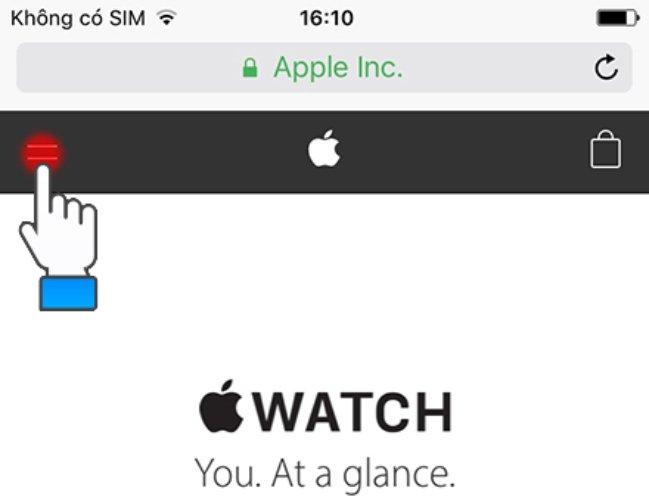
<p><strong>Bước 1</strong>: Vào trang web của Apple (www.apple.com), sau đó chọn vào biểu tượng có 2 dấu gạch bên góc trái của màn hình.</p>
<figure id="attachment_315042" aria-describedby="caption-attachment-315042" style="width: 649px" class="wp-caption aligncenter"><img loading="lazy" class="size-full wp-image-315042" src="https://bloganchoi.com/wp-content/uploads/2020/11/check-imei-iphone-9.jpg" alt="Nhấn vào dấu 2 gạch bên góc trái màn hình" width="649" height="500" srcset="https://bloganchoi.com/wp-content/uploads/2020/11/check-imei-iphone-9.jpg 649w, https://bloganchoi.com/wp-content/uploads/2020/11/check-imei-iphone-9-300x231.jpg 300w, https://bloganchoi.com/wp-content/uploads/2020/11/check-imei-iphone-9-545x420.jpg 545w" sizes="(max-width: 649px) 100vw, 649px" /><figcaption id="caption-attachment-315042" class="wp-caption-text">Nhấn vào dấu 2 gạch bên góc trái màn hình (Ảnh: internet)</figcaption></figure>
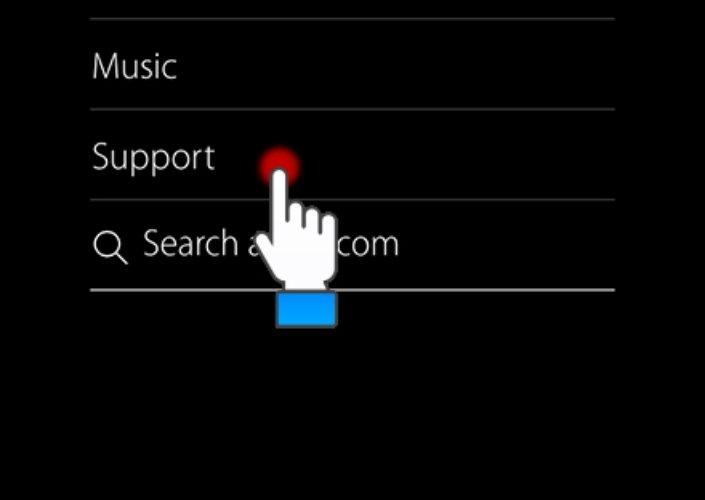
<p><strong>Bước 2</strong>: Tìm mục Support</p>
<figure id="attachment_315041" aria-describedby="caption-attachment-315041" style="width: 705px" class="wp-caption aligncenter"><img loading="lazy" class="size-full wp-image-315041" src="https://bloganchoi.com/wp-content/uploads/2020/11/check-imei-iphone-5.jpg" alt="Tìm mục Support" width="705" height="500" srcset="https://bloganchoi.com/wp-content/uploads/2020/11/check-imei-iphone-5.jpg 705w, https://bloganchoi.com/wp-content/uploads/2020/11/check-imei-iphone-5-300x213.jpg 300w, https://bloganchoi.com/wp-content/uploads/2020/11/check-imei-iphone-5-100x70.jpg 100w, https://bloganchoi.com/wp-content/uploads/2020/11/check-imei-iphone-5-696x494.jpg 696w, https://bloganchoi.com/wp-content/uploads/2020/11/check-imei-iphone-5-592x420.jpg 592w" sizes="(max-width: 705px) 100vw, 705px" /><figcaption id="caption-attachment-315041" class="wp-caption-text">Tìm mục Support (Ảnh: internet)</figcaption></figure>
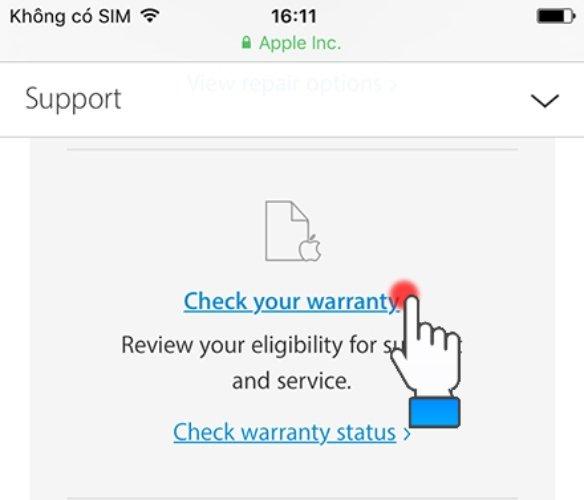
<p><strong>Bước 3</strong>: Trong mục Support kéo xuống tìm dòng chữ có tên Check your warranty.</p>
<figure id="attachment_315040" aria-describedby="caption-attachment-315040" style="width: 584px" class="wp-caption aligncenter"><img loading="lazy" class="size-full wp-image-315040" src="https://bloganchoi.com/wp-content/uploads/2020/11/check-imei-iphone-6.jpg" alt="Kéo tìm và chọn dòng chữ" width="584" height="500" srcset="https://bloganchoi.com/wp-content/uploads/2020/11/check-imei-iphone-6.jpg 584w, https://bloganchoi.com/wp-content/uploads/2020/11/check-imei-iphone-6-300x257.jpg 300w, https://bloganchoi.com/wp-content/uploads/2020/11/check-imei-iphone-6-491x420.jpg 491w" sizes="(max-width: 584px) 100vw, 584px" /><figcaption id="caption-attachment-315040" class="wp-caption-text">Kéo tìm và chọn dòng chữ tên Check your warranty (Ảnh: internet)</figcaption></figure>
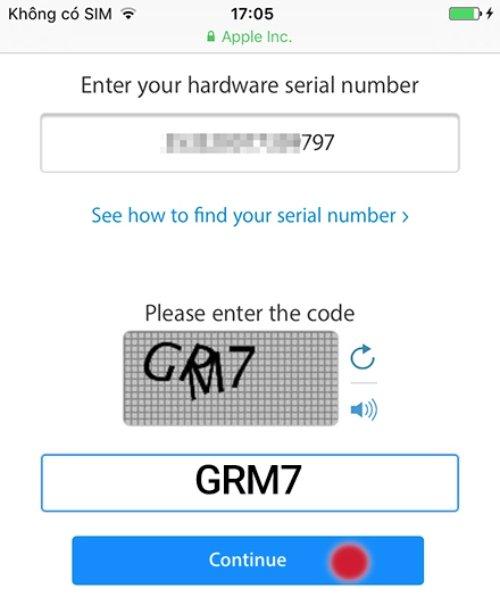
<p><strong>Bước 4</strong>: Nhập vào dãy số IMEI của iPhone của bạn vào ô trống Enter your hardware seial number và mã code rồi nhấn Continue</p>
<figure id="attachment_315039" aria-describedby="caption-attachment-315039" style="width: 500px" class="wp-caption aligncenter"><img loading="lazy" class="size-full wp-image-315039" src="https://bloganchoi.com/wp-content/uploads/2020/11/check-imei-iphone-7.jpg" alt="Nhập số IMEI vào" width="500" height="597" srcset="https://bloganchoi.com/wp-content/uploads/2020/11/check-imei-iphone-7.jpg 500w, https://bloganchoi.com/wp-content/uploads/2020/11/check-imei-iphone-7-251x300.jpg 251w, https://bloganchoi.com/wp-content/uploads/2020/11/check-imei-iphone-7-352x420.jpg 352w" sizes="(max-width: 500px) 100vw, 500px" /><figcaption id="caption-attachment-315039" class="wp-caption-text">Nhập số IMEI vào(Ảnh: internet)</figcaption></figure>
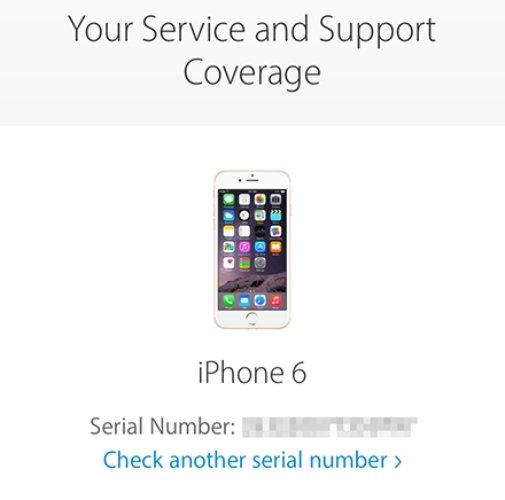
<p>Khi hoàn thành xong bước 4, nếu điện thoại iPhone của bạn là chính hãng thì trên màn hình sẽ xuất hiện các thông tin về máy, thời gian bảo hành.</p>
<figure id="attachment_315038" aria-describedby="caption-attachment-315038" style="width: 505px" class="wp-caption aligncenter"><img alt="Check IMEI: Thủ thuật ưu việt giúp kiểm tra điện thoại chính hãng bàn phím check imei chính hãng công dụng điện thoại điện thoại chính hãng điện thoại Oppo điện thoại Samsung điện thoại Samsung Galaxy điện thoại xiaomi imei imei điện thoại imei smartphone kiểm tra kiểm tra điện thoại kiểm tra điện thoại chính hãng kiểm tra imei samsung galaxy smartphone smartphone chính hãng thủ thuật thủ thuật tiện ích thủ thuật trên điện thoại" loading="lazy" class="size-full wp-image-315038" src="https://bloganchoi.com/wp-content/uploads/2020/11/check-imei-iphone-8.jpg"  width="505" height="500" srcset="https://bloganchoi.com/wp-content/uploads/2020/11/check-imei-iphone-8.jpg 505w, https://bloganchoi.com/wp-content/uploads/2020/11/check-imei-iphone-8-300x297.jpg 300w, https://bloganchoi.com/wp-content/uploads/2020/11/check-imei-iphone-8-150x150.jpg 150w, https://bloganchoi.com/wp-content/uploads/2020/11/check-imei-iphone-8-424x420.jpg 424w" sizes="(max-width: 505px) 100vw, 505px" /><figcaption id="caption-attachment-315038" class="wp-caption-text">Thông báo thành công (Ảnh: internet)</figcaption></figure>
<p><strong>Bạn có thể xem hướng dẫn chi tiết qua video của Thế giới di động:</strong></p>
<p><iframe loading="lazy" class="youtube-player" width="640" height="360" src="https://www.youtube.com/embed/44uJIN8-WGk?version=3&#038;rel=1&#038;showsearch=0&#038;showinfo=1&#038;iv_load_policy=1&#038;fs=1&#038;hl=vi&#038;autohide=2&#038;wmode=transparent" allowfullscreen="true" style="border:0;" sandbox="allow-scripts allow-same-origin allow-popups allow-presentation"></iframe></p>
<h3><strong>Cách check IMEI của Samsung</strong></h3>
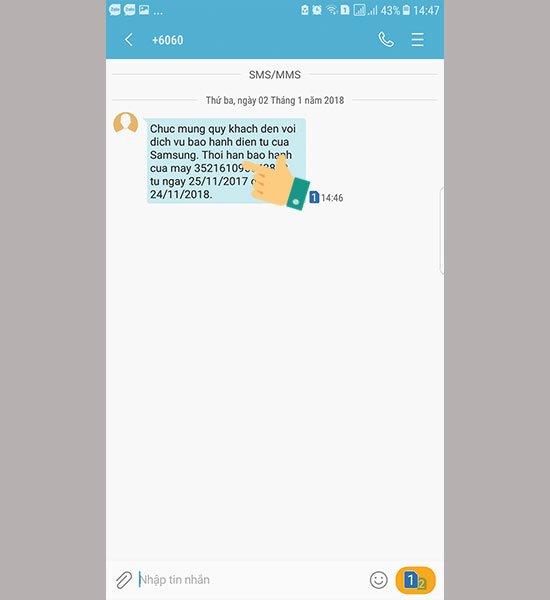
<p>Khi có số IMEI của chiếc điện thoại Samsung, để kiểm tra ở Samsung thì nó có phần đơn giản hơn so với iPhone. Bạn có thể kiểm tra với một tin nhắn với cú pháp: IMEI gửi 6060. Trong đó IMEI là 15 số có được ở bước lấy IMEI.</p>
<figure id="attachment_315048" aria-describedby="caption-attachment-315048" style="width: 550px" class="wp-caption aligncenter"><img loading="lazy" class="size-full wp-image-315048" src="https://bloganchoi.com/wp-content/uploads/2020/11/kiem-tra-imei-samsung-06.jpg" alt="Thông báo tin nhắn trả về" width="550" height="600" srcset="https://bloganchoi.com/wp-content/uploads/2020/11/kiem-tra-imei-samsung-06.jpg 550w, https://bloganchoi.com/wp-content/uploads/2020/11/kiem-tra-imei-samsung-06-275x300.jpg 275w, https://bloganchoi.com/wp-content/uploads/2020/11/kiem-tra-imei-samsung-06-385x420.jpg 385w" sizes="(max-width: 550px) 100vw, 550px" /><figcaption id="caption-attachment-315048" class="wp-caption-text">Thông báo tin nhắn trả về (Ảnh: internet)</figcaption></figure>
<p>Nếu tin nhắn bạn gửi được trả về gồm tình trạng, thời gian bảo hành của máy thì đấy là Samsung chính hãng rồi nhé.</p>
<h3><strong>Cách check IMEI của OPPO</strong></h3>
<p>Để kiểm tra máy có phải chính hãng ở OPPO, thì bạn phải lên trực tiếp trang chủ hỗ trợ của OPPO</p>
<p><strong>Bước 1</strong>: <strong><a href="https://bloganchoi.com/xredirect/?afflink=0&nofollow=1&noindex=1&outlink=1&rdtp=header&utm_campaign=bloganchoi.com%7C%7Cbloganchoi.com%7C%7Cbloganchoi.com&utm_content=bloganchoi.com&utm_medium=%7C%7Chttps%3A%2F%2Fsupport.oppomobile.vn%2Fimeicheck%7C%7C&utm_source=https%3A%2F%2Fbloganchoi.com%2Fcheck-imei-kiem-tra-dien-thoai-chinh-hang%2F&utm_term=bloganchoi.com&wafx=1&wpaflt=80c08a46&wpaflt_url_domain=oppomobile.vn&wpaflt_url_host=support.oppomobile.vn&wppepvndtecrv=K5hSGP71tvsEeUDZ6IlG0mOXoBEQSgQ-p1LMVwMyNtLVs2IdFdr-GZ4hotd3StPLmL5xVyfCsFYOjQTHNqD1S21lrNd8SwEt1wD7uVPquUobPyPRIYotyElzR9JifeXyb9qvOPDJcjGA4ZP_3q9gMbMfbmBJq3xCnZ97StDScbr6xH1ipCeTzKZbS6KZGY-4WenmJZw_JsR6J_607psOPiLN9y-bdkBDoKE-UQKbsxC25FCZrPUqXufBKBtrmbwQYoGngmMM7909APCESKGtua6-AzjwDovCbuVEu8HVHQbCHl58qS9WPPCTwLVGKOisy_D_gZFhyt5LJbH4O5u1zzECgVnlHvu05u6xk2kVfcY3GShfuRtPABVj7fKbadu1eqAT06Xisc_JO0MBwZij2ky7ut6bhPHiad4KXS1PlgJSW9tBMoAMKwjwOdjvby9RxS0Zng_Fs93XaC38XuT84mkLjI-93uqcRwU6-zQHysQygY-2HaiU3UUqpnVSmFarTD3muchhUmCsliUB1thRSITBvSQKZ599eqvoNLkZgjWlUlWg42Y6nI94iFiNw9rCnGjsGqf5fuNOk3s7p7OOYpnZsm9DDp7wtWBQJn9uk7AaJmNnZtG-25-vhYrMoBhb_QzlAI6UZDVfrFNEagKiqNAtjGBcQJXOFBNlTeA05yI5ryY3acZama-_k1qeYtPitkgi0fubnd2E6R3l4VoRwRI1sqCy-gvNwp-v-AuxGtBYJb7_Mny2fY_k6rg_KfgCMp3Rw0RkzCUHnk-XHFbpaFr4e8ksxvTPUkqEHlEVgv2N39vu2wQMJOZj_M8h3RoqTUqvfwETxw.." target="_blank" rel="nofollow">Bạn truy cập vào link này;</a></strong></p>
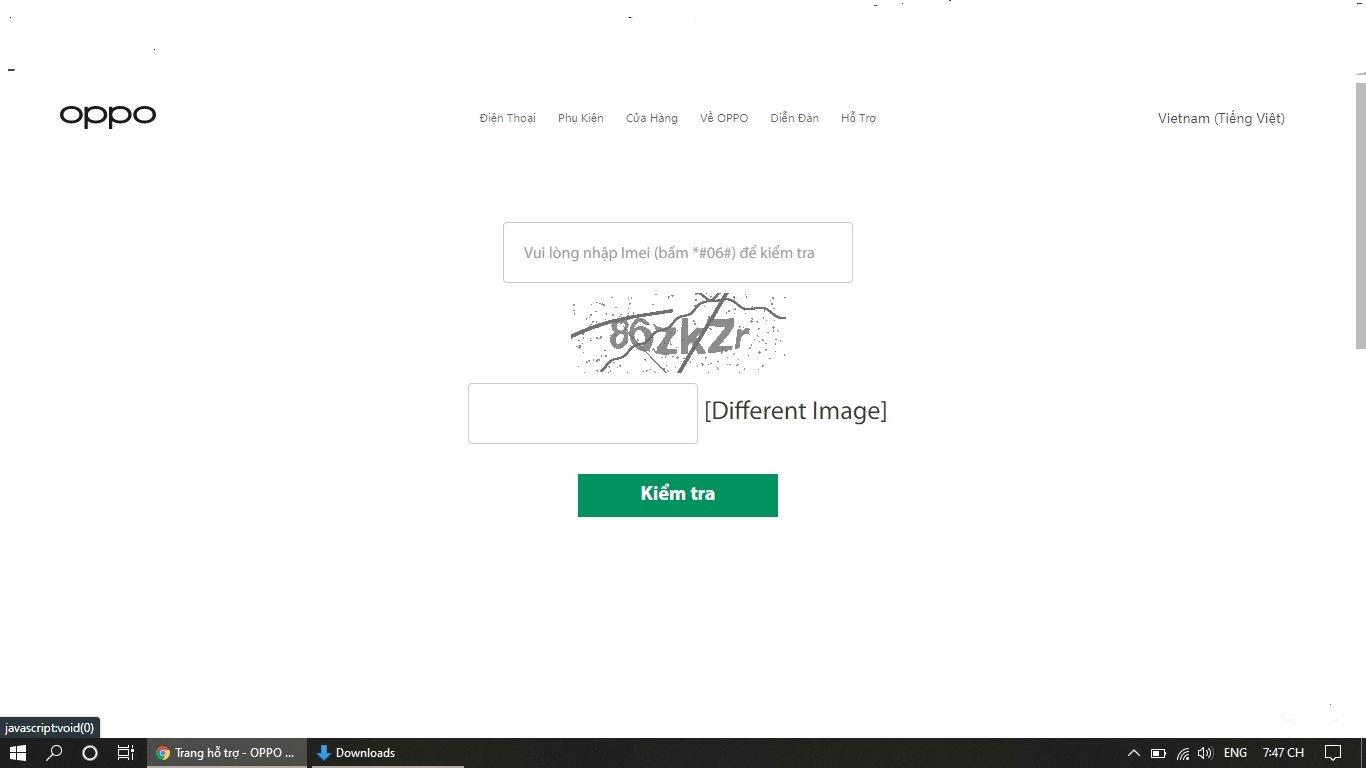
<p><strong>Bước 2</strong>: Nhập vào số IMEI bạn vừa có được ở các bước lấy IMEI của OPPO và nhấn kiểm tra</p>
<figure id="attachment_315054" aria-describedby="caption-attachment-315054" style="width: 1366px" class="wp-caption aligncenter"><img loading="lazy" class="size-full wp-image-315054" src="https://bloganchoi.com/wp-content/uploads/2020/11/check-imei-oppo-6.jpg" alt="Nhập số IMEI vào để kiểm tra" width="1366" height="768" srcset="https://bloganchoi.com/wp-content/uploads/2020/11/check-imei-oppo-6.jpg 1366w, https://bloganchoi.com/wp-content/uploads/2020/11/check-imei-oppo-6-300x169.jpg 300w, https://bloganchoi.com/wp-content/uploads/2020/11/check-imei-oppo-6-1024x576.jpg 1024w, https://bloganchoi.com/wp-content/uploads/2020/11/check-imei-oppo-6-768x432.jpg 768w, https://bloganchoi.com/wp-content/uploads/2020/11/check-imei-oppo-6-696x391.jpg 696w, https://bloganchoi.com/wp-content/uploads/2020/11/check-imei-oppo-6-1068x600.jpg 1068w, https://bloganchoi.com/wp-content/uploads/2020/11/check-imei-oppo-6-747x420.jpg 747w" sizes="(max-width: 1366px) 100vw, 1366px" /><figcaption id="caption-attachment-315054" class="wp-caption-text">Nhập số IMEI vào để kiểm tra (Ảnh: internet)</figcaption></figure>
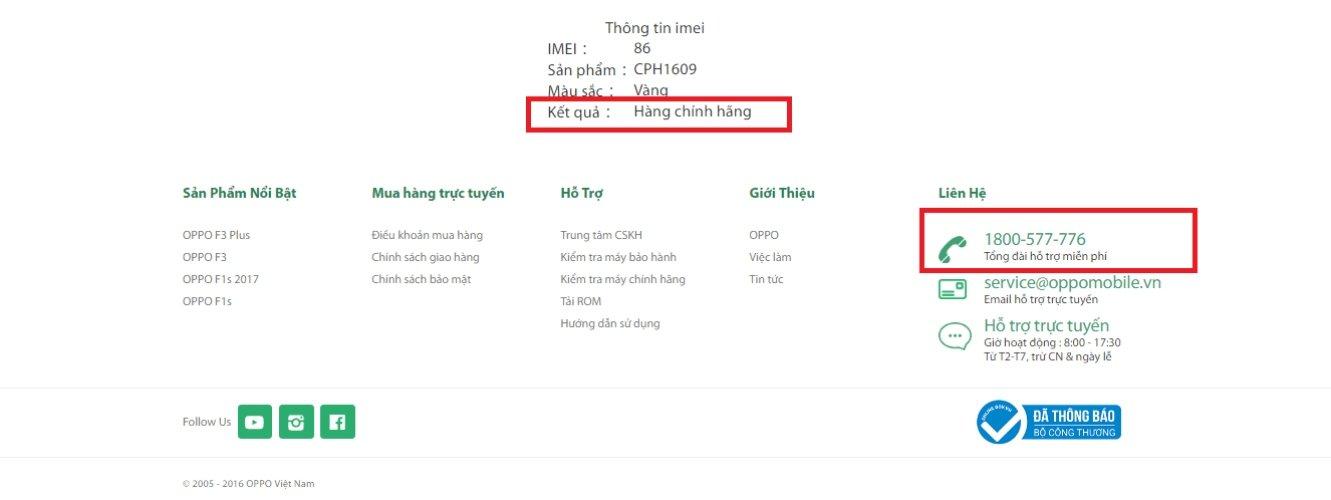
<p><strong>Bước 3</strong>: Nếu là máy chính hãng của OPPO kết quả trả về gồm thông tin máy, kèm theo dòng chữ hàng chính hãng.</p>
<figure id="attachment_315053" aria-describedby="caption-attachment-315053" style="width: 1331px" class="wp-caption aligncenter"><img loading="lazy" class="size-full wp-image-315053" src="https://bloganchoi.com/wp-content/uploads/2020/11/check-imei-oppo-5.jpg" alt="Thông báo trả về thành công" width="1331" height="500" srcset="https://bloganchoi.com/wp-content/uploads/2020/11/check-imei-oppo-5.jpg 1331w, https://bloganchoi.com/wp-content/uploads/2020/11/check-imei-oppo-5-300x113.jpg 300w, https://bloganchoi.com/wp-content/uploads/2020/11/check-imei-oppo-5-1024x385.jpg 1024w, https://bloganchoi.com/wp-content/uploads/2020/11/check-imei-oppo-5-768x289.jpg 768w, https://bloganchoi.com/wp-content/uploads/2020/11/check-imei-oppo-5-696x261.jpg 696w, https://bloganchoi.com/wp-content/uploads/2020/11/check-imei-oppo-5-1068x401.jpg 1068w, https://bloganchoi.com/wp-content/uploads/2020/11/check-imei-oppo-5-1118x420.jpg 1118w" sizes="(max-width: 1331px) 100vw, 1331px" /><figcaption id="caption-attachment-315053" class="wp-caption-text">Thông báo trả về thành công (Ảnh: internet)</figcaption></figure>
<h3><strong>Cách check IMEI của Xiaomi</strong></h3>
<p>Để kiểm tra máy chính hãng ở Xiaomi cần thực hiện qua các bước như:</p>
<p><strong>Bước 1</strong>: <strong><a href="https://bloganchoi.com/xredirect/?afflink=0&nofollow=1&noindex=1&outlink=1&rdtp=header&utm_campaign=bloganchoi.com%7C%7Cbloganchoi.com%7C%7Cbloganchoi.com&utm_content=bloganchoi.com&utm_medium=%7C%7Chttps%3A%2F%2Fwww.mi.com%2Fglobal%2Fverify%2F%23%2Fen%2Ftab%2Fimei%7C%7C&utm_source=https%3A%2F%2Fbloganchoi.com%2Fcheck-imei-kiem-tra-dien-thoai-chinh-hang%2F&utm_term=bloganchoi.com&wafx=1&wpaflt=80c08a46&wpaflt_url_domain=www.mi.com&wpaflt_url_host=www.mi.com&wppepvndtecrv=8RWjnqTTNBjNq_CINeCXj5X7xCDzTTeLRXfzi0VYkqv_vrvXyWZNT6B9DPHtcHxdMIVssjZYegJGm7_H1DH-BHyEapT8Kk_ZVA75ZRFOIFlfBWi25ybqEDW5YLRmJWVF8o5eFr4bugQ65w0aizZJXDwZ8HcYjLCzK2uGtxh7NkI33agUJNUufM3y1zDQGjXjg-WtchAbdVviDPBMiVDk7_SY789OwloUw4XNY9noyRUA-jJtYvuQtwYbvwjm8UGrcQtlQhuty4mncbojca9LcQbiRsEiFgAy6q2I3A9vfms8WXi6ATQzutE8J5WK-wgUb5r3EEMCMW280YiOzKBuCeZEDLF34C3cQilQR3X6Xlj9AtZoFb1RtAHDvkGdNSlT4QxqF4eXk94bqZgeaOT1f9PLmBG0bfZuEBh50CYeDfpGsktQNq5oqRTqf4KHXofRV86zYh83ztExFh0WQnO7pRSsxlV5aqTE3CafaCx4wq1bdxOdzVhqO3_SdPg0zEtZ_Tk93nfpYIkdPOBkuVDTHib2dZrwhtlpf47pfelwf2K1iQbqJCI-0WyeMb_5fq9CpNy9F42Ljfma8lGs5vKNcSVl8_4Zihd8QbEAHloQoMf7zS8fmieQp9A3a2mO42D2JcUkdBkS7cx9YNM_G9NirEqLvcNXJGvHdlyMbPLI_TlkJEoyB3qRMRWMhXZcz1JJMYHCiBtyZbo2xWY5JUF8oKEdjss1UkZ-Cy877BLvVqSYYh0wVrzFDEYQXjWbsYBJgijVC8_6kc6vr-ZHLtmglj7CIVnyIaowJVpX5K0eQuUBF5zl2H7vQ-du6-KVDmZVE6IT_uMg" target="_blank" rel="nofollow">Vào trang kiểm tra bảo hành của Xiaomi tại đây</a></strong>;</p>
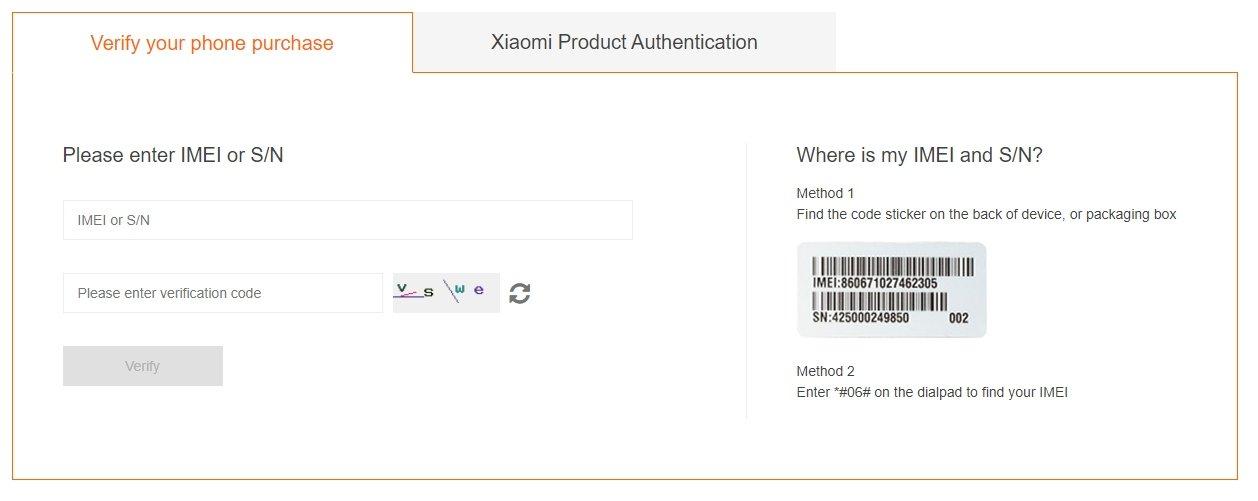
<p><strong>Bước 2</strong>: Nhập số IMEI vào ô trống và chọn Verify</p>
<figure id="attachment_315050" aria-describedby="caption-attachment-315050" style="width: 1258px" class="wp-caption aligncenter"><img loading="lazy" class="size-full wp-image-315050" src="https://bloganchoi.com/wp-content/uploads/2020/11/check-imei-xiaomi-5.jpg" alt="Nhập số IMEI vào" width="1258" height="501" srcset="https://bloganchoi.com/wp-content/uploads/2020/11/check-imei-xiaomi-5.jpg 1258w, https://bloganchoi.com/wp-content/uploads/2020/11/check-imei-xiaomi-5-300x119.jpg 300w, https://bloganchoi.com/wp-content/uploads/2020/11/check-imei-xiaomi-5-1024x408.jpg 1024w, https://bloganchoi.com/wp-content/uploads/2020/11/check-imei-xiaomi-5-768x306.jpg 768w, https://bloganchoi.com/wp-content/uploads/2020/11/check-imei-xiaomi-5-696x277.jpg 696w, https://bloganchoi.com/wp-content/uploads/2020/11/check-imei-xiaomi-5-1068x425.jpg 1068w, https://bloganchoi.com/wp-content/uploads/2020/11/check-imei-xiaomi-5-1055x420.jpg 1055w" sizes="(max-width: 1258px) 100vw, 1258px" /><figcaption id="caption-attachment-315050" class="wp-caption-text">Nhập số IMEI vào</figcaption></figure>
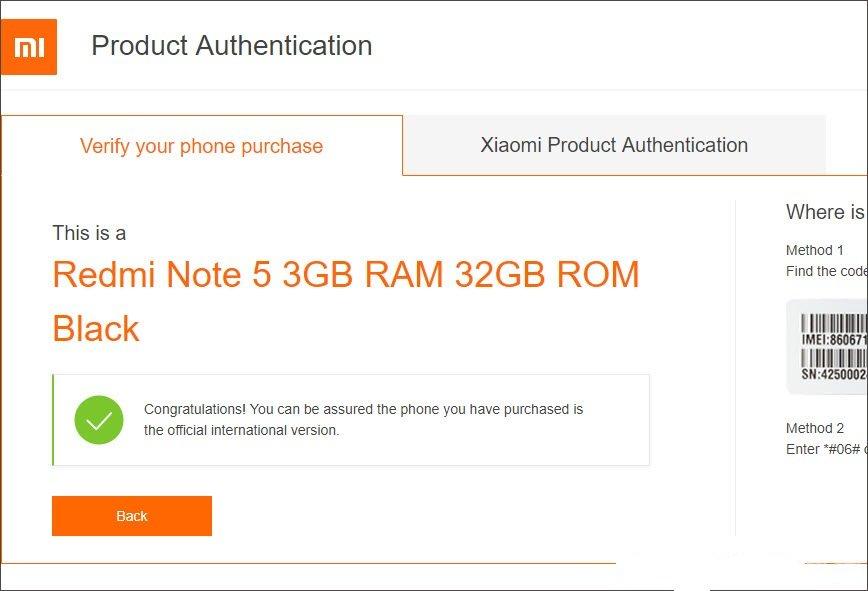
<p><strong>Bước 3</strong>: Nếu trang web trả về với thông báo Congratulations! và dấu tích màu xanh có nghĩa chiếc điện thoại Xiaomi của bạn là hàng chính hãng rồi nhé.</p>
<figure id="attachment_315052" aria-describedby="caption-attachment-315052" style="width: 868px" class="wp-caption aligncenter"><img loading="lazy" class="size-full wp-image-315052" src="https://bloganchoi.com/wp-content/uploads/2020/11/check-imei-xiaomi-4-1.jpg" alt="Thông báo trả về thành công" width="868" height="591" srcset="https://bloganchoi.com/wp-content/uploads/2020/11/check-imei-xiaomi-4-1.jpg 868w, https://bloganchoi.com/wp-content/uploads/2020/11/check-imei-xiaomi-4-1-300x204.jpg 300w, https://bloganchoi.com/wp-content/uploads/2020/11/check-imei-xiaomi-4-1-768x523.jpg 768w, https://bloganchoi.com/wp-content/uploads/2020/11/check-imei-xiaomi-4-1-696x474.jpg 696w, https://bloganchoi.com/wp-content/uploads/2020/11/check-imei-xiaomi-4-1-617x420.jpg 617w" sizes="(max-width: 868px) 100vw, 868px" /><figcaption id="caption-attachment-315052" class="wp-caption-text">Thông báo trả về thành công</figcaption></figure>
<p>Trên đây là những cách bạn có thể dễ dàng lấy được số IMEI trên điện thoại đang được sử dụng một cách nhanh chóng, ngoài ra cũng có thể dùng số IMEI đó để kiểm tra xem máy mình đang sở hữu có phải chính hãng hay không. Đừng quên theo dõi BlogAnChoi để được cập nhật các thông tin mới nhất về công nghệ nhé!.</p>
<p><b>Một số thủ thuật hay khác như:</b></p>
<ul>
<li><a href="https://bloganchoi.com/tai-mp3-tu-youtube/"><strong>Cách tải MP3 từ YouTube một cách dễ dàng và nhanh chóng</strong></a></li>
<li><a href="https://bloganchoi.com/dang-nhap-zalo-web/"><strong>Đăng nhập Zalo trên web một </strong></a><a href="https://bloganchoi.com/dang-nhap-zalo-web/"><strong>dễ dàng, nhanh chóng</strong></a></li>
</ul>]]></content>
		
					<link rel="replies" type="text/html" href="https://bloganchoi.com/check-imei-kiem-tra-dien-thoai-chinh-hang/#comments" thr:count="0" />
			<link rel="replies" type="application/atom+xml" href="https://bloganchoi.com/check-imei-kiem-tra-dien-thoai-chinh-hang/feed/atom/" thr:count="0" />
			<thr:total>0</thr:total>
			</entry>
	</feed>