<?xml version="1.0" encoding="UTF-8"?><feed
	xmlns="http://www.w3.org/2005/Atom"
	xmlns:thr="http://purl.org/syndication/thread/1.0"
	xml:lang="vi"
	
	xmlns:georss="http://www.georss.org/georss"
	xmlns:geo="http://www.w3.org/2003/01/geo/wgs84_pos#"
	>
	<title type="text">chính sách bảo mật &#8211; BlogAnChoi</title>
	<subtitle type="text">Blog giải trí về du lịch, làm đẹp, quán ngon dành cho giới trẻ.</subtitle>

	<updated>2021-07-02T04:02:06Z</updated>

	<link rel="alternate" type="text/html" href="https://bloganchoi.com" />
	<id>https://bloganchoi.com/feed/atom/</id>
	<link rel="self" type="application/atom+xml" href="https://bloganchoi.com/tag/chinh-sach-bao-mat/feed/atom/" />

	
	<entry>
		<author>
			<name>Dũng Nguyễn</name>
					</author>

		<title type="html"><![CDATA[Windows 11 có tính năng gì mới so với Windows 10, Windows 8.1 và macOS?]]></title>
		<link rel="alternate" type="text/html" href="https://bloganchoi.com/windows-11-tinh-nang-moi-so-voi-windows-10-windows-8-1-va-macos/" />

		<id>https://bloganchoi.com/?p=395601</id>
		<updated>2021-07-02T04:02:06Z</updated>
		<published>2021-07-02T04:02:06Z</published>
		<category scheme="https://bloganchoi.com" term="Ứng dụng - Phần mềm" /><category scheme="https://bloganchoi.com" term="cách cài windows 11" /><category scheme="https://bloganchoi.com" term="cấu hình máy để cài windows 11" /><category scheme="https://bloganchoi.com" term="chính sách bảo mật" /><category scheme="https://bloganchoi.com" term="chip tpm" /><category scheme="https://bloganchoi.com" term="Cortana của Microsoft" /><category scheme="https://bloganchoi.com" term="giả lập trên windows" /><category scheme="https://bloganchoi.com" term="hệ điều hành MacOS" /><category scheme="https://bloganchoi.com" term="hệ điều hành windows" /><category scheme="https://bloganchoi.com" term="laptop MacOS" /><category scheme="https://bloganchoi.com" term="macos" /><category scheme="https://bloganchoi.com" term="macos bigsur" /><category scheme="https://bloganchoi.com" term="Microsoft" /><category scheme="https://bloganchoi.com" term="Microsoft Authenticator" /><category scheme="https://bloganchoi.com" term="Microsoft Edge" /><category scheme="https://bloganchoi.com" term="Microsoft Edge 15" /><category scheme="https://bloganchoi.com" term="Microsoft Flight Simulator" /><category scheme="https://bloganchoi.com" term="microsoft surface" /><category scheme="https://bloganchoi.com" term="multi-windows" /><category scheme="https://bloganchoi.com" term="phần mềm microsoft" /><category scheme="https://bloganchoi.com" term="phương pháp bảo mật" /><category scheme="https://bloganchoi.com" term="setting trên windows 10" /><category scheme="https://bloganchoi.com" term="start menu" /><category scheme="https://bloganchoi.com" term="surface windows" /><category scheme="https://bloganchoi.com" term="tính năng" /><category scheme="https://bloganchoi.com" term="trình duyệt Microsoft Edge" /><category scheme="https://bloganchoi.com" term="ứng dụng" /><category scheme="https://bloganchoi.com" term="vấn đề bảo mật" /><category scheme="https://bloganchoi.com" term="windows 10" /><category scheme="https://bloganchoi.com" term="Windows 11" /><category scheme="https://bloganchoi.com" term="windows 7" /><category scheme="https://bloganchoi.com" term="Windows 8" /><category scheme="https://bloganchoi.com" term="Windows Store" />
		<summary type="html"><![CDATA[Tối ngày 24/06/2021 (theo giờ Việt Nam), Microsoft đã chính thức ra mắt Windows 11 với nhiều cải tiến mới. Vậy là sau 5 năm kể từ Windows 10, Microsoft đã đem tới người dùng một phiên bản Windows tốt hơn, mở hơn. Trong bài viết này, BlogAnChoi sẽ tổng hợp lại những điểm thay]]></summary>

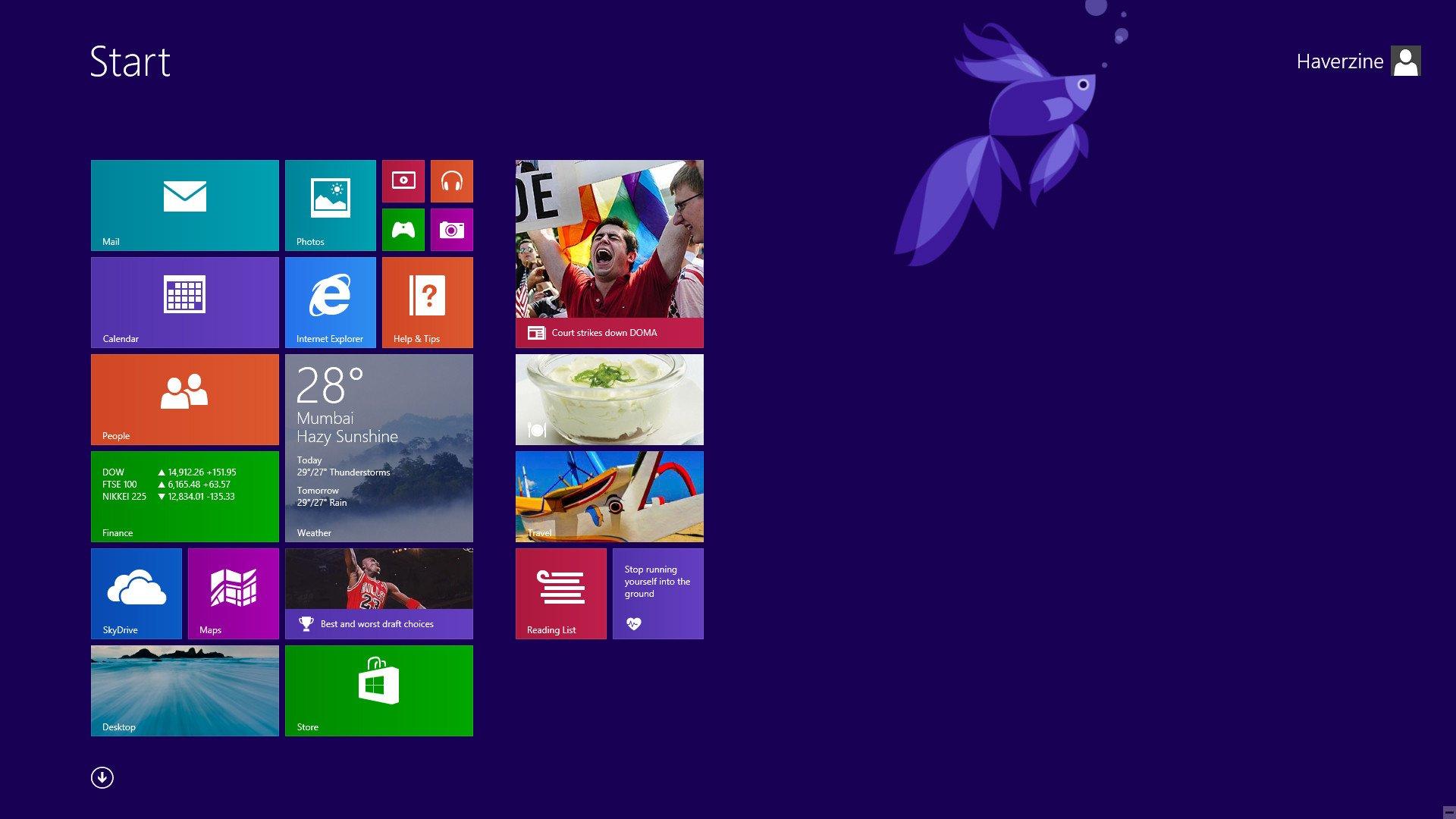
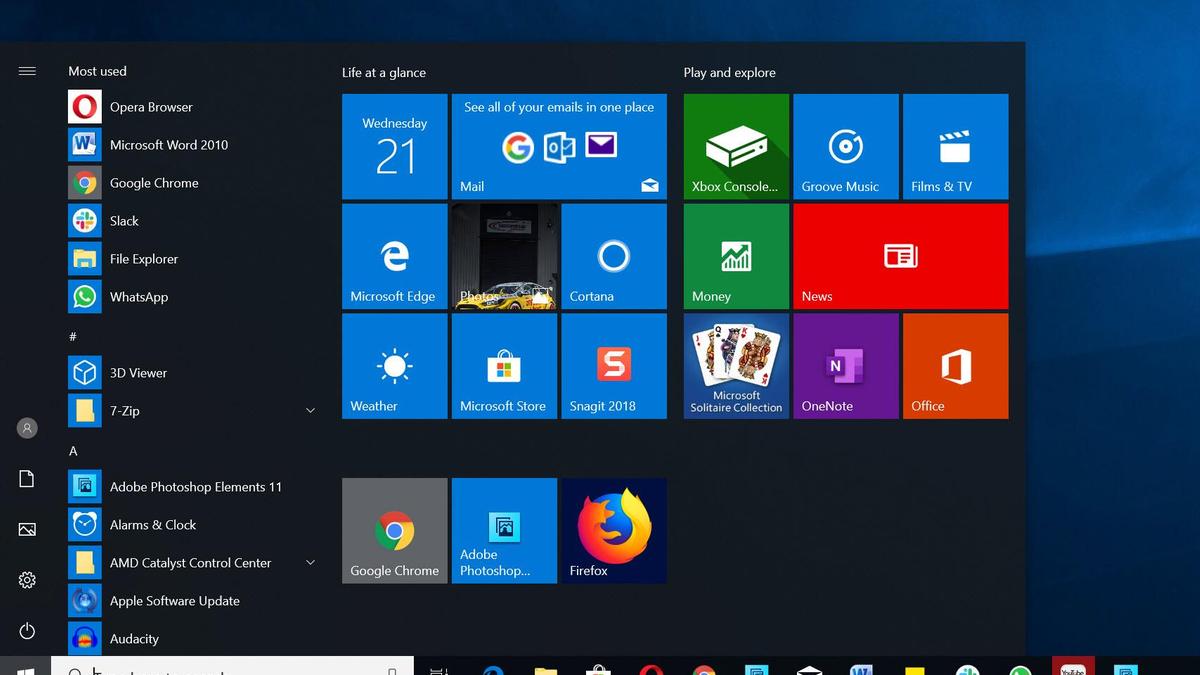
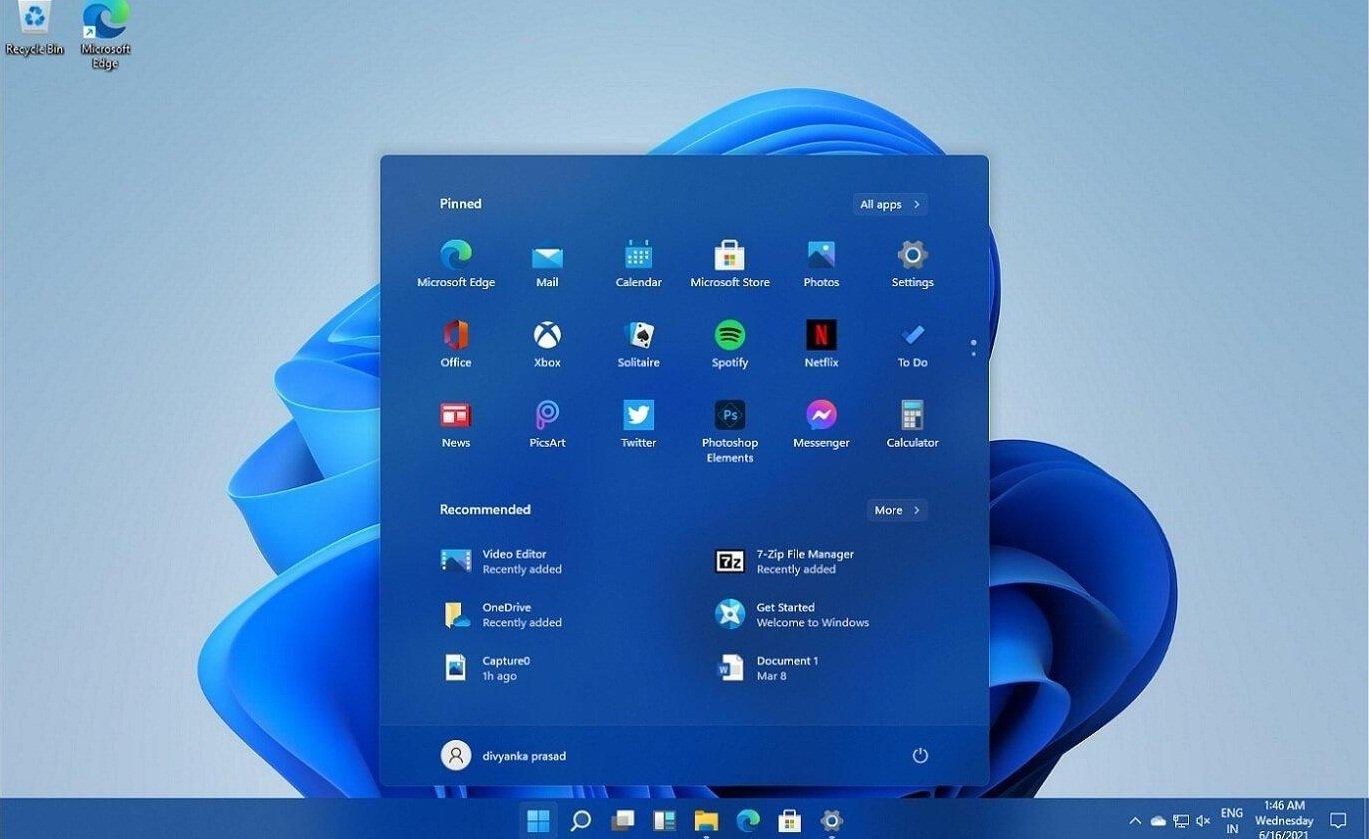
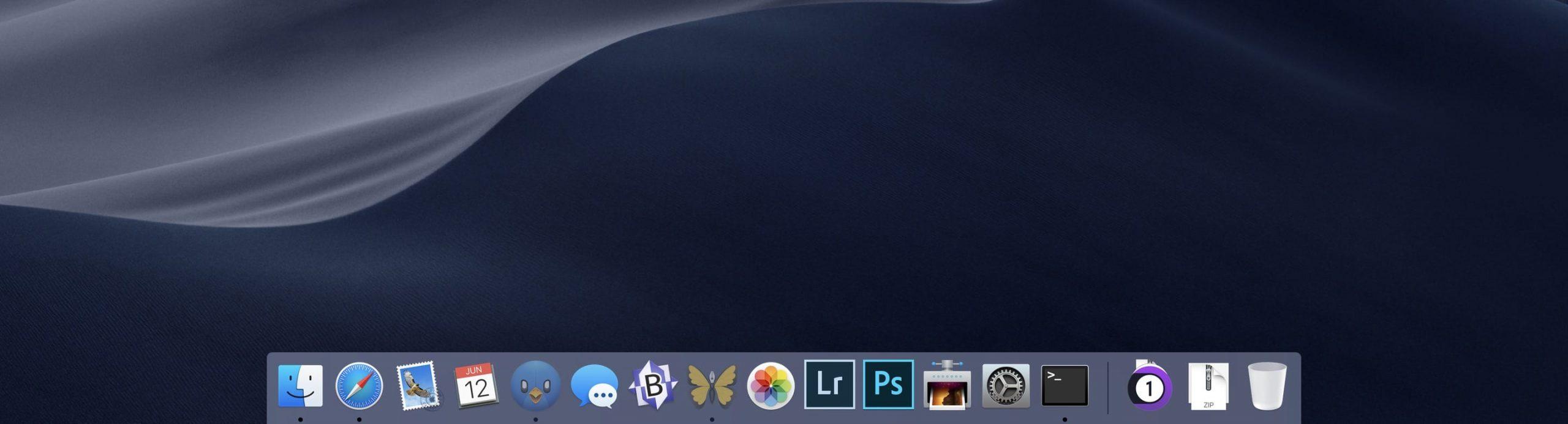
					<content type="html" xml:base="https://bloganchoi.com/windows-11-tinh-nang-moi-so-voi-windows-10-windows-8-1-va-macos/"><![CDATA[<p><strong>Tối ngày 24/06/2021 (theo giờ Việt Nam), Microsoft đã chính thức ra mắt Windows 11 với nhiều cải tiến mới. Vậy là sau 5 năm kể từ Windows 10, Microsoft đã đem tới người dùng một phiên bản Windows tốt hơn, mở hơn. Trong bài viết này, BlogAnChoi sẽ tổng hợp lại những điểm thay đổi trên Windows 11 so với hai &#8220;người tiền nhiệm&#8221; Windows 8.1 và Windows 10, nhằm giúp <strong><a href="https://bloganchoi.com/tin/ban-doc/"  target="_bank"   title="bạn đọc">bạn đọc</a></strong> có thêm thông tin để quyết định có nên nâng cấp máy tính của mình lên phiên bản Windows mới nhất này hay không.</strong></p>
<p><span id="more-395601"></span></p>
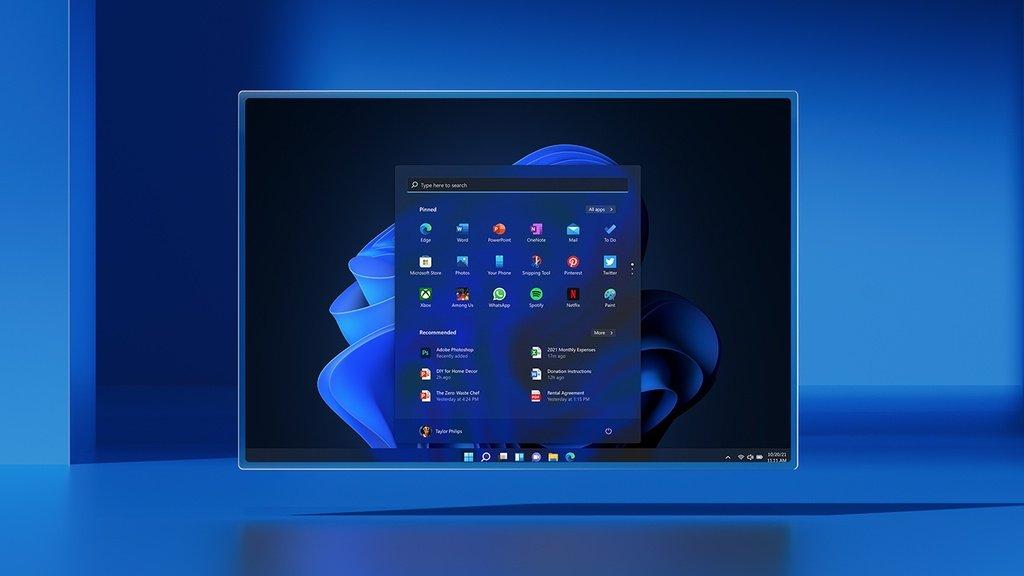
<figure id="attachment_395622" aria-describedby="caption-attachment-395622" style="width: 1024px" class="wp-caption aligncenter"><img loading="lazy" class="wp-image-395622 size-full" title="Windows 11 đi kèm với Start Menu hoàn toàn mới (Ảnh: Internet)." src="https://bloganchoi.com/wp-content/uploads/2021/06/windows-11-tinh-nang-moi-01.jpg" alt="Windows 11 đi kèm với Start Menu hoàn toàn mới (Ảnh: Internet)." width="1024" height="576" srcset="https://bloganchoi.com/wp-content/uploads/2021/06/windows-11-tinh-nang-moi-01.jpg 1024w, https://bloganchoi.com/wp-content/uploads/2021/06/windows-11-tinh-nang-moi-01-300x169.jpg 300w, https://bloganchoi.com/wp-content/uploads/2021/06/windows-11-tinh-nang-moi-01-768x432.jpg 768w, https://bloganchoi.com/wp-content/uploads/2021/06/windows-11-tinh-nang-moi-01-696x392.jpg 696w, https://bloganchoi.com/wp-content/uploads/2021/06/windows-11-tinh-nang-moi-01-747x420.jpg 747w" sizes="(max-width: 1024px) 100vw, 1024px" /><figcaption id="caption-attachment-395622" class="wp-caption-text">Windows 11 đi kèm với Start Menu hoàn toàn mới (Ảnh: Internet).</figcaption></figure>
<h2><strong>1. Windows 11 có Start Menu mới</strong></h2>
<p>Đập vào mắt người dùng trên Windows 11 đó chính là Start Menu. Kể từ Windows 8.1 hay Windows 10, Microsoft đã cố gắng lồng ghép nhiều tính năng vào Start Menu nhằm tăng sự tương tác cũng như trải nghiệm người dùng, song không phải cải tiến nào cũng đáng giá.</p>
<figure id="attachment_395627" aria-describedby="caption-attachment-395627" style="width: 1920px" class="wp-caption aligncenter"><img loading="lazy" class="wp-image-395627 size-full" title="Start Menu trên Windows 8.1. Người dùng thường hay đùa vui rằng đây là Start Screen chứ không phải Start Menu mà họ muốn. (Ảnh: Internet)" src="https://bloganchoi.com/wp-content/uploads/2021/06/windows-11-windows-8-1-start-menu.jpg" alt="Start Menu trên Windows 8.1. Người dùng thường hay đùa vui rằng đây là Start Screen chứ không phải Start Menu mà họ muốn. (Ảnh: Internet)" width="1920" height="1080" srcset="https://bloganchoi.com/wp-content/uploads/2021/06/windows-11-windows-8-1-start-menu.jpg 1920w, https://bloganchoi.com/wp-content/uploads/2021/06/windows-11-windows-8-1-start-menu-300x169.jpg 300w, https://bloganchoi.com/wp-content/uploads/2021/06/windows-11-windows-8-1-start-menu-1024x576.jpg 1024w, https://bloganchoi.com/wp-content/uploads/2021/06/windows-11-windows-8-1-start-menu-768x432.jpg 768w, https://bloganchoi.com/wp-content/uploads/2021/06/windows-11-windows-8-1-start-menu-1536x864.jpg 1536w, https://bloganchoi.com/wp-content/uploads/2021/06/windows-11-windows-8-1-start-menu-696x392.jpg 696w, https://bloganchoi.com/wp-content/uploads/2021/06/windows-11-windows-8-1-start-menu-1068x601.jpg 1068w, https://bloganchoi.com/wp-content/uploads/2021/06/windows-11-windows-8-1-start-menu-747x420.jpg 747w" sizes="(max-width: 1920px) 100vw, 1920px" /><figcaption id="caption-attachment-395627" class="wp-caption-text">Start Menu trên Windows 8.1. Người dùng thường hay đùa vui rằng đây là Start Screen chứ không phải Start Menu mà họ muốn. (Ảnh: Internet)</figcaption></figure>
<p>Trên Windows 8.1, người dùng thường xuyên kêu ca về việc họ chỉ có Start Screen chứ không phải Start Menu thực sự. Hoạt động thiếu ổn định đi kèm với giao diện khá rối mắt khiến Start Screen thực sự là một điểm trừ lớn của phiên bản Windows 8.1 vốn đã thiếu sự ổn định so với Windows 7.</p>
<p><iframe loading="lazy" class="youtube-player" width="640" height="360" src="https://www.youtube.com/embed/_KY3y3SdPWg?version=3&#038;rel=1&#038;showsearch=0&#038;showinfo=1&#038;iv_load_policy=1&#038;fs=1&#038;hl=vi&#038;autohide=2&#038;wmode=transparent" allowfullscreen="true" style="border:0;" sandbox="allow-scripts allow-same-origin allow-popups allow-presentation"></iframe></p>
<figure id="attachment_395633" aria-describedby="caption-attachment-395633" style="width: 1200px" class="wp-caption aligncenter"><img loading="lazy" class="wp-image-395633 size-full" title="Start Menu trên Windows 10: bạn sẽ phải tốn thời gian để tinh chỉnh lại nếu muốn Start Menu của mình đỡ lộn xộn hơn (Ảnh: Internet)." src="https://bloganchoi.com/wp-content/uploads/2021/06/windows-11-windows-10-start-menu-1.jpg" alt="Start Menu trên Windows 10: bạn sẽ phải tốn thời gian để tinh chỉnh lại nếu muốn Start Menu của mình đỡ lộn xộn hơn (Ảnh: Internet)." width="1200" height="675" srcset="https://bloganchoi.com/wp-content/uploads/2021/06/windows-11-windows-10-start-menu-1.jpg 1200w, https://bloganchoi.com/wp-content/uploads/2021/06/windows-11-windows-10-start-menu-1-300x169.jpg 300w, https://bloganchoi.com/wp-content/uploads/2021/06/windows-11-windows-10-start-menu-1-1024x576.jpg 1024w, https://bloganchoi.com/wp-content/uploads/2021/06/windows-11-windows-10-start-menu-1-768x432.jpg 768w, https://bloganchoi.com/wp-content/uploads/2021/06/windows-11-windows-10-start-menu-1-696x392.jpg 696w, https://bloganchoi.com/wp-content/uploads/2021/06/windows-11-windows-10-start-menu-1-1068x601.jpg 1068w, https://bloganchoi.com/wp-content/uploads/2021/06/windows-11-windows-10-start-menu-1-747x420.jpg 747w" sizes="(max-width: 1200px) 100vw, 1200px" /><figcaption id="caption-attachment-395633" class="wp-caption-text">Start Menu trên Windows 10: bạn sẽ phải tốn thời gian để tinh chỉnh lại nếu muốn Start Menu của mình đỡ lộn xộn hơn (Ảnh: Internet).</figcaption></figure>
<p>Ở Windows 11, người dùng sẽ thấy một Start Menu gọn gàng, chi tiết. Bạn có thể ghim những ứng dụng thường xuyên sử dụng và truy cập nhanh đến chúng. So với Windows 8.1 hay Windows 10, đây chính là một điểm cộng khiến người dùng muốn nâng cấp lên Windows 11.</p>
<figure id="attachment_396404" aria-describedby="caption-attachment-396404" style="width: 1369px" class="wp-caption aligncenter"><img loading="lazy" class="wp-image-396404 size-full" title="Start Menu trên Windows 11 (Ảnh: Internet)." src="https://bloganchoi.com/wp-content/uploads/2021/06/windows-11-start-menu-1.jpg" alt="Start Menu trên Windows 11 (Ảnh: Internet)." width="1369" height="839" srcset="https://bloganchoi.com/wp-content/uploads/2021/06/windows-11-start-menu-1.jpg 1369w, https://bloganchoi.com/wp-content/uploads/2021/06/windows-11-start-menu-1-300x184.jpg 300w, https://bloganchoi.com/wp-content/uploads/2021/06/windows-11-start-menu-1-1024x628.jpg 1024w, https://bloganchoi.com/wp-content/uploads/2021/06/windows-11-start-menu-1-768x471.jpg 768w, https://bloganchoi.com/wp-content/uploads/2021/06/windows-11-start-menu-1-696x427.jpg 696w, https://bloganchoi.com/wp-content/uploads/2021/06/windows-11-start-menu-1-1068x655.jpg 1068w, https://bloganchoi.com/wp-content/uploads/2021/06/windows-11-start-menu-1-685x420.jpg 685w" sizes="(max-width: 1369px) 100vw, 1369px" /><figcaption id="caption-attachment-396404" class="wp-caption-text">Start Menu trên Windows 11 (Ảnh: Internet).</figcaption></figure>
<figure id="attachment_395636" aria-describedby="caption-attachment-395636" style="width: 2560px" class="wp-caption aligncenter"><img loading="lazy" class="wp-image-395636 size-full" title="Nhiều người cho rằng Start Menu trên Windows 11 khá tương đồng với Dock Menu trên macOS (Ảnh: Internet)." src="https://bloganchoi.com/wp-content/uploads/2021/06/windows-11-dock-menu-macos-scaled.jpg" alt="Nhiều người cho rằng Start Menu trên Windows 11 khá tương đồng với Dock Menu trên macOS (Ảnh: Internet)." width="2560" height="693" srcset="https://bloganchoi.com/wp-content/uploads/2021/06/windows-11-dock-menu-macos-scaled.jpg 2560w, https://bloganchoi.com/wp-content/uploads/2021/06/windows-11-dock-menu-macos-300x81.jpg 300w, https://bloganchoi.com/wp-content/uploads/2021/06/windows-11-dock-menu-macos-1024x277.jpg 1024w, https://bloganchoi.com/wp-content/uploads/2021/06/windows-11-dock-menu-macos-768x208.jpg 768w, https://bloganchoi.com/wp-content/uploads/2021/06/windows-11-dock-menu-macos-1536x416.jpg 1536w, https://bloganchoi.com/wp-content/uploads/2021/06/windows-11-dock-menu-macos-2048x555.jpg 2048w, https://bloganchoi.com/wp-content/uploads/2021/06/windows-11-dock-menu-macos-696x189.jpg 696w, https://bloganchoi.com/wp-content/uploads/2021/06/windows-11-dock-menu-macos-1068x289.jpg 1068w, https://bloganchoi.com/wp-content/uploads/2021/06/windows-11-dock-menu-macos-1551x420.jpg 1551w" sizes="(max-width: 2560px) 100vw, 2560px" /><figcaption id="caption-attachment-395636" class="wp-caption-text">Nhiều người cho rằng Start Menu trên Windows 11 khá tương đồng với Dock Menu trên macOS (Ảnh: Internet).</figcaption></figure>
<h2><strong>2. Windows 11 không cho di chuyển Task Bar</strong></h2>
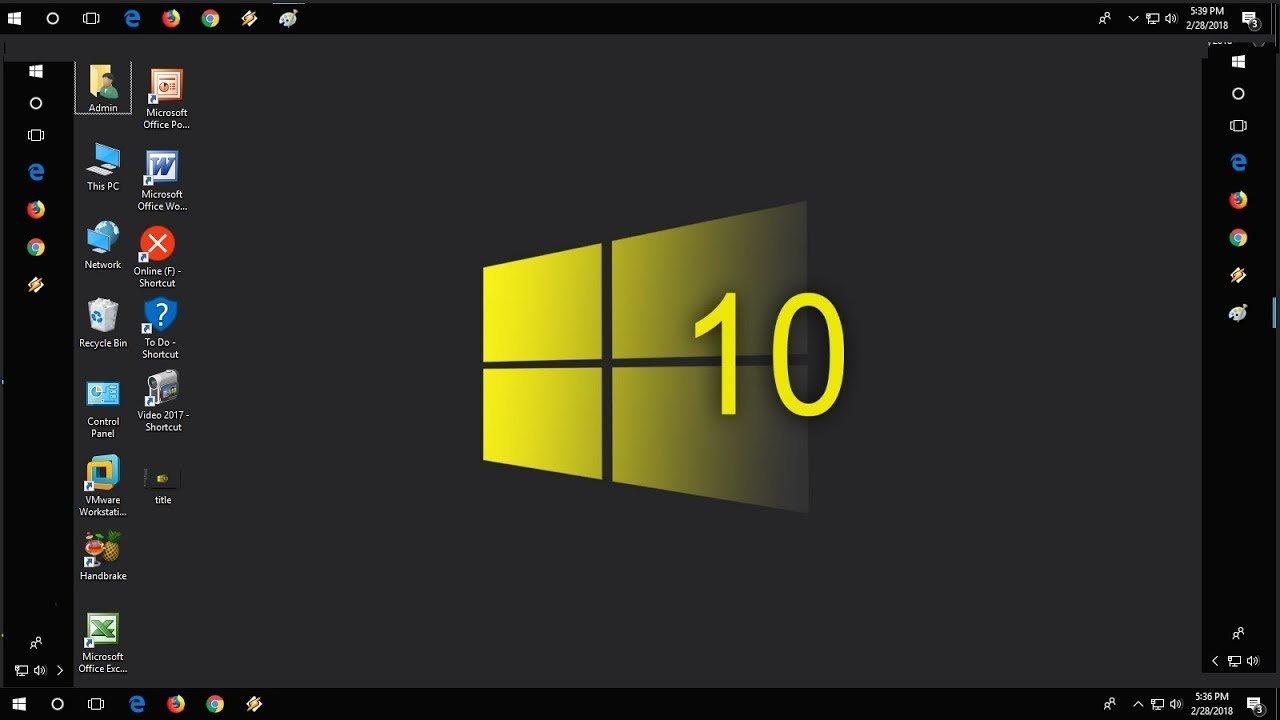
<p>So với macOS, người dùng Windows luôn có một sự “tự do” hơn nhất định. Họ có thể thoải mái tuỳ chỉnh hệ điều hành mình sử dụng ở mọi khía cạnh: từ giao diện cho đến những thiết lập ảnh hưởng đến sự vận hành của hệ thống. Một trong những điều đó là khả năng di chuyển thanh Taskbar từ trên, dưới, trái hay phải.</p>
<figure id="attachment_395642" aria-describedby="caption-attachment-395642" style="width: 1280px" class="wp-caption aligncenter"><img loading="lazy" class="wp-image-395642 size-full" title="Bốn vị trí mà người dùng có thể thoải mái &quot;xê dịch&quot; thanh Taskbar trên Windows 10 (Ảnh: Internet)." src="https://bloganchoi.com/wp-content/uploads/2021/06/windows-11-windows-10-taskbar.jpg" alt="Bốn vị trí mà người dùng có thể thoải mái &quot;xê dịch&quot; thanh Taskbar trên Windows 10 (Ảnh: Internet)." width="1280" height="720" srcset="https://bloganchoi.com/wp-content/uploads/2021/06/windows-11-windows-10-taskbar.jpg 1280w, https://bloganchoi.com/wp-content/uploads/2021/06/windows-11-windows-10-taskbar-300x169.jpg 300w, https://bloganchoi.com/wp-content/uploads/2021/06/windows-11-windows-10-taskbar-1024x576.jpg 1024w, https://bloganchoi.com/wp-content/uploads/2021/06/windows-11-windows-10-taskbar-768x432.jpg 768w, https://bloganchoi.com/wp-content/uploads/2021/06/windows-11-windows-10-taskbar-696x392.jpg 696w, https://bloganchoi.com/wp-content/uploads/2021/06/windows-11-windows-10-taskbar-1068x601.jpg 1068w, https://bloganchoi.com/wp-content/uploads/2021/06/windows-11-windows-10-taskbar-747x420.jpg 747w" sizes="(max-width: 1280px) 100vw, 1280px" /><figcaption id="caption-attachment-395642" class="wp-caption-text">Bốn vị trí mà người dùng có thể thoải mái &#8220;xê dịch&#8221; thanh Taskbar trên Windows 10 (Ảnh: Internet).</figcaption></figure>
<p>Tuy nhiên theo phản hồi của nhiều người dùng thì họ không thể di chuyển Task Bar trên Windows 11 một cách tuỳ ý như trên những phiên bản tiền nhiệm. Thanh Taskbar trên Windows 11 sẽ chỉ nằm cố định ở phía dưới cùng của góc màn hình. Hy vọng rằng ở những bản cập nhật trong tương lai Microsoft có thể khắc phục được điều này và cho phép người dùng tự do hơn trong việc đặt thanh Taskbar.</p>
<figure id="attachment_395622" aria-describedby="caption-attachment-395622" style="width: 1024px" class="wp-caption aligncenter"><img loading="lazy" class="wp-image-395622 size-full" title="Windows 11 có giao diện rất đẹp, chỉ là không cho thay đổi vị trí Taskbar mà thôi (Ảnh: Internet)." src="https://bloganchoi.com/wp-content/uploads/2021/06/windows-11-tinh-nang-moi-01.jpg" alt="Windows 11 có giao diện rất đẹp, chỉ là không cho thay đổi vị trí Taskbar mà thôi (Ảnh: Internet)." width="1024" height="576" srcset="https://bloganchoi.com/wp-content/uploads/2021/06/windows-11-tinh-nang-moi-01.jpg 1024w, https://bloganchoi.com/wp-content/uploads/2021/06/windows-11-tinh-nang-moi-01-300x169.jpg 300w, https://bloganchoi.com/wp-content/uploads/2021/06/windows-11-tinh-nang-moi-01-768x432.jpg 768w, https://bloganchoi.com/wp-content/uploads/2021/06/windows-11-tinh-nang-moi-01-696x392.jpg 696w, https://bloganchoi.com/wp-content/uploads/2021/06/windows-11-tinh-nang-moi-01-747x420.jpg 747w" sizes="(max-width: 1024px) 100vw, 1024px" /><figcaption id="caption-attachment-395622" class="wp-caption-text">Windows 11 có giao diện rất đẹp, chỉ là không cho thay đổi vị trí Taskbar mà thôi (Ảnh: Internet).</figcaption></figure>
<p><iframe loading="lazy" class="youtube-player" width="640" height="360" src="https://www.youtube.com/embed/cp6D8RzqgTQ?version=3&#038;rel=1&#038;showsearch=0&#038;showinfo=1&#038;iv_load_policy=1&#038;fs=1&#038;hl=vi&#038;autohide=2&#038;wmode=transparent" allowfullscreen="true" style="border:0;" sandbox="allow-scripts allow-same-origin allow-popups allow-presentation"></iframe></p>
<h2><strong>3. Task View của Windows 11 </strong></h2>
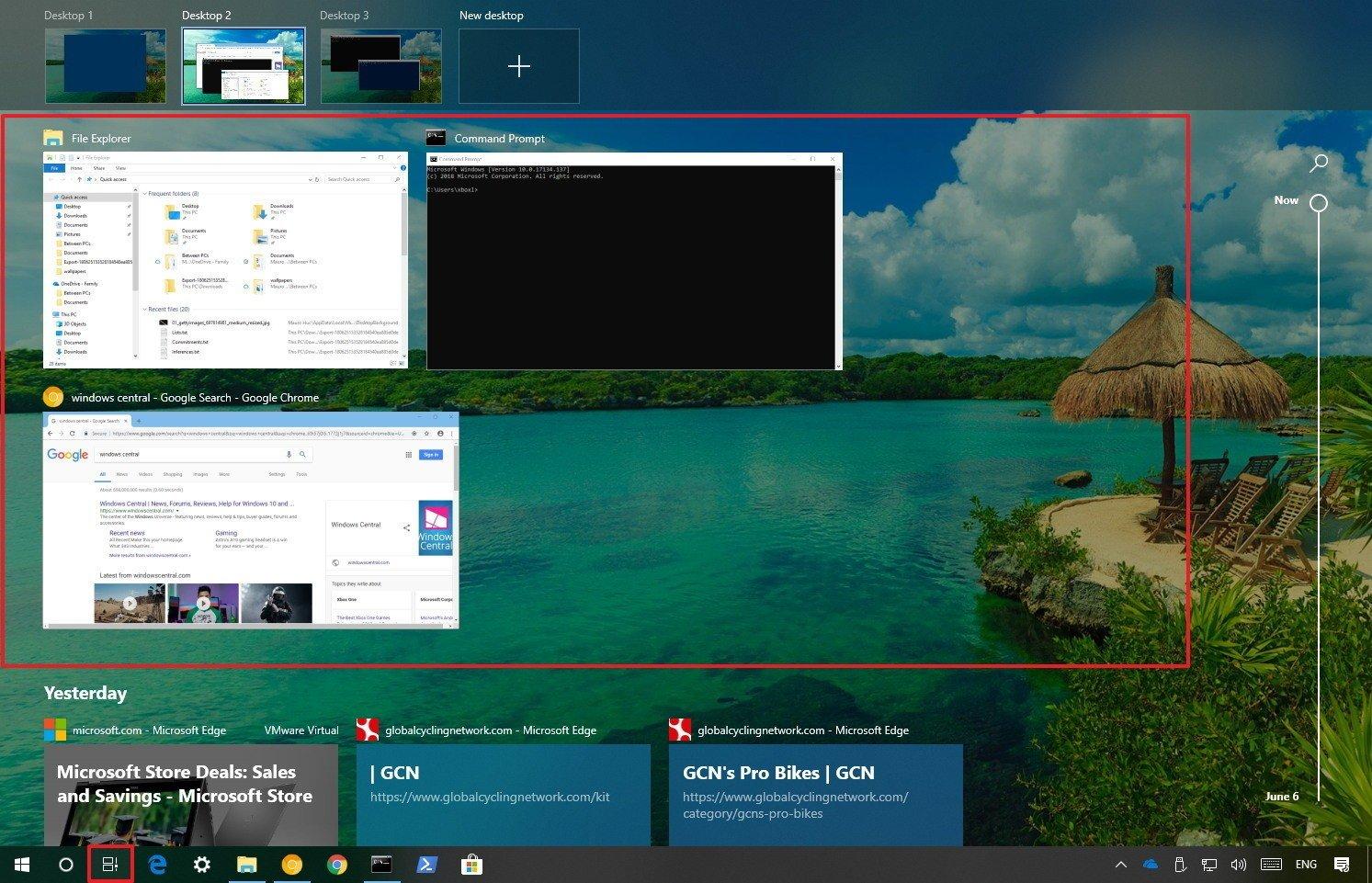
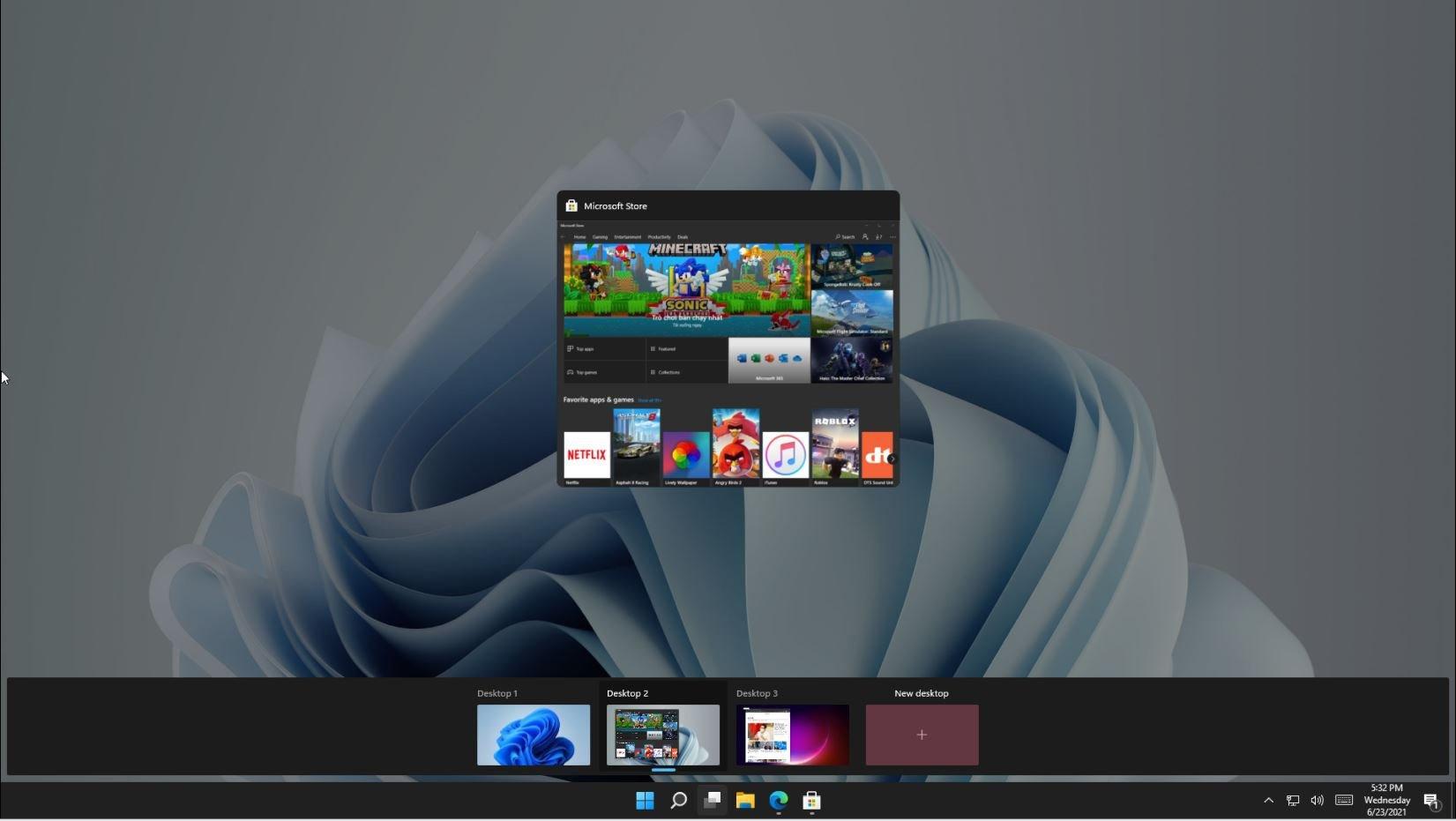
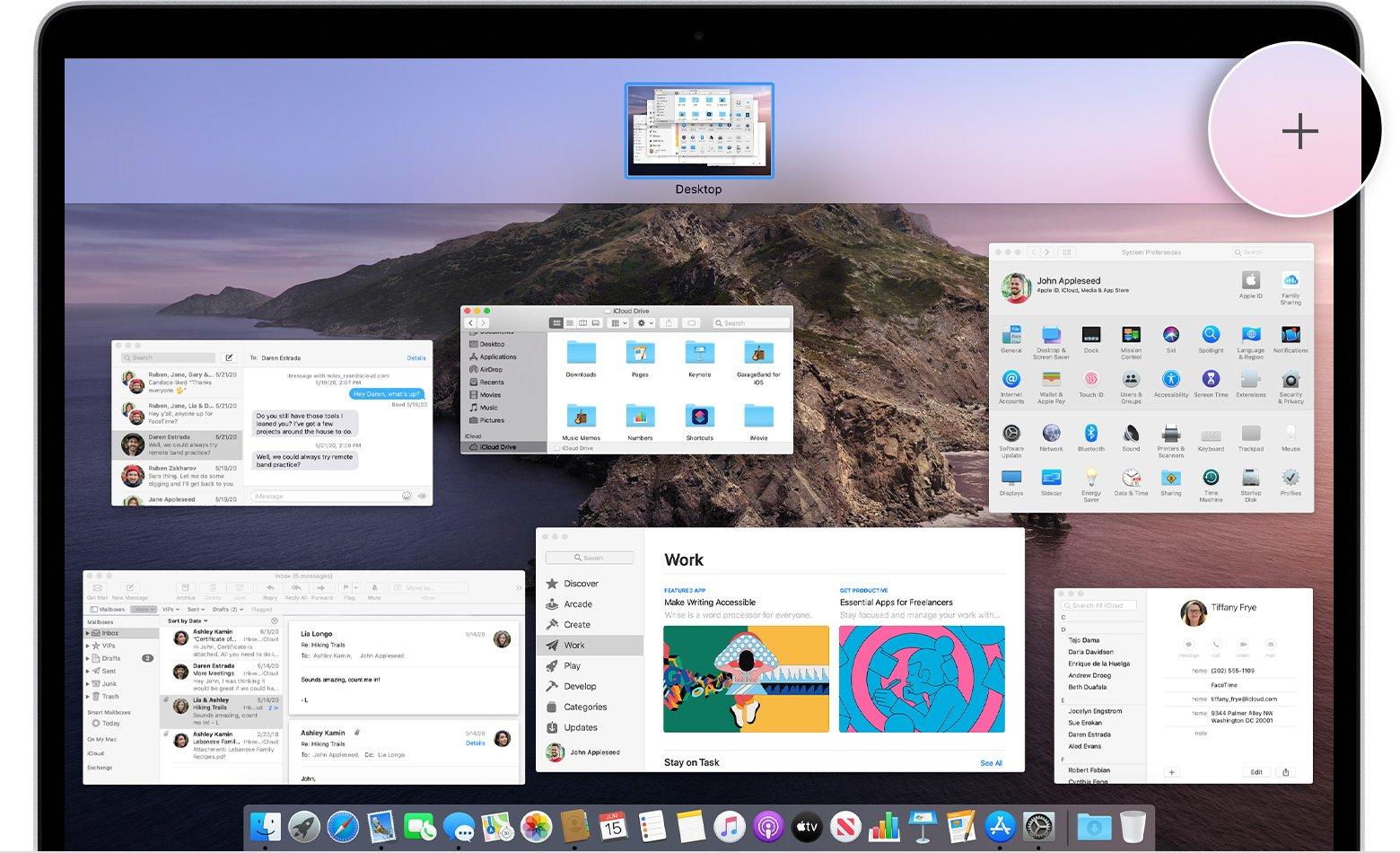
<p>Trên Windows 11, tính năng Task View đã được update và cải thiện. Việc tạo ra các desktop mới để làm việc đa tác vụ đã xuất hiện lần đầu ở Windows 10. Trên Windows 11, tính năng này được nhiều người dùng đánh giá là học hỏi đến &#8230;99% từ Mission Control, một trình quản lý đa tác vụ mặc định đến từ &#8220;đối thủ&#8221; macOS.</p>
<figure id="attachment_395650" aria-describedby="caption-attachment-395650" style="width: 1493px" class="wp-caption aligncenter"><img loading="lazy" class="wp-image-395650 size-full" title="Task View trên Windows 10. (Ảnh: Internet)" src="https://bloganchoi.com/wp-content/uploads/2021/06/windows-11-windows-10-task-view.jpg" alt="Task View trên Windows 10. (Ảnh: Internet)" width="1493" height="961" srcset="https://bloganchoi.com/wp-content/uploads/2021/06/windows-11-windows-10-task-view.jpg 1493w, https://bloganchoi.com/wp-content/uploads/2021/06/windows-11-windows-10-task-view-300x193.jpg 300w, https://bloganchoi.com/wp-content/uploads/2021/06/windows-11-windows-10-task-view-1024x659.jpg 1024w, https://bloganchoi.com/wp-content/uploads/2021/06/windows-11-windows-10-task-view-768x494.jpg 768w, https://bloganchoi.com/wp-content/uploads/2021/06/windows-11-windows-10-task-view-696x448.jpg 696w, https://bloganchoi.com/wp-content/uploads/2021/06/windows-11-windows-10-task-view-1068x687.jpg 1068w, https://bloganchoi.com/wp-content/uploads/2021/06/windows-11-windows-10-task-view-653x420.jpg 653w" sizes="(max-width: 1493px) 100vw, 1493px" /><figcaption id="caption-attachment-395650" class="wp-caption-text">Task View trên Windows 10. (Ảnh: Internet)</figcaption></figure>
<figure id="attachment_395651" aria-describedby="caption-attachment-395651" style="width: 1651px" class="wp-caption aligncenter"><img loading="lazy" class="wp-image-395651 size-full" title="Task View trên Windows 11: Tính năng này giúp người dùng phân chia từng Desktop riêng cho một công việc hoặc ứng dụng cụ thể. (Ảnh: Internet)" src="https://bloganchoi.com/wp-content/uploads/2021/06/windows-11-task-view.jpg" alt="Task View trên Windows 11: Tính năng này giúp người dùng phân chia từng Desktop riêng cho một công việc hoặc ứng dụng cụ thể. (Ảnh: Internet)" width="1651" height="931" srcset="https://bloganchoi.com/wp-content/uploads/2021/06/windows-11-task-view.jpg 1651w, https://bloganchoi.com/wp-content/uploads/2021/06/windows-11-task-view-300x169.jpg 300w, https://bloganchoi.com/wp-content/uploads/2021/06/windows-11-task-view-1024x577.jpg 1024w, https://bloganchoi.com/wp-content/uploads/2021/06/windows-11-task-view-768x433.jpg 768w, https://bloganchoi.com/wp-content/uploads/2021/06/windows-11-task-view-1536x866.jpg 1536w, https://bloganchoi.com/wp-content/uploads/2021/06/windows-11-task-view-696x392.jpg 696w, https://bloganchoi.com/wp-content/uploads/2021/06/windows-11-task-view-1068x602.jpg 1068w, https://bloganchoi.com/wp-content/uploads/2021/06/windows-11-task-view-745x420.jpg 745w" sizes="(max-width: 1651px) 100vw, 1651px" /><figcaption id="caption-attachment-395651" class="wp-caption-text">Task View trên Windows 11: Tính năng này giúp người dùng phân chia từng Desktop riêng cho một công việc hoặc ứng dụng cụ thể. (Ảnh: Internet)</figcaption></figure>
<figure id="attachment_395652" aria-describedby="caption-attachment-395652" style="width: 1560px" class="wp-caption aligncenter"><img loading="lazy" class="wp-image-395652 size-full" title="Những người từng sử dụng qua cả 2 hệ điều hành sẽ không khó để nhận ra sự tương đồng giữa Mission Control của macOS so với Task View của Windows 11 (Ảnh: Internet)." src="https://bloganchoi.com/wp-content/uploads/2021/06/windows-11-mission-control-macos.jpg" alt="Những người từng sử dụng qua cả 2 hệ điều hành sẽ không khó để nhận ra sự tương đồng giữa Mission Control của macOS so với Task View của Windows 11 (Ảnh: Internet)." width="1560" height="950" srcset="https://bloganchoi.com/wp-content/uploads/2021/06/windows-11-mission-control-macos.jpg 1560w, https://bloganchoi.com/wp-content/uploads/2021/06/windows-11-mission-control-macos-300x183.jpg 300w, https://bloganchoi.com/wp-content/uploads/2021/06/windows-11-mission-control-macos-1024x624.jpg 1024w, https://bloganchoi.com/wp-content/uploads/2021/06/windows-11-mission-control-macos-768x468.jpg 768w, https://bloganchoi.com/wp-content/uploads/2021/06/windows-11-mission-control-macos-1536x935.jpg 1536w, https://bloganchoi.com/wp-content/uploads/2021/06/windows-11-mission-control-macos-696x424.jpg 696w, https://bloganchoi.com/wp-content/uploads/2021/06/windows-11-mission-control-macos-1068x650.jpg 1068w, https://bloganchoi.com/wp-content/uploads/2021/06/windows-11-mission-control-macos-690x420.jpg 690w" sizes="(max-width: 1560px) 100vw, 1560px" /><figcaption id="caption-attachment-395652" class="wp-caption-text">Những người từng sử dụng qua cả 2 hệ điều hành sẽ không khó để nhận ra sự tương đồng giữa Mission Control của macOS so với Task View của Windows 11 (Ảnh: Internet).</figcaption></figure>
<p><iframe loading="lazy" class="youtube-player" width="640" height="360" src="https://www.youtube.com/embed/uBYP5IdfoCo?version=3&#038;rel=1&#038;showsearch=0&#038;showinfo=1&#038;iv_load_policy=1&#038;fs=1&#038;hl=vi&#038;autohide=2&#038;wmode=transparent" allowfullscreen="true" style="border:0;" sandbox="allow-scripts allow-same-origin allow-popups allow-presentation"></iframe></p>
<h2><strong>4. Màn hình cài đặt của Windows 11 </strong></h2>
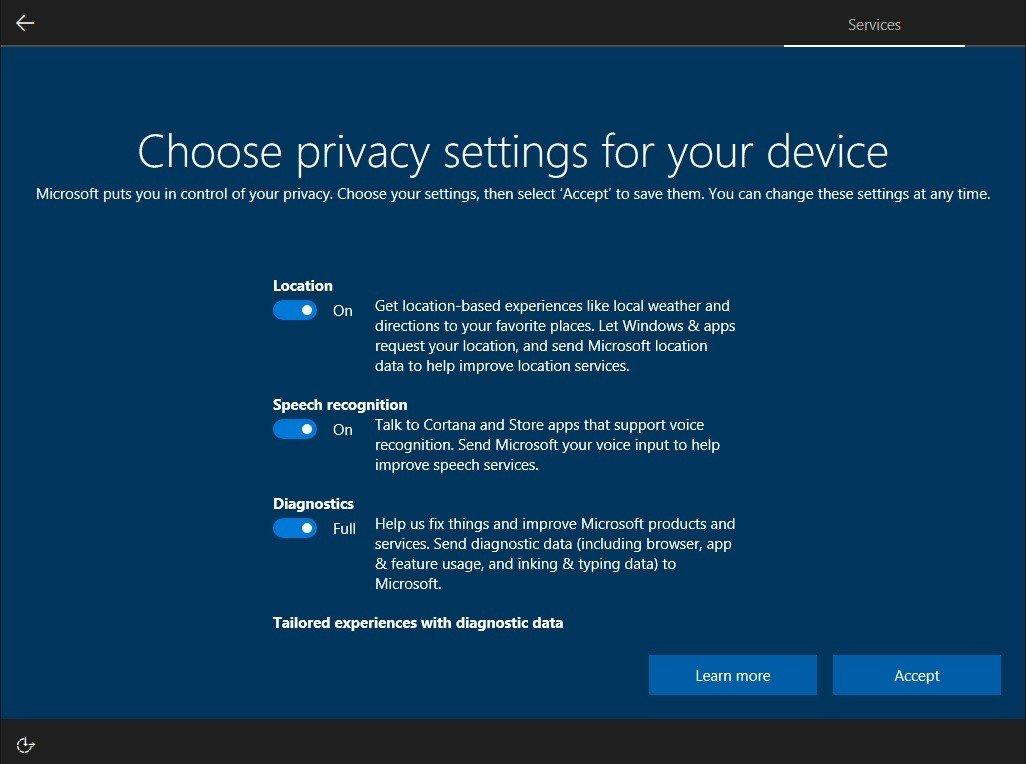
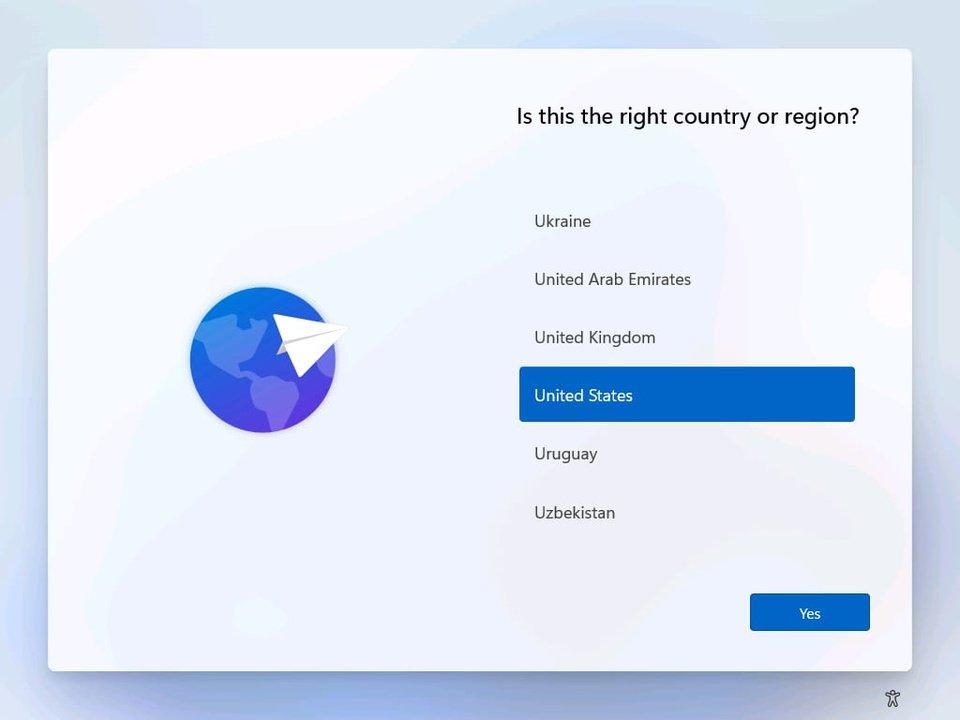
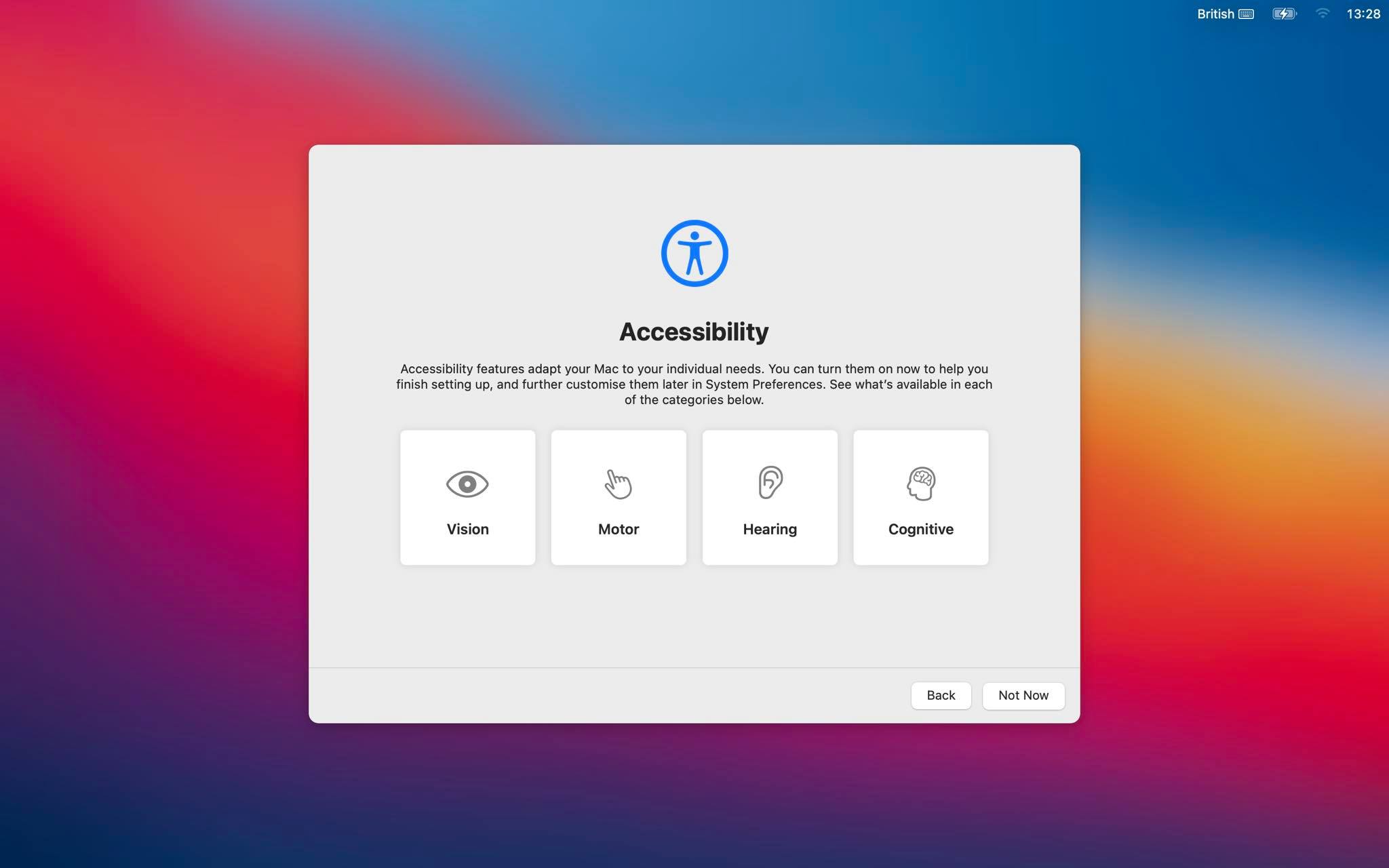
<p>Trên Windows 7, Windows 8.1 hay Windows 10, Microsoft thường sử dụng tông màu khá tối ở màn hình thiết lập cài đặt. Nhưng ở Windows 11, Microsoft lại chủ động chỉnh tông màu phần thiết lập sáng sủa hơn. Ngôn ngữ thiết kế này khá tương đồng với macOS Big Sur, khi mà thiết kế mô phỏng đồ vật đã được thay thế bằng giao diện màu sắc sặc sỡ.</p>
<figure id="attachment_395655" aria-describedby="caption-attachment-395655" style="width: 1026px" class="wp-caption aligncenter"><img loading="lazy" class="wp-image-395655 size-full" title="Giao diện thiết lập cài đặt trên Windows 10 khá tối và tù túng. (Ảnh: Internet)" src="https://bloganchoi.com/wp-content/uploads/2021/06/windows-11-windows-10-setting.jpg" alt="Giao diện thiết lập cài đặt trên Windows 10 khá tối và tù túng. (Ảnh: Internet)" width="1026" height="764" srcset="https://bloganchoi.com/wp-content/uploads/2021/06/windows-11-windows-10-setting.jpg 1026w, https://bloganchoi.com/wp-content/uploads/2021/06/windows-11-windows-10-setting-300x223.jpg 300w, https://bloganchoi.com/wp-content/uploads/2021/06/windows-11-windows-10-setting-1024x763.jpg 1024w, https://bloganchoi.com/wp-content/uploads/2021/06/windows-11-windows-10-setting-768x572.jpg 768w, https://bloganchoi.com/wp-content/uploads/2021/06/windows-11-windows-10-setting-80x60.jpg 80w, https://bloganchoi.com/wp-content/uploads/2021/06/windows-11-windows-10-setting-265x198.jpg 265w, https://bloganchoi.com/wp-content/uploads/2021/06/windows-11-windows-10-setting-696x518.jpg 696w, https://bloganchoi.com/wp-content/uploads/2021/06/windows-11-windows-10-setting-564x420.jpg 564w" sizes="(max-width: 1026px) 100vw, 1026px" /><figcaption id="caption-attachment-395655" class="wp-caption-text">Giao diện thiết lập cài đặt trên Windows 10 khá tối và tù túng. (Ảnh: Internet)</figcaption></figure>
<figure id="attachment_395654" aria-describedby="caption-attachment-395654" style="width: 960px" class="wp-caption aligncenter"><img loading="lazy" class="wp-image-395654 size-full" title="Màn hình thiết lập ban đầu trên Windows 11. Lối thiết kế này, trùng hợp thay, lại khá tương đồng với... (Ảnh: Internet)" src="https://bloganchoi.com/wp-content/uploads/2021/06/windows-11-country-region-setting.jpg" alt="Màn hình thiết lập ban đầu trên Windows 11. Lối thiết kế này, trùng hợp thay, lại khá tương đồng với... (Ảnh: Internet)" width="960" height="720" srcset="https://bloganchoi.com/wp-content/uploads/2021/06/windows-11-country-region-setting.jpg 960w, https://bloganchoi.com/wp-content/uploads/2021/06/windows-11-country-region-setting-300x225.jpg 300w, https://bloganchoi.com/wp-content/uploads/2021/06/windows-11-country-region-setting-768x576.jpg 768w, https://bloganchoi.com/wp-content/uploads/2021/06/windows-11-country-region-setting-80x60.jpg 80w, https://bloganchoi.com/wp-content/uploads/2021/06/windows-11-country-region-setting-265x198.jpg 265w, https://bloganchoi.com/wp-content/uploads/2021/06/windows-11-country-region-setting-696x522.jpg 696w, https://bloganchoi.com/wp-content/uploads/2021/06/windows-11-country-region-setting-560x420.jpg 560w" sizes="(max-width: 960px) 100vw, 960px" /><figcaption id="caption-attachment-395654" class="wp-caption-text">Màn hình thiết lập ban đầu trên Windows 11. Lối thiết kế này, trùng hợp thay, lại khá tương đồng với&#8230; (Ảnh: Internet)</figcaption></figure>
<figure id="attachment_395656" aria-describedby="caption-attachment-395656" style="width: 2048px" class="wp-caption aligncenter"><img loading="lazy" class="wp-image-395656 size-full" title="...màn hình thiết lập của macOS Big Sur (Ảnh: Internet)." src="https://bloganchoi.com/wp-content/uploads/2021/06/windows-11-big-sur-screen-4.jpg" alt="...màn hình thiết lập của macOS Big Sur (Ảnh: Internet)." width="2048" height="1280" srcset="https://bloganchoi.com/wp-content/uploads/2021/06/windows-11-big-sur-screen-4.jpg 2048w, https://bloganchoi.com/wp-content/uploads/2021/06/windows-11-big-sur-screen-4-300x188.jpg 300w, https://bloganchoi.com/wp-content/uploads/2021/06/windows-11-big-sur-screen-4-1024x640.jpg 1024w, https://bloganchoi.com/wp-content/uploads/2021/06/windows-11-big-sur-screen-4-768x480.jpg 768w, https://bloganchoi.com/wp-content/uploads/2021/06/windows-11-big-sur-screen-4-1536x960.jpg 1536w, https://bloganchoi.com/wp-content/uploads/2021/06/windows-11-big-sur-screen-4-696x435.jpg 696w, https://bloganchoi.com/wp-content/uploads/2021/06/windows-11-big-sur-screen-4-1068x668.jpg 1068w, https://bloganchoi.com/wp-content/uploads/2021/06/windows-11-big-sur-screen-4-672x420.jpg 672w" sizes="(max-width: 2048px) 100vw, 2048px" /><figcaption id="caption-attachment-395656" class="wp-caption-text">&#8230;màn hình thiết lập của macOS Big Sur (Ảnh: Internet).</figcaption></figure>
<p><iframe loading="lazy" class="youtube-player" width="640" height="360" src="https://www.youtube.com/embed/zLG5zgu9DqQ?version=3&#038;rel=1&#038;showsearch=0&#038;showinfo=1&#038;iv_load_policy=1&#038;fs=1&#038;hl=vi&#038;autohide=2&#038;wmode=transparent" allowfullscreen="true" style="border:0;" sandbox="allow-scripts allow-same-origin allow-popups allow-presentation"></iframe></p>
<h2><strong>5. Snap Layout của Windows 11</strong></h2>
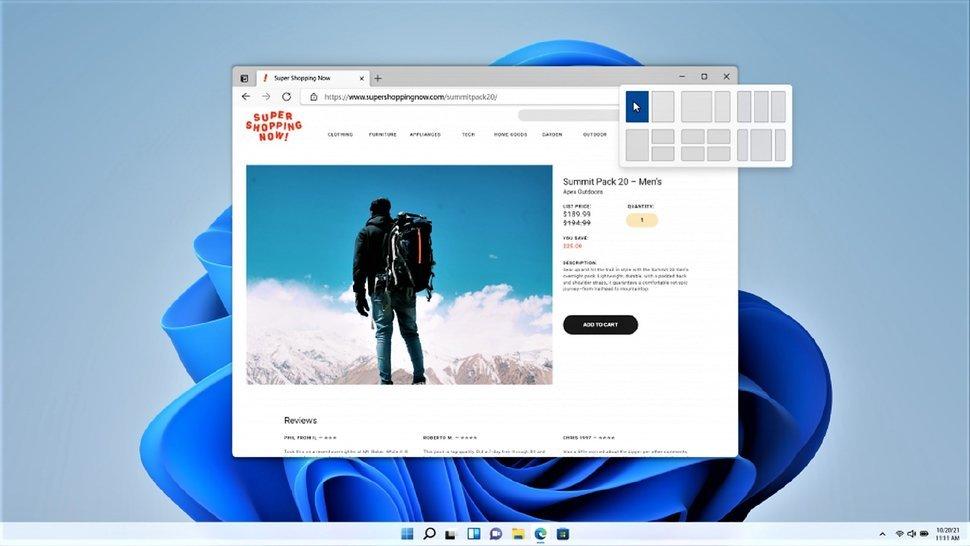
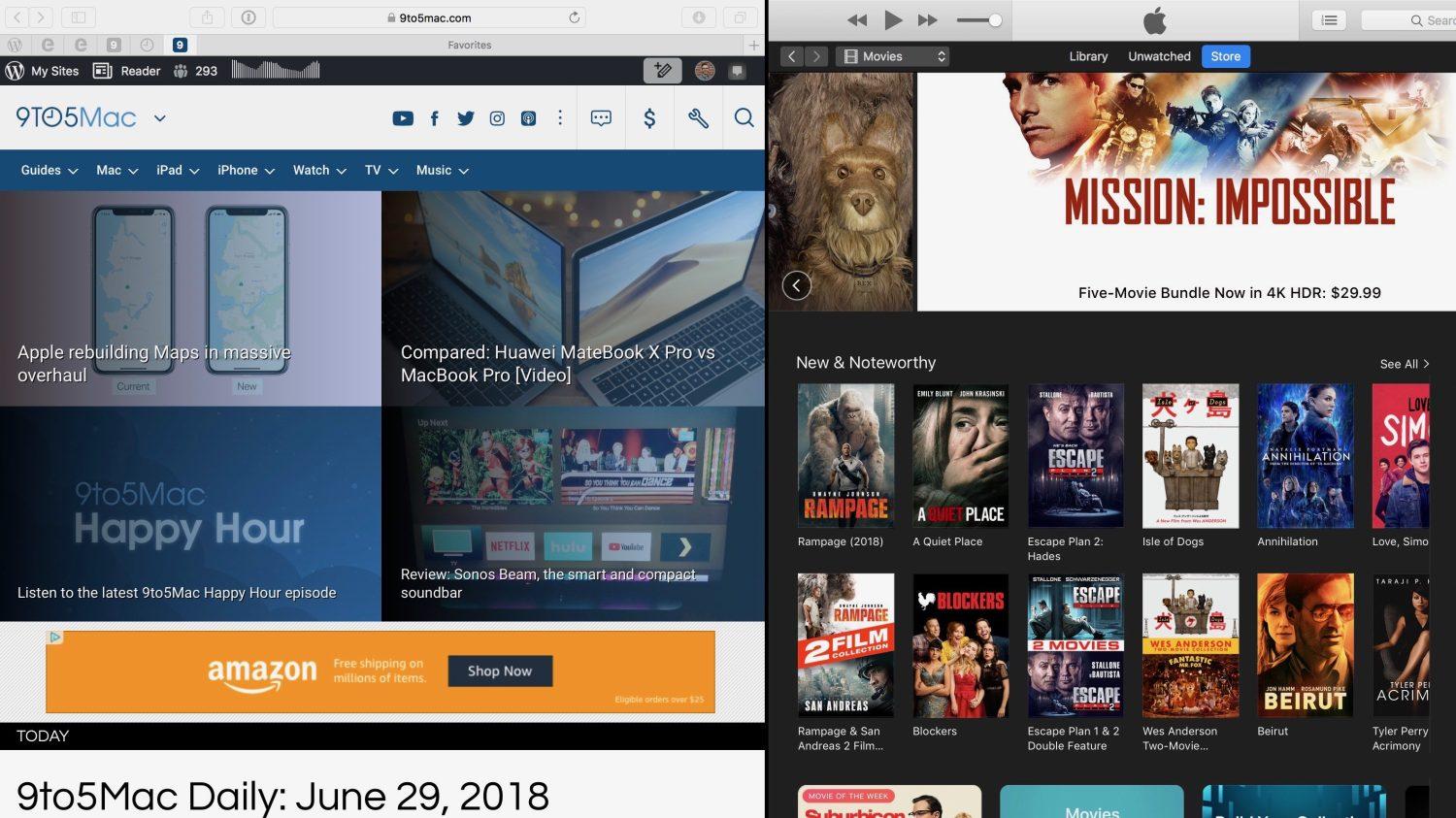
<p>Từ trước đến nay, người dùng Windows sẽ phải căn chỉnh thủ công độ rộng của hai ứng dụng nếu muốn làm việc đa nhiệm. Điểm bất tiện này đã được cải thiện dần dần qua tính năng Task View trên Windows 10. Tuy vậy phải đến Windows 11 thì tính năng <em>Snap Layout</em> mới thật sự trở nên lợi hại. Giờ đây <em>Snap</em> <em>Layout</em> đã cho phép người dùng có thể làm việc đồng thời lên tới 4 ứng dụng cùng một lúc trên một màn hình.</p>
<figure id="attachment_396151" aria-describedby="caption-attachment-396151" style="width: 970px" class="wp-caption aligncenter"><img loading="lazy" class="wp-image-396151 size-full" title="Snap Layout trên Windows 11. Tuy đi sau đối thủ macOS đến 6 năm, Windows 11 vẫn đem lại trải nghiệm tuyệt vời hơn do hỗ trợ đồng thời tới 4 màn hình làm việc. (Ảnh: Internet)" src="https://bloganchoi.com/wp-content/uploads/2021/06/windows-11-snap-layout.jpeg" alt="Snap Layout trên Windows 11. Tuy đi sau đối thủ macOS đến 6 năm, Windows 11 vẫn đem lại trải nghiệm tuyệt vời hơn do hỗ trợ đồng thời tới 4 màn hình làm việc. (Ảnh: Internet)" width="970" height="546" srcset="https://bloganchoi.com/wp-content/uploads/2021/06/windows-11-snap-layout.jpeg 970w, https://bloganchoi.com/wp-content/uploads/2021/06/windows-11-snap-layout-300x169.jpeg 300w, https://bloganchoi.com/wp-content/uploads/2021/06/windows-11-snap-layout-768x432.jpeg 768w, https://bloganchoi.com/wp-content/uploads/2021/06/windows-11-snap-layout-696x392.jpeg 696w, https://bloganchoi.com/wp-content/uploads/2021/06/windows-11-snap-layout-746x420.jpeg 746w" sizes="(max-width: 970px) 100vw, 970px" /><figcaption id="caption-attachment-396151" class="wp-caption-text">Snap Layout trên Windows 11. Tuy đi sau đối thủ macOS đến 6 năm, Windows 11 vẫn đem lại trải nghiệm tuyệt vời hơn do hỗ trợ đồng thời tới 4 màn hình làm việc. (Ảnh: Internet)</figcaption></figure>
<p>So với Windows, macOS đã có tính năng tương tự mang tên Split View, được ra mắt trên OS X El Capitan (2015). Tuy đi sau macOS đến 6 năm ở tính năng này, người dùng Windows có thể cảm thấy tự hào về khoản làm việc đa nhiệm lên tới 4 màn hình, so với 2 của macOS.</p>
<p><iframe loading="lazy" class="youtube-player" width="640" height="360" src="https://www.youtube.com/embed/R_WpfsB9cao?version=3&#038;rel=1&#038;showsearch=0&#038;showinfo=1&#038;iv_load_policy=1&#038;fs=1&#038;hl=vi&#038;autohide=2&#038;wmode=transparent" allowfullscreen="true" style="border:0;" sandbox="allow-scripts allow-same-origin allow-popups allow-presentation"></iframe></p>
<figure id="attachment_396149" aria-describedby="caption-attachment-396149" style="width: 1500px" class="wp-caption aligncenter"><img loading="lazy" class="wp-image-396149 size-full" title="Tính năng Split View trên macOS được ra mắt lần đầu trên macOS X El Capitan (2015). Kể cả trên phiên bản macOS Montery vừa rồi, số lượng ứng dụng đa nhiệm tối đa vẫn chỉ là 2 (Ảnh: Internet)." src="https://bloganchoi.com/wp-content/uploads/2021/06/windows-11-macos-split-view.jpg" alt="Tính năng Split View trên macOS được ra mắt lần đầu trên macOS X El Capitan (2015). Kể cả trên phiên bản macOS Montery vừa rồi, số lượng ứng dụng đa nhiệm tối đa vẫn chỉ là 2 (Ảnh: Internet)." width="1500" height="843" srcset="https://bloganchoi.com/wp-content/uploads/2021/06/windows-11-macos-split-view.jpg 1500w, https://bloganchoi.com/wp-content/uploads/2021/06/windows-11-macos-split-view-300x169.jpg 300w, https://bloganchoi.com/wp-content/uploads/2021/06/windows-11-macos-split-view-1024x575.jpg 1024w, https://bloganchoi.com/wp-content/uploads/2021/06/windows-11-macos-split-view-768x432.jpg 768w, https://bloganchoi.com/wp-content/uploads/2021/06/windows-11-macos-split-view-696x391.jpg 696w, https://bloganchoi.com/wp-content/uploads/2021/06/windows-11-macos-split-view-1068x600.jpg 1068w, https://bloganchoi.com/wp-content/uploads/2021/06/windows-11-macos-split-view-747x420.jpg 747w" sizes="(max-width: 1500px) 100vw, 1500px" /><figcaption id="caption-attachment-396149" class="wp-caption-text">Tính năng Split View trên macOS được ra mắt lần đầu trên macOS X El Capitan (2015). Kể cả trên phiên bản macOS Montery vừa rồi, số lượng ứng dụng đa nhiệm tối đa vẫn chỉ là 2 (Ảnh: Internet).</figcaption></figure>
<h2><strong>6. Windows 11 cho phép chạy native ứng dụng Android </strong></h2>
<p>Một trong những tính năng vô cùng hấp dẫn được chờ đón trên Windows 11 là khả năng chạy ứng dụng Android trực tiếp mà không cần thông qua bất kỳ bên thứ 3 nào. Tuy nhiên thay vì tải trực tiếp ứng dụng từ Google Play, Microsoft đã &#8220;bắt tay&#8221; với Amazon AppStore để tích hợp tài nguyên có sẵn vào kho ứng dụng Microsoft Store. Bạn cần phải có tài khoản Amazon để có thể cài đặt ứng dụng Android trên Windows 11.</p>
<p><iframe loading="lazy" class="youtube-player" width="640" height="360" src="https://www.youtube.com/embed/hfXXMGei4Ys?version=3&#038;rel=1&#038;showsearch=0&#038;showinfo=1&#038;iv_load_policy=1&#038;fs=1&#038;hl=vi&#038;autohide=2&#038;wmode=transparent" allowfullscreen="true" style="border:0;" sandbox="allow-scripts allow-same-origin allow-popups allow-presentation"></iframe></p>
<p>Theo thông tin nội bộ, bạn hoàn toàn có thể cài đặt file APK trực tiếp lên Windows 11 mà không phải thông qua Microsoft Store hay Amazon Appstore. Tính năng này hiện vẫn chưa có mặt trên phiên bản Windows 11 hiện tại, nhưng sẽ được sớm ra mắt trong phiên bản chính thức.</p>
<p><iframe loading="lazy" class="youtube-player" width="640" height="360" src="https://www.youtube.com/embed/9ul3kuxwgwE?version=3&#038;rel=1&#038;showsearch=0&#038;showinfo=1&#038;iv_load_policy=1&#038;fs=1&#038;hl=vi&#038;autohide=2&#038;wmode=transparent" allowfullscreen="true" style="border:0;" sandbox="allow-scripts allow-same-origin allow-popups allow-presentation"></iframe></p>
<p>Cả macOS và Windows 11 đã đều phát triển khả năng chạy ứng dụng di động ngay trên nền tảng PC. Tuy nhiên chúng ta vẫn phải chờ đợi thêm thời gian nữa mới có thể thực sự có một trải nghiệm hoàn hảo về việc chạy ứng dụng iOS/Android trên PC hoặc laptop của mình.</p>
<p><strong>Mời bạn xem thêm những bài viết liên quan của BlogAnChoi:</strong></p>
<ul>
<li><a href="https://bloganchoi.com/nhung-ly-do-windows-10-van-con-giu-lai-control-panel/"><strong>Vì sao Windows 10 vẫn còn giữ lại Control Panel?</strong></a></li>
<li><a href="https://bloganchoi.com/macbook-la-gi-thong-tin-co-ban-ve-laptop-macbook-apple/#:~:text=MacBook%20l%C3%A0%20d%C3%B2ng%20s%E1%BA%A3n%20ph%E1%BA%A9m,(%E1%BA%A2nh%3A%20Internet)."><strong>Macbook là gì? Macbook rẻ hay đắt? Macbook Air, Macbook Pro là gì?</strong></a></li>
<li><a href="https://bloganchoi.com/mac-pro-ban-cao-cap-nhat-co-gia-52-600-usd/"><strong>Mac Pro &#8220;không dành cho người sợ lỗ&#8221; giá hơn 1 tỉ, có gì mà đắt đến như vậy?</strong></a></li>
</ul>
<p>Hãy đón xem BlogAnChoi mỗi ngày để nhận được nhiều thông tin thú vị cho cuộc sống bạn nhé!</p>]]></content>
		
					<link rel="replies" type="text/html" href="https://bloganchoi.com/windows-11-tinh-nang-moi-so-voi-windows-10-windows-8-1-va-macos/#comments" thr:count="0" />
			<link rel="replies" type="application/atom+xml" href="https://bloganchoi.com/windows-11-tinh-nang-moi-so-voi-windows-10-windows-8-1-va-macos/feed/atom/" thr:count="0" />
			<thr:total>0</thr:total>
			</entry>
		<entry>
		<author>
			<name>minhviet5678</name>
					</author>

		<title type="html"><![CDATA[Review phần mềm NoxPlayer : Trình giả lập Android tốt nhất để chơi game mobile trên PC]]></title>
		<link rel="alternate" type="text/html" href="https://bloganchoi.com/review-phan-mem-noxplayer-trinh-gia-lap-android-tot-nhat-de-choi-game-mobile-tren-pc/" />

		<id>https://bloganchoi.com/?p=222706</id>
		<updated>2020-01-15T05:40:20Z</updated>
		<published>2020-01-13T13:01:03Z</published>
		<category scheme="https://bloganchoi.com" term="Ứng dụng - Phần mềm" /><category scheme="https://bloganchoi.com" term="android" /><category scheme="https://bloganchoi.com" term="Android 7 Nougat" /><category scheme="https://bloganchoi.com" term="APK" /><category scheme="https://bloganchoi.com" term="bàn phím" /><category scheme="https://bloganchoi.com" term="chính sách bảo mật" /><category scheme="https://bloganchoi.com" term="chơi game" /><category scheme="https://bloganchoi.com" term="để lộ thông tin" /><category scheme="https://bloganchoi.com" term="game" /><category scheme="https://bloganchoi.com" term="game mobile" /><category scheme="https://bloganchoi.com" term="game thủ" /><category scheme="https://bloganchoi.com" term="GDPR" /><category scheme="https://bloganchoi.com" term="giả lập android" /><category scheme="https://bloganchoi.com" term="giả lập chơi game" /><category scheme="https://bloganchoi.com" term="hệ điều hành" /><category scheme="https://bloganchoi.com" term="hình ảnh" /><category scheme="https://bloganchoi.com" term="Mobile" /><category scheme="https://bloganchoi.com" term="nổi bật" /><category scheme="https://bloganchoi.com" term="Nougat" /><category scheme="https://bloganchoi.com" term="NoxPlayer" /><category scheme="https://bloganchoi.com" term="phần mềm" /><category scheme="https://bloganchoi.com" term="Review phần mềm" /><category scheme="https://bloganchoi.com" term="streamer" /><category scheme="https://bloganchoi.com" term="thông tin khách hàng" /><category scheme="https://bloganchoi.com" term="tính năng" /><category scheme="https://bloganchoi.com" term="trải nghiệm" /><category scheme="https://bloganchoi.com" term="trình giả lập Android" />
		<summary type="html"><![CDATA[Việc chơi game mobile trên PC là một trải nghiệm cực kì thú vị mà game thủ nào cũng nên thử, tuy nhiên để làm được điều này chúng ta phải sử dụng trình giả lập Android. NoxPlayer được xem như trình giả lập Android xuất sắc nhất hiện tại, bởi vì nó nhẹ, nhanh]]></summary>

					<content type="html" xml:base="https://bloganchoi.com/review-phan-mem-noxplayer-trinh-gia-lap-android-tot-nhat-de-choi-game-mobile-tren-pc/"><![CDATA[<p><strong>Việc chơi game mobile trên PC là một trải nghiệm cực kì thú vị mà game thủ nào cũng nên thử, tuy nhiên để làm được điều này chúng ta phải sử dụng trình giả lập Android. NoxPlayer được xem như trình giả lập Android xuất sắc nhất hiện tại, bởi vì nó nhẹ, nhanh và có hiệu năng vô cùng mượt mà. </strong></p>
<p><span id="more-222706"></span></p>
<h2><strong>Giới thiệu về NoxPlayer</strong></h2>
<h3><b>NoxPlayer là gì?</b></h3>
<figure id="attachment_222780" aria-describedby="caption-attachment-222780" style="width: 900px" class="wp-caption aligncenter"><img loading="lazy" class="size-full wp-image-222780" src="https://bloganchoi.com/wp-content/uploads/2020/01/trinh-gia-lap-8.jpg" alt="Ứng dụng NoxPlayer. Ảnh: internet" width="900" height="900" srcset="https://bloganchoi.com/wp-content/uploads/2020/01/trinh-gia-lap-8.jpg 900w, https://bloganchoi.com/wp-content/uploads/2020/01/trinh-gia-lap-8-150x150.jpg 150w, https://bloganchoi.com/wp-content/uploads/2020/01/trinh-gia-lap-8-300x300.jpg 300w, https://bloganchoi.com/wp-content/uploads/2020/01/trinh-gia-lap-8-768x768.jpg 768w, https://bloganchoi.com/wp-content/uploads/2020/01/trinh-gia-lap-8-696x696.jpg 696w, https://bloganchoi.com/wp-content/uploads/2020/01/trinh-gia-lap-8-420x420.jpg 420w" sizes="(max-width: 900px) 100vw, 900px" /><figcaption id="caption-attachment-222780" class="wp-caption-text">Ứng dụng NoxPlayer. Ảnh: internet</figcaption></figure>
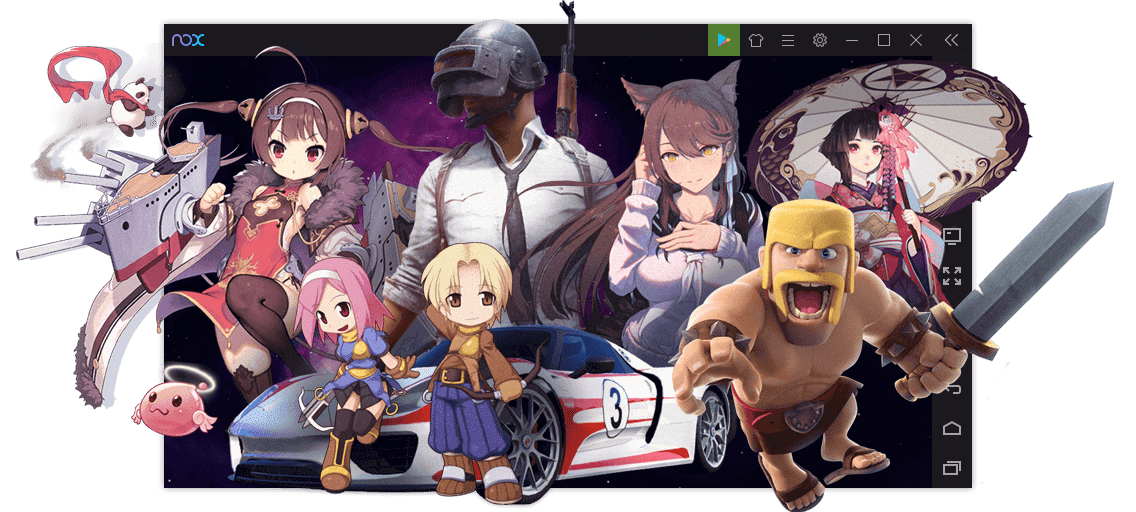
<p>NoxPlayer là một trình giả lập Android sử dụng trên cả 2 hệ điều hành Windows và Mac OS, được đánh giá là phần mềm giả lập tốt nhất thời điểm hiện tại. Với NoxPlayer, người dùng có thể tải và chơi mọi tựa game mobile trên máy tính của mình, điều này sẽ có ích vô cùng cho các streamer hoặc những game thủ.</p>
<p>Đặc biệt, trình giả lập Nox hoàn toàn miễn phí và cực kỳ dễ sử dụng, chỉ cần vài thao tác nhỏ là bạn đã có thể làm quen với nó rồi.</p>
<h4 style="text-align: center;"><em><strong><a href="https://bloganchoi.com/xredirect/?afflink=0&amp%3Bsaleslink=1&nofollow=1&noindex=1&outlink=1&rdtp=header&saleslink=1&utm_campaign=bloganchoi.com%7C%7Cbloganchoi.com%7C%7Cbloganchoi.com&utm_content=bloganchoi.com&utm_medium=%7C%7Chttps%3A%2F%2Fvn.bignox.com%2F%3Futm_source%3Dbloganchoi%26amp%3Bsaleslink%3D1%7C%7Csaleslink%7C%7C&utm_source=bloganchoi&utm_term=bloganchoi.com&wafx=1&wpaflt=80c08a46&wpaflt_url_domain=bignox.com&wpaflt_url_host=vn.bignox.com&wppepvndtecrv=3fZfUtgwQNUt-wFXPFV5KVF7UpZH-1nCbgBXNsARSjkk42ZvzqTK2muI3_Kx6j_X7q_ytemHtDVhud64FvpvV_8IRhkzcdFT9r1G6fXchrkh8aqewwS-o_MBvvfgFPaqu39wN00UelvO8IwJ_QIiDLCpDP16iYIZJYB3fFrnoOe4wNPK3go2-hDfCXwzrKGAn7ZfVX5dy2FKN_NhUpkJagFty6PorVfLcVgnXTMg6xPS3YPRzjGCqr9OJTBxOmp2JqtKZNaaILsLieECFQZSLMDjtgKX3ZDLHCQ1rj0q_qinrew_UPqiydQ89M-Yjgrak-jE2QC4WvV_03HW3HzZFMzc0HkbCxUMbSeNSHh2aM-oPI6mw2Iijx-OZoeK5LiyQ1ZxU09Cr9_TuY76DvcmOVdI-bFW_OY0PVL21hwrvJzRM5jtBywhEhQwqFQt60IiZ-b3PN3uH356HTVFGFHqESDGKbNJ9d5HlH1pPYt1jIJTst9XwjPBTE7XRs_8H8m-gQMFxOqnufjr5C829_MW-_X_-K8BwV7wXkiVFGdBGo1PJBJV01LuH8oFiOsHWFjxlpVcuWLu6nYMLyKeUrup026ug7Omx5DRGtMho_fV4ooD8iS7R2XRQGqcCtq5mSg_NZY-zLKkLfYfh8t2UmjM0XGhzJ7Z5KUmestg2Gd3YYk6gdtbeccs4mgA2dhldBuO8AYmWNvbrZy--yNdQKA1rmYITlym-20nU3SQa_SYuvjv8u-TA8mVa4v1Wz0zevoc8cw8dW-sBlc5VCWXL0jxHlz0E2ikjFLNG6MLVDrm1Ffpf8MlmA.." target="_blank" rel="nofollow">Bạn có thể tìm hiểu và tải phần mềm NoxPlayer tại đây</a></strong></em></h4>
<h2><strong>Những lý do để người dùng chọn NoxPlayer để chơi game mobile trên Pc</strong></h2>
<h3><b>NoxPlayer là trình giả lập Android tốt nhất hiện tại</b></h3>
<figure id="attachment_223807" aria-describedby="caption-attachment-223807" style="width: 1136px" class="wp-caption aligncenter"><a href="https://bloganchoi.com/wp-content/uploads/2020/01/hien-tai-kho-co-trinh-gia-lap-nao-vuot-qua-duoc-noxplayer.png"><img loading="lazy" class="size-full wp-image-223807" src="https://bloganchoi.com/wp-content/uploads/2020/01/hien-tai-kho-co-trinh-gia-lap-nao-vuot-qua-duoc-noxplayer.png" alt="Hiện tại khó có trình giả lập nào vượt qua được NoxPlayer. Ảnh: internet" width="1136" height="512" srcset="https://bloganchoi.com/wp-content/uploads/2020/01/hien-tai-kho-co-trinh-gia-lap-nao-vuot-qua-duoc-noxplayer.png 1136w, https://bloganchoi.com/wp-content/uploads/2020/01/hien-tai-kho-co-trinh-gia-lap-nao-vuot-qua-duoc-noxplayer-300x135.png 300w, https://bloganchoi.com/wp-content/uploads/2020/01/hien-tai-kho-co-trinh-gia-lap-nao-vuot-qua-duoc-noxplayer-768x346.png 768w, https://bloganchoi.com/wp-content/uploads/2020/01/hien-tai-kho-co-trinh-gia-lap-nao-vuot-qua-duoc-noxplayer-1024x462.png 1024w, https://bloganchoi.com/wp-content/uploads/2020/01/hien-tai-kho-co-trinh-gia-lap-nao-vuot-qua-duoc-noxplayer-696x314.png 696w, https://bloganchoi.com/wp-content/uploads/2020/01/hien-tai-kho-co-trinh-gia-lap-nao-vuot-qua-duoc-noxplayer-1068x481.png 1068w, https://bloganchoi.com/wp-content/uploads/2020/01/hien-tai-kho-co-trinh-gia-lap-nao-vuot-qua-duoc-noxplayer-932x420.png 932w" sizes="(max-width: 1136px) 100vw, 1136px" /></a><figcaption id="caption-attachment-223807" class="wp-caption-text">Hiện tại khó có trình giả lập nào vượt qua được NoxPlayer. Ảnh: internet</figcaption></figure>
<p>Nhắc tới các trình giả lập Android thì chúng ta lại ngán ngẩm, bởi vì hầu hết các phần mềm này đều sẽ gây chậm máy, giảm hiệu năng thậm chí là giật, lag. Tuy nhiên mọi chuyện sẽ thay đổi với NoxPlayer, hiện tại NoxPlayer đang có phiên bản mới nhất là 6.6.0.0 ra mắt vào ngày 3/1/2020 với một giao diện đã được tối giản đi khá nhiều và cực kì dễ sử dụng, cũng nhờ đơn giản hóa giao diện đi mà phần mềm cực kỳ nhẹ.</p>
<p>NoxPlayer luôn được cập nhật các phiên bản mới một cách nhanh chóng để sửa chữa các lỗi cũng như tăng khả năng tối ưu hóa và tương thích hơn với các game hiện hành. Chưa hết, NoxPlayer luôn có một đội ngũ chăm sóc khách hàng cực kỳ hùng hậu, mọi thắc mắc của bạn sẽ được giải đáp một cách nhanh chóng nếu bạn liên hệ tới Fanpage của NoxPlayer trên Facebook.</p>
<p>Không chỉ thế, NoxPlayer cũng là số ít các trình giả lập Android hiện tại hỗ trợ chơi game với số khung hình lên đến 120 FPS. Giờ đây, trải nghiệm chơi game mobile sẽ tuyệt vời và mượt mà hơn bao giờ hết.</p>
<h3><strong>Bảo vệ tối đa thông tin của người sử dụng</strong></h3>
<figure id="attachment_222784" aria-describedby="caption-attachment-222784" style="width: 1679px" class="wp-caption aligncenter"><img loading="lazy" class="size-full wp-image-222784" src="https://bloganchoi.com/wp-content/uploads/2020/01/trinh-gia-lap-19.jpg" alt="Nhờ có GDPR, NoxPlayer sẽ bảo vệ tối đa dữ liệu của người dùng. Ảnh: internet" width="1679" height="931" srcset="https://bloganchoi.com/wp-content/uploads/2020/01/trinh-gia-lap-19.jpg 1679w, https://bloganchoi.com/wp-content/uploads/2020/01/trinh-gia-lap-19-300x166.jpg 300w, https://bloganchoi.com/wp-content/uploads/2020/01/trinh-gia-lap-19-768x426.jpg 768w, https://bloganchoi.com/wp-content/uploads/2020/01/trinh-gia-lap-19-1024x568.jpg 1024w, https://bloganchoi.com/wp-content/uploads/2020/01/trinh-gia-lap-19-696x385.jpg 696w, https://bloganchoi.com/wp-content/uploads/2020/01/trinh-gia-lap-19-1068x592.jpg 1068w, https://bloganchoi.com/wp-content/uploads/2020/01/trinh-gia-lap-19-757x420.jpg 757w" sizes="(max-width: 1679px) 100vw, 1679px" /><figcaption id="caption-attachment-222784" class="wp-caption-text">Nhờ có GDPR, NoxPlayer sẽ bảo vệ tối đa dữ liệu của người dùng. Ảnh: internet</figcaption></figure>
<p>Trong suốt thời gian vừa qua, chúng ta liên tục phải thấy nhiều vụ bê bối của các hãng công nghệ lớn vì để lộ thông tin của khách hàng. Tuy nhiên, khi sử dụng NoxPlayer thì bạn sẽ không cần phải lo lắng bất cứ thứ gì, bởi vì về bản chất, phần mềm không thể tiếp cận được với thông tin cá nhân của người dùng, chỉ tiếp cận được với các thông tin như thông số máy tính hay thông tin hệ thống, bên cạnh đó, NoxPlayer cam kết tuân thủ chặt chẽ GDPR (chính sách bảo mật của EU). Người dùng sẽ không cần phải lo lắng về việc dữ liệu của mình sẽ bị lộ hay bị bán cho một bên thứ 3.</p>
<h3><strong>Hệ điều hành trên NoxPlayer</strong></h3>
<figure id="attachment_222783" aria-describedby="caption-attachment-222783" style="width: 984px" class="wp-caption aligncenter"><img loading="lazy" class="size-full wp-image-222783" src="https://bloganchoi.com/wp-content/uploads/2020/01/trinh-gia-lap-10.jpg" alt="Mạnh mẽ hơn với Android 7 trên NoxPlayer. Ảnh: internet" width="984" height="525" srcset="https://bloganchoi.com/wp-content/uploads/2020/01/trinh-gia-lap-10.jpg 984w, https://bloganchoi.com/wp-content/uploads/2020/01/trinh-gia-lap-10-300x160.jpg 300w, https://bloganchoi.com/wp-content/uploads/2020/01/trinh-gia-lap-10-768x410.jpg 768w, https://bloganchoi.com/wp-content/uploads/2020/01/trinh-gia-lap-10-696x371.jpg 696w, https://bloganchoi.com/wp-content/uploads/2020/01/trinh-gia-lap-10-787x420.jpg 787w" sizes="(max-width: 984px) 100vw, 984px" /><figcaption id="caption-attachment-222783" class="wp-caption-text">Mạnh mẽ hơn với Android 7 trên NoxPlayer. Ảnh: internet</figcaption></figure>
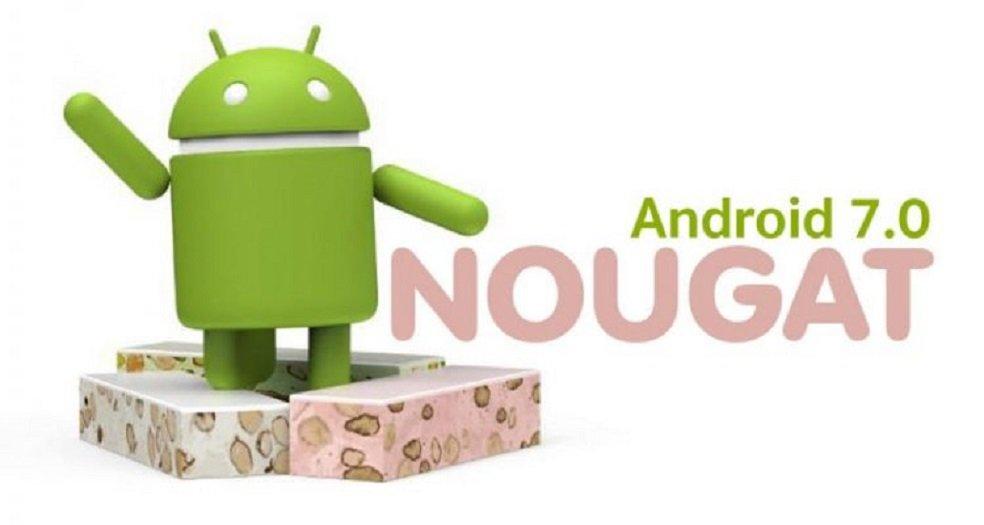
<p>NoxPlayer hỗ trợ tốt trên hệ điều hành Android 4,5,7 cực kỳ nhanh và mượt mà, các phiên bản hệ điều hành này cũng đã rất phổ biến quen thuộc với nhiều người. Khả năng tương thích của phần mềm thì phải nói là rất tuyệt vời, bất kỳ một game hay ứng dụng mới nào trên Android thì NoxPlayer đều có thể giúp bạn tải và cài đặt dễ dàng.</p>
<h3><strong>Khả năng tùy biến cao</strong></h3>
<p>Khả năng tùy biến cũng như cá nhân hóa trên NoxPlayer cực kỳ cao và đáng giá. Đầu tiên, chúng ta có thể lựa chọn giả lập các mẫu điện thoại khác nhau, tuy nhiên đa phần là các smartphone đến từ Samsung. Tiếp theo, chúng ta được chỉnh các thông số như CPU, ram, độ phân giải màn hình sao cho phù hợp với từng game bạn chơi. Thậm chí, chúng ta còn có thể giả lập số imei, mặc dù nó chỉ là ảo nhưng cũng cực kỳ thú vị rồi.</p>
<h3><strong>Khả năng tương thích tốt</strong></h3>
<figure id="attachment_222742" aria-describedby="caption-attachment-222742" style="width: 704px" class="wp-caption aligncenter"><img loading="lazy" class="size-full wp-image-222742" src="https://bloganchoi.com/wp-content/uploads/2020/01/trinh-gia-lap-1.jpg" alt="NoxPlayer yêu cầu cấu hình máy tính rất nhẹ. Ảnh: internet" width="704" height="535" srcset="https://bloganchoi.com/wp-content/uploads/2020/01/trinh-gia-lap-1.jpg 704w, https://bloganchoi.com/wp-content/uploads/2020/01/trinh-gia-lap-1-300x228.jpg 300w, https://bloganchoi.com/wp-content/uploads/2020/01/trinh-gia-lap-1-80x60.jpg 80w, https://bloganchoi.com/wp-content/uploads/2020/01/trinh-gia-lap-1-696x529.jpg 696w, https://bloganchoi.com/wp-content/uploads/2020/01/trinh-gia-lap-1-553x420.jpg 553w" sizes="(max-width: 704px) 100vw, 704px" /><figcaption id="caption-attachment-222742" class="wp-caption-text">NoxPlayer yêu cầu cấu hình máy tính rất nhẹ. Ảnh: internet</figcaption></figure>
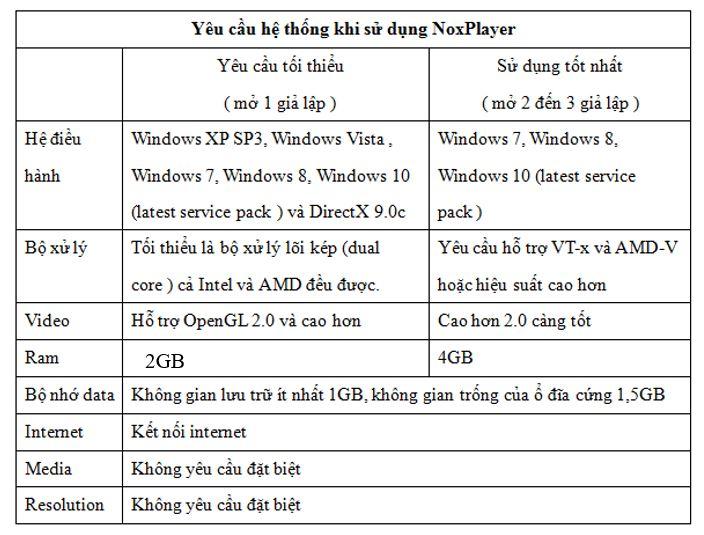
<p>NoxPlayer là một trong số ít hiếm hoi các trình giả lập hiện nay hỗ trợ cả 2 nền tảng Windows và Mac OS. Riêng đối với Windows thì phần mềm yêu cầu cấu hình cài đặt khá nhẹ, và hỗ trợ tất cả các phiên bản từ Windows Vista, 7, 8, 10.</p>
<p>Phần mềm giả lập này không chỉ cho phép người dùng cài đặt các ứng dụng từ Google Play Store mà nó còn cho tải các file APK, điều này cho thấy khả năng giả lập cực kì tuyệt vời cũng như tạo sự thoải mái hơn cho trải nghiệm của người dùng.</p>
<h3><strong>Nhiều tính năng đi kèm</strong></h3>
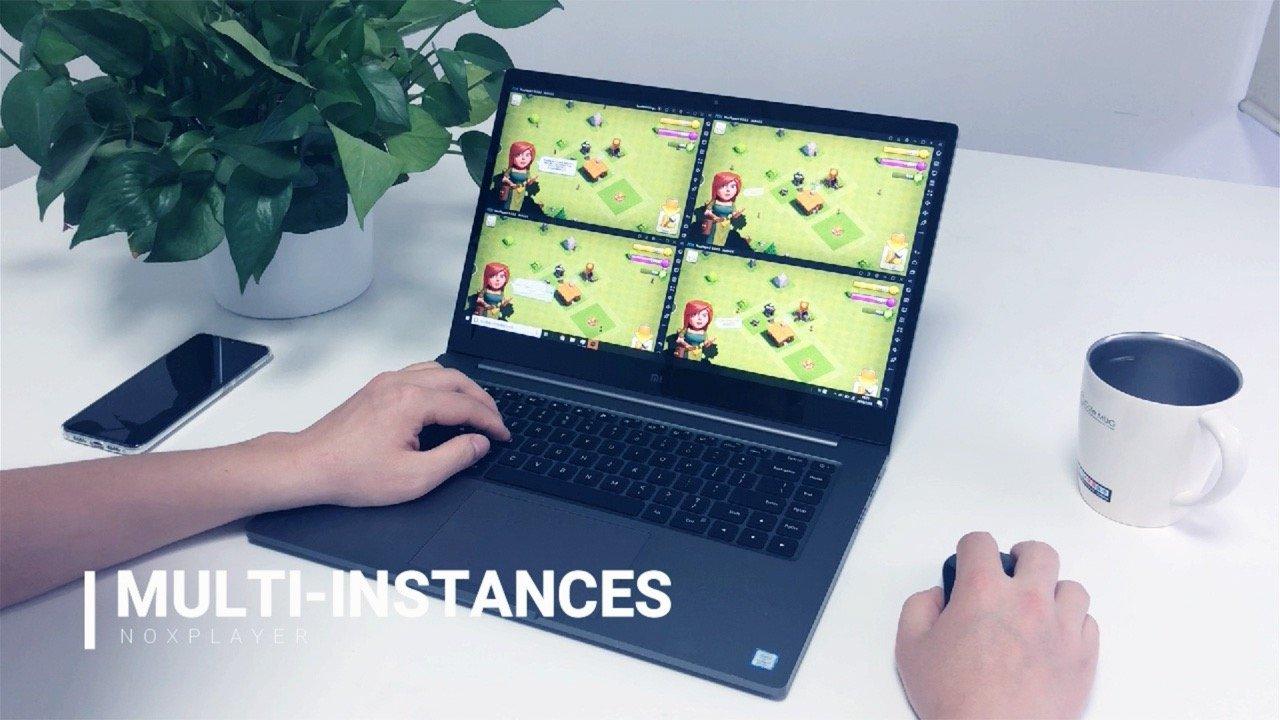
<figure id="attachment_222782" aria-describedby="caption-attachment-222782" style="width: 1280px" class="wp-caption aligncenter"><img loading="lazy" class="wp-image-222782 size-full" title="Tính năng đa nhiệm cực kỳ hay trên NoxPlayer. Ảnh: internet" src="https://bloganchoi.com/wp-content/uploads/2020/01/trinh-gia-lap-9.jpg" alt="Tính năng đa nhiệm cực kỳ hay trên NoxPlayer. Ảnh: internet" width="1280" height="720" srcset="https://bloganchoi.com/wp-content/uploads/2020/01/trinh-gia-lap-9.jpg 1280w, https://bloganchoi.com/wp-content/uploads/2020/01/trinh-gia-lap-9-300x169.jpg 300w, https://bloganchoi.com/wp-content/uploads/2020/01/trinh-gia-lap-9-768x432.jpg 768w, https://bloganchoi.com/wp-content/uploads/2020/01/trinh-gia-lap-9-1024x576.jpg 1024w, https://bloganchoi.com/wp-content/uploads/2020/01/trinh-gia-lap-9-696x392.jpg 696w, https://bloganchoi.com/wp-content/uploads/2020/01/trinh-gia-lap-9-1068x601.jpg 1068w, https://bloganchoi.com/wp-content/uploads/2020/01/trinh-gia-lap-9-747x420.jpg 747w" sizes="(max-width: 1280px) 100vw, 1280px" /><figcaption id="caption-attachment-222782" class="wp-caption-text">Tính năng đa nhiệm cực kỳ hay trên NoxPlayer. Ảnh: internet</figcaption></figure>
<p>NoxPlayer có rất nhiều tính năng và công nghệ đi kèm có thể kể đến như quay và chụp màn hình chơi game, chạy đa nhiệm, sử dụng chuột &#8211; bàn phím &#8211; tay cầm để chơi các game Android, ghi nhớ các thao tác tay được thiết lập sẵn (macro), và nhiều thứ khác nữa. Ở phần sau, chúng ta sẽ tìm hiểu kĩ hơn về các tính năng trên NoxPlayer, tin chắc rằng bạn sẽ không thất vọng đâu.</p>
<h2><strong>Các tính năng nổi bật có trên NoxPlayer</strong></h2>
<ul>
<li><strong>NoxPlayer được tích hợp tính năng recorder cho phép quay hoặc chụp màn hình khi chơi game</strong>, không khác gì một chiếc smartphone thực thụ. Tính năng này vô cùng hữu ích cho những bạn làm streamer hoặc YouTuber.</li>
<li><strong>Cài đặt các file APK từ một bên thứ 3</strong>. Cụ thể, bạn có thể tải ngay một tập tin đuôi APK trực tiếp từ máy tính, rồi chỉ cần thao tác kéo thả chuột vào trình giả lập thì đã có thể cài ứng dụng một cách dễ dàng. NoxPlayer đang dần đơn giản hóa và không gây phức tạp cho người dùng mới.</li>
<li><strong>Khả năng đa nhiệm mở nhiều trình giả lập một lúc</strong>, mỗi một giả lập có thể chơi một game khác nhau, hỗ trợ đăng nhập nhiều tài khoản.</li>
<li><strong>Tính năng kết hợp bàn phím, chuột, tay cầm khi chơi game</strong>.</li>
<li>Với tính năng macro, giờ đây bạn có thể <strong>thiết lập sẵn các thao tác</strong> và bằng một thao tác đơn giản là chúng sẽ lặp lại liên tục, vừa cày game vừa rảnh rỗi để làm việc khác.</li>
<li><strong>Sao chép, cài đặt các tập tin APK</strong> từ bên ngoài một cách dễ dàng nhất</li>
</ul>
<h2><strong>Hướng dẫn tải &amp; cài đặt NoxPlayer</strong></h2>
<h3><strong>Tải phần mềm NoxPlayer</strong></h3>
<p>Để tải phần mềm NoxPlayer, các bạn truy cập vào link sau :</p>
<ul>
<li><a href="https://bloganchoi.com/xredirect/?afflink=0&nofollow=1&noindex=1&outlink=1&rdtp=header&saleslink=1&utm_campaign=bloganchoi.com%7C%7Cbloganchoi.com%7C%7Cbloganchoi.com&utm_content=bloganchoi.com&utm_medium=%7C%7Chttps%3A%2F%2Fwww.bignox.com%2Fdownload%2FfullPackage%3Fsaleslink%3D1%7C%7Csaleslink%7C%7C&utm_source=https%3A%2F%2Fbloganchoi.com%2Freview-phan-mem-noxplayer-trinh-gia-lap-android-tot-nhat-de-choi-game-mobile-tren-pc%2F&utm_term=bloganchoi.com&wafx=1&wpaflt=80c08a46&wpaflt_url_domain=bignox.com&wpaflt_url_host=www.bignox.com&wppepvndtecrv=RE51ENnaviEU4fOH4H9MhU_oRfseFgNBvFhDEnV5f9Jg__j5UKRLrHKdQOU8w7DTfyIrnPdDO9Z-HHSPjdEnfv3sUJxjBc9gitDiI-St02nopIHR0xGLq7ffDQiE8APiDqmjzGJuEFKMUm2bZbQbqyETtPC3TPEzXsGDF5WX7AJht2hbICGThEr9htFHomLSs1IJQh9p8GBAHLG8TVoWTne8xBfY5F9-pEk--u0SP66infd09d4ZPFo9R23Ac97jlrv9MQVA4H2TnQtk0II7dCic0MTt1fZQJhy6Syrgql-3wQMCk7QHglSrnQR7lRTE1Vtoj6_0IqyROV09p32kINgy0K0-8liS5G_FIoNEP9PxVe-OKxs5AlBMM_o6CnzOgUg2f0ADVpPAFdVfzJLn6YRn_isjLNZboSaxSr9IzQD6XIbfNrHTi9ntqwZO1nX_Dx4K1fwQvxhStJjB0eILhQgOJnfyWMcM2czHve87ZL6UIj6uflr_LDGT-ejj_2hTv0HK0R6U-DF2H-nZX5F1Lr_jurNjTtiatQ72GEWzmXQLCvuaF8ck5b3m3HbOMF0TBnQAS1YepWBBwUh1Tlr2fC_6Kl1vcb70nBVgUfEiTsdOuGkAxf9LEebwIBFyZ7XTkDlFurW9QwlxcVMgSgiOCfD58TmcSPz5zb5KTuiLF0eNUQJOUTEangRK7UQ76W-S1xzfWXIQpmV2royOdME5fS_a0uUVfazroxXRPgowvNqJHQaJq6F7K27EFCLNyFo5olWBCrQtUW903f3skIVIm_QIC2JvT4xkdzpDW02Bgc7zrKQ5KYb9zIt9hgLJaQESbjEZxAieuHWND1F7x2cNPJ2WNkkKR7Dk1W4_UXeRQQkG2eUVjYnll0cPuTfuOgM62HqwzEQSkiG3NYOanETjrlqJbnnDdvTmuoE4YU4iavCHFZqKsQ-g40E3Zbs." target="_blank" rel="nofollow"><strong>Tải NoxPlayer cho Windows</strong></a></li>
<li><strong><a href="https://bloganchoi.com/xredirect/?afflink=0&nofollow=1&noindex=1&outlink=1&rdtp=header&saleslink=1&utm_campaign=bloganchoi.com%7C%7Cbloganchoi.com%7C%7Cbloganchoi.com&utm_content=bloganchoi.com&utm_medium=%7C%7Chttps%3A%2F%2Fwww.bignox.com%2Fen%2Fdownload%2FfullPackage%2Fmac_fullzip%3Fsaleslink%3D1%7C%7Csaleslink%7C%7C&utm_source=https%3A%2F%2Fbloganchoi.com%2Freview-phan-mem-noxplayer-trinh-gia-lap-android-tot-nhat-de-choi-game-mobile-tren-pc%2F&utm_term=bloganchoi.com&wafx=1&wpaflt=80c08a46&wpaflt_url_domain=bignox.com&wpaflt_url_host=www.bignox.com&wppepvndtecrv=FphhESxrClqAdmXoXFm4YqNbdD_amnWbtoXY3sXUe4bTcF5uVcbw3mQV19jRyLuNhCdS7VThQHIGM_FQ8qvp6cJna73BKpQvlpTghoz7Vv-Ml_H4J0-wmawcNwwAeiZgGSCSscFQKMseWFO5xW15PSNkbzMV8XteZCOJQ_oBv4WHX3ztbEr9JKQq3OozTCx3sIFaF8ZQRotgxvL6EKGVCRScE5SSzkUTZjx0CcVMRRfhqja1-XyIyoXbFpE01TRkHIkTMrSkdFDeoHpYGQxZavDuwIP3Psn3iw7gzrgErmLMvFzmLug0a_Pv8K5-EyCGNAUTHUtj1fy3JYh-2uQ_-AxseHnzyWIDnZr1-Ag4l4y9Wm6tyRcrnf5h2m7RBvzWlhyfMskteoSIUxdE6Wab4Fsgd4wA5N-DGi8H56wvj7CWnt_wbRlvR7OGZaC6OZ1JCsjw9PW93cmlbNt59Rw6Sq8J-0aOamVXbPrTVtQHe9i0ZcK4Haq8LtLiMLIQD7UzjJfAINyQY5rjMSOeb-0P1Mwk_yvJ16D4JGueUOz4TLyWDmsVDRWbComiCMy9q9EEx0MZF_AqZcJL-IFmqcPJQ8nN7d2zekEyGnn2-OWJoNDlFcPeEmCmw3WFHgh7n1YPlEkbswwbs_JiWqtbkzmfW5wtH2s9tBwzOKeiQPMk_RtWchmt9z_40KUrgtMiggu93KODSqpLJLjsV6r2rIHxiMMvjmT4_ZgWYPdbUBKb9qvLK-5L864JrLGZrbIYKCQk2YZHC_PrAEprxHTWy2U_H-twLsYLmW5Rp0qFW17W0b7IHVVyQRzLFva6RL9ALj0wOKwwZvVv-ZK3o97oaJgIJ5Zve0_Ys15AjTYATwJ6VKbd2Txix7jAKOvSe6dId6XreiVFoFOeX-KBbU8t4iJ8zDH1GcOL1pHYjxFoR_X1Mzxvkn35pjA51IA5JuxKoqUlOC21eIVL8dE2Pp2dIghtnCJX1MW5KD-7ykwT0W9D8A.." target="_blank" rel="nofollow">Tải NoxPlayer cho macOS (Apple)</a></strong></li>
</ul>
<h3><strong>Hướng dẫn cài đặt bằng hình ảnh</strong></h3>
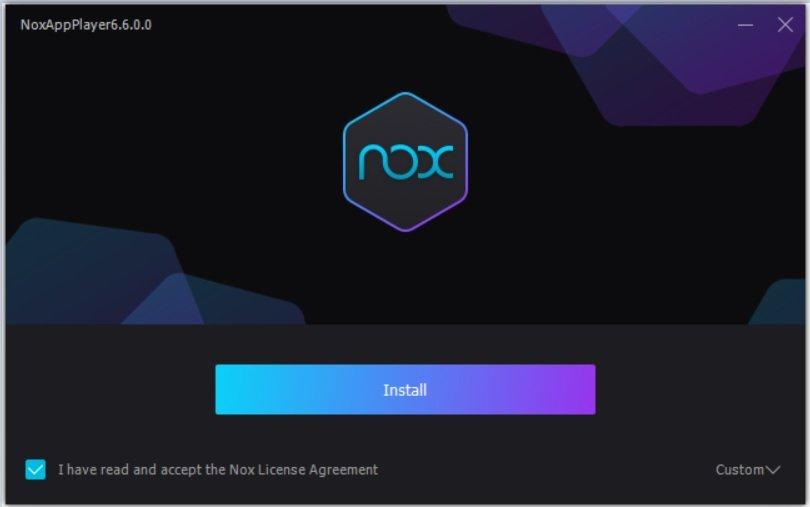
<figure id="attachment_222773" aria-describedby="caption-attachment-222773" style="width: 810px" class="wp-caption aligncenter"><img loading="lazy" class="size-full wp-image-222773" src="https://bloganchoi.com/wp-content/uploads/2020/01/trinh-gia-lap-2.jpg" alt="Sau khi tải ứng dụng thì chúng ta mở nó ra rồi nhấn vào nút Install. Ảnh: BlogAnChoi" width="810" height="507" srcset="https://bloganchoi.com/wp-content/uploads/2020/01/trinh-gia-lap-2.jpg 810w, https://bloganchoi.com/wp-content/uploads/2020/01/trinh-gia-lap-2-300x188.jpg 300w, https://bloganchoi.com/wp-content/uploads/2020/01/trinh-gia-lap-2-768x481.jpg 768w, https://bloganchoi.com/wp-content/uploads/2020/01/trinh-gia-lap-2-696x436.jpg 696w, https://bloganchoi.com/wp-content/uploads/2020/01/trinh-gia-lap-2-671x420.jpg 671w" sizes="(max-width: 810px) 100vw, 810px" /><figcaption id="caption-attachment-222773" class="wp-caption-text">Sau khi tải ứng dụng thì chúng ta mở nó ra rồi nhấn vào nút Install. Ảnh: BlogAnChoi</figcaption></figure>
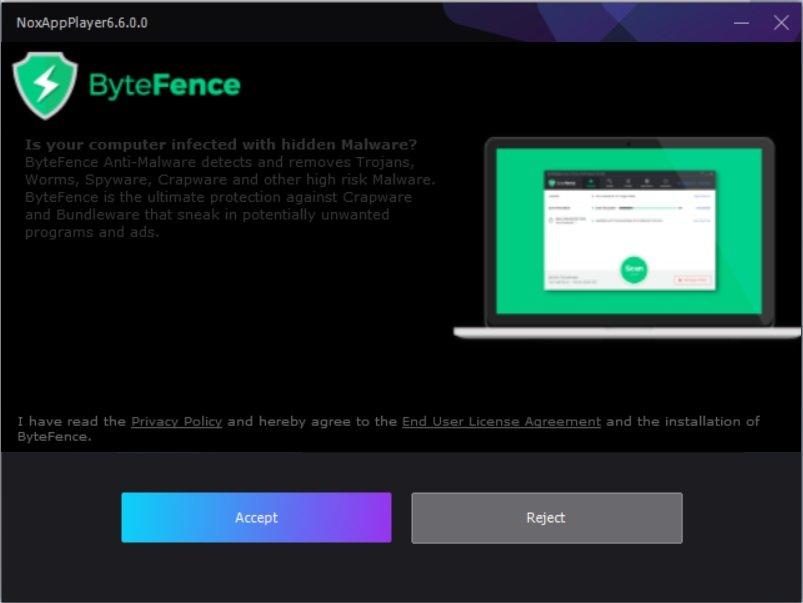
<figure id="attachment_222775" aria-describedby="caption-attachment-222775" style="width: 803px" class="wp-caption aligncenter"><img loading="lazy" class="size-full wp-image-222775" src="https://bloganchoi.com/wp-content/uploads/2020/01/trinh-gia-lap-3.jpg" alt="Tiếp theo, bạn có thể lựa chọn cài đặt thêm ứng dụng diệt virus đi kèm. Nếu đồng ý thì chọn Accept, từ chối thì chọn Reject. Ảnh: BlogAnChoi" width="803" height="603" srcset="https://bloganchoi.com/wp-content/uploads/2020/01/trinh-gia-lap-3.jpg 803w, https://bloganchoi.com/wp-content/uploads/2020/01/trinh-gia-lap-3-300x225.jpg 300w, https://bloganchoi.com/wp-content/uploads/2020/01/trinh-gia-lap-3-768x577.jpg 768w, https://bloganchoi.com/wp-content/uploads/2020/01/trinh-gia-lap-3-80x60.jpg 80w, https://bloganchoi.com/wp-content/uploads/2020/01/trinh-gia-lap-3-265x198.jpg 265w, https://bloganchoi.com/wp-content/uploads/2020/01/trinh-gia-lap-3-696x523.jpg 696w, https://bloganchoi.com/wp-content/uploads/2020/01/trinh-gia-lap-3-559x420.jpg 559w" sizes="(max-width: 803px) 100vw, 803px" /><figcaption id="caption-attachment-222775" class="wp-caption-text">Tiếp theo, bạn có thể lựa chọn cài đặt thêm ứng dụng diệt virus đi kèm. Nếu đồng ý thì chọn Accept, từ chối thì chọn Reject. Ảnh: BlogAnChoi</figcaption></figure>
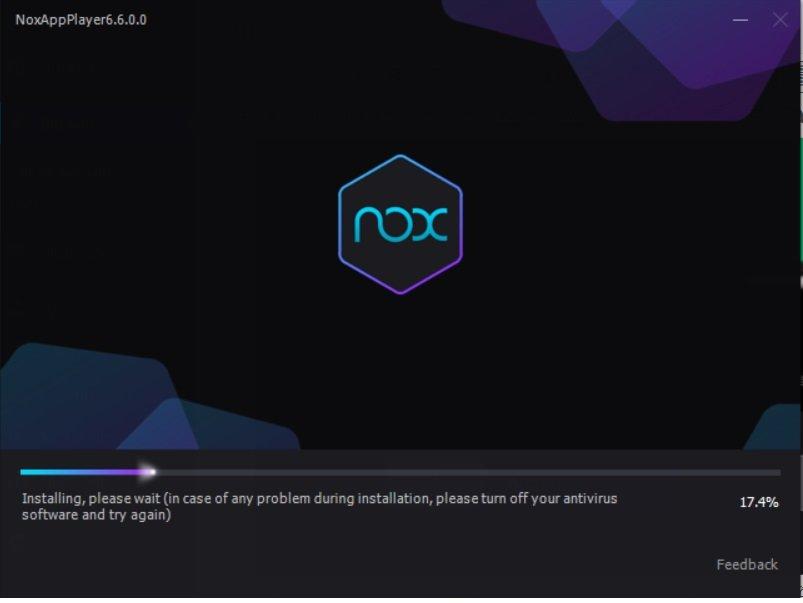
<figure id="attachment_222776" aria-describedby="caption-attachment-222776" style="width: 803px" class="wp-caption aligncenter"><img loading="lazy" class="size-full wp-image-222776" src="https://bloganchoi.com/wp-content/uploads/2020/01/trinh-gia-lap-4.jpg" alt="Sau đó, bạn chỉ cần chờ đợi NoxPlayer tự cài đặt. Ảnh: BlogAnChoi" width="803" height="603" srcset="https://bloganchoi.com/wp-content/uploads/2020/01/trinh-gia-lap-4.jpg 803w, https://bloganchoi.com/wp-content/uploads/2020/01/trinh-gia-lap-4-300x225.jpg 300w, https://bloganchoi.com/wp-content/uploads/2020/01/trinh-gia-lap-4-768x577.jpg 768w, https://bloganchoi.com/wp-content/uploads/2020/01/trinh-gia-lap-4-80x60.jpg 80w, https://bloganchoi.com/wp-content/uploads/2020/01/trinh-gia-lap-4-265x198.jpg 265w, https://bloganchoi.com/wp-content/uploads/2020/01/trinh-gia-lap-4-696x523.jpg 696w, https://bloganchoi.com/wp-content/uploads/2020/01/trinh-gia-lap-4-559x420.jpg 559w" sizes="(max-width: 803px) 100vw, 803px" /><figcaption id="caption-attachment-222776" class="wp-caption-text">Sau đó, bạn chỉ cần chờ đợi NoxPlayer tự cài đặt. Ảnh: BlogAnChoi</figcaption></figure>
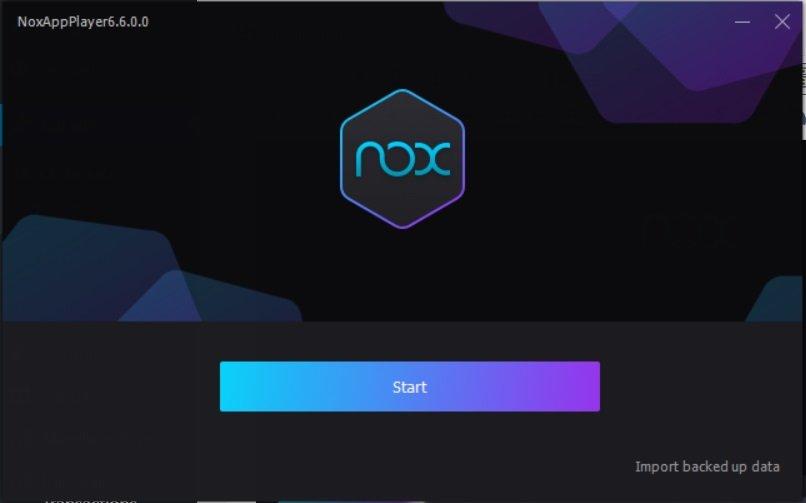
<figure id="attachment_222777" aria-describedby="caption-attachment-222777" style="width: 806px" class="wp-caption aligncenter"><img loading="lazy" class="size-full wp-image-222777" src="https://bloganchoi.com/wp-content/uploads/2020/01/trinh-gia-lap-5.jpg" alt="Nhấn tiếp tục nút Start để bắt đầu. Ảnh: BlogAnChoi" width="806" height="503" srcset="https://bloganchoi.com/wp-content/uploads/2020/01/trinh-gia-lap-5.jpg 806w, https://bloganchoi.com/wp-content/uploads/2020/01/trinh-gia-lap-5-300x187.jpg 300w, https://bloganchoi.com/wp-content/uploads/2020/01/trinh-gia-lap-5-768x479.jpg 768w, https://bloganchoi.com/wp-content/uploads/2020/01/trinh-gia-lap-5-696x434.jpg 696w, https://bloganchoi.com/wp-content/uploads/2020/01/trinh-gia-lap-5-673x420.jpg 673w" sizes="(max-width: 806px) 100vw, 806px" /><figcaption id="caption-attachment-222777" class="wp-caption-text">Nhấn tiếp tục nút Start để bắt đầu. Ảnh: BlogAnChoi</figcaption></figure>
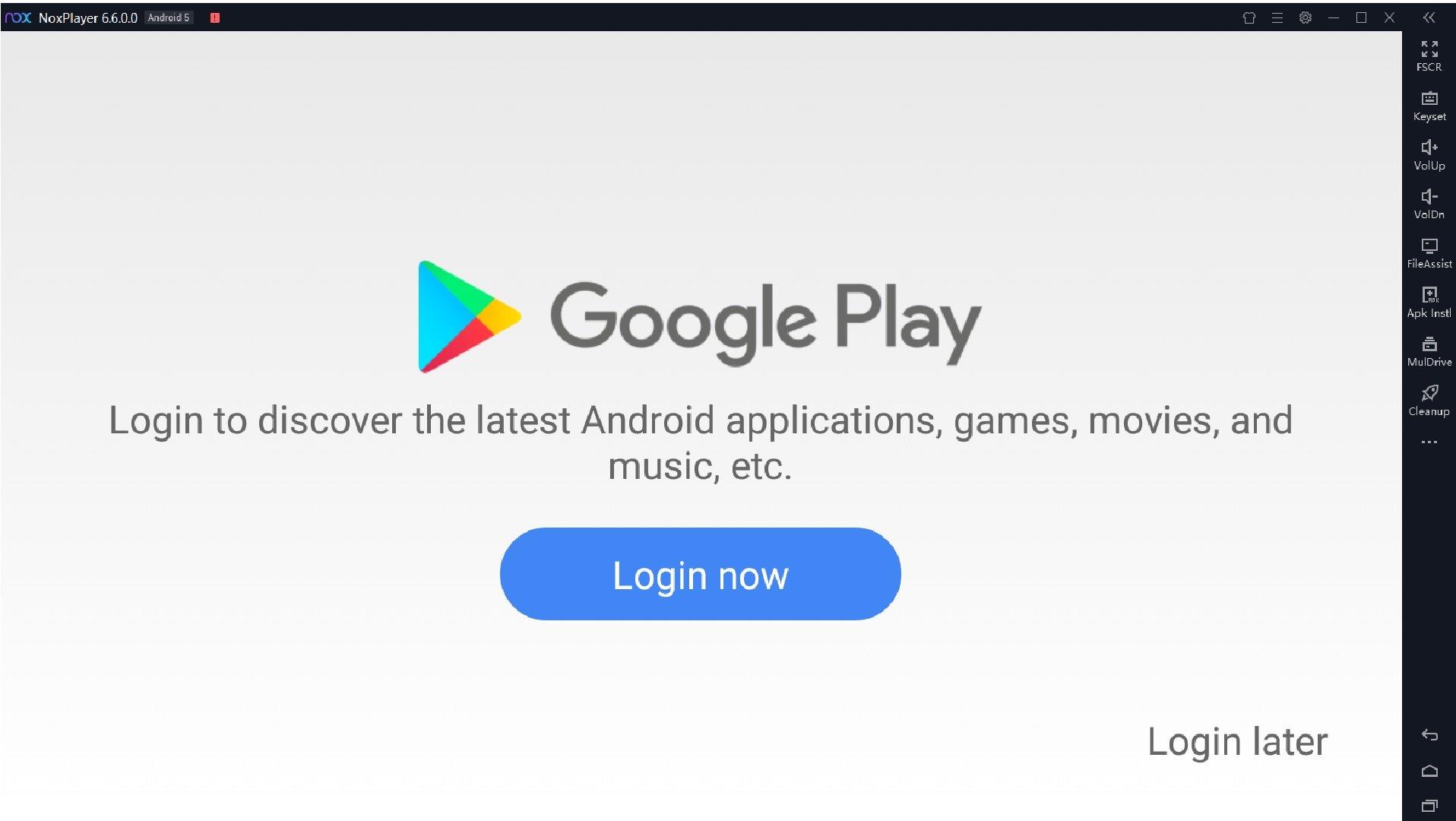
<figure id="attachment_222778" aria-describedby="caption-attachment-222778" style="width: 1916px" class="wp-caption aligncenter"><img loading="lazy" class="size-full wp-image-222778" src="https://bloganchoi.com/wp-content/uploads/2020/01/trinh-gia-lap-6.jpg" alt="Đăng nhập tài khoản Google bằng cách nhấn vào Login Now, nếu không muốn bạn hãy chọn Login Later. Ảnh: BlogAnChoi" width="1916" height="1080" srcset="https://bloganchoi.com/wp-content/uploads/2020/01/trinh-gia-lap-6.jpg 1916w, https://bloganchoi.com/wp-content/uploads/2020/01/trinh-gia-lap-6-300x169.jpg 300w, https://bloganchoi.com/wp-content/uploads/2020/01/trinh-gia-lap-6-768x433.jpg 768w, https://bloganchoi.com/wp-content/uploads/2020/01/trinh-gia-lap-6-1024x577.jpg 1024w, https://bloganchoi.com/wp-content/uploads/2020/01/trinh-gia-lap-6-696x392.jpg 696w, https://bloganchoi.com/wp-content/uploads/2020/01/trinh-gia-lap-6-1068x602.jpg 1068w, https://bloganchoi.com/wp-content/uploads/2020/01/trinh-gia-lap-6-745x420.jpg 745w" sizes="(max-width: 1916px) 100vw, 1916px" /><figcaption id="caption-attachment-222778" class="wp-caption-text">Đăng nhập tài khoản Google bằng cách nhấn vào Login Now, nếu không muốn bạn hãy chọn Login Later. Ảnh: BlogAnChoi</figcaption></figure>
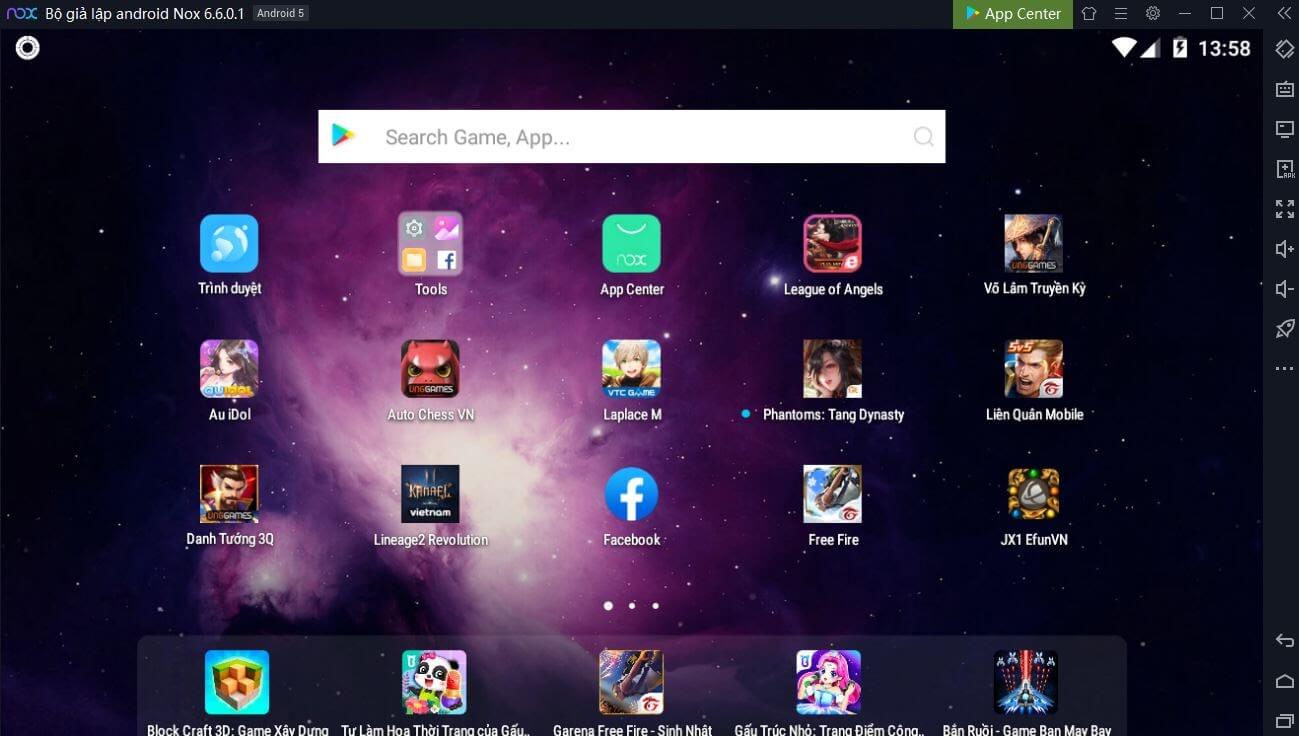
<figure id="attachment_223808" aria-describedby="caption-attachment-223808" style="width: 1299px" class="wp-caption aligncenter"><a href="https://bloganchoi.com/wp-content/uploads/2020/01/cuoi-cung-la-ban-co-the-bat-dau-su-dung-noxplayer-roi-bloganchoi.jpg"><img loading="lazy" class="size-full wp-image-223808" src="https://bloganchoi.com/wp-content/uploads/2020/01/cuoi-cung-la-ban-co-the-bat-dau-su-dung-noxplayer-roi-bloganchoi.jpg" alt="Cuối cùng là bạn có thể bắt đầu sử dụng NoxPlayer rồi. Ảnh: BlogAnChoi" width="1299" height="736" srcset="https://bloganchoi.com/wp-content/uploads/2020/01/cuoi-cung-la-ban-co-the-bat-dau-su-dung-noxplayer-roi-bloganchoi.jpg 1299w, https://bloganchoi.com/wp-content/uploads/2020/01/cuoi-cung-la-ban-co-the-bat-dau-su-dung-noxplayer-roi-bloganchoi-300x170.jpg 300w, https://bloganchoi.com/wp-content/uploads/2020/01/cuoi-cung-la-ban-co-the-bat-dau-su-dung-noxplayer-roi-bloganchoi-768x435.jpg 768w, https://bloganchoi.com/wp-content/uploads/2020/01/cuoi-cung-la-ban-co-the-bat-dau-su-dung-noxplayer-roi-bloganchoi-1024x580.jpg 1024w, https://bloganchoi.com/wp-content/uploads/2020/01/cuoi-cung-la-ban-co-the-bat-dau-su-dung-noxplayer-roi-bloganchoi-696x394.jpg 696w, https://bloganchoi.com/wp-content/uploads/2020/01/cuoi-cung-la-ban-co-the-bat-dau-su-dung-noxplayer-roi-bloganchoi-1068x605.jpg 1068w, https://bloganchoi.com/wp-content/uploads/2020/01/cuoi-cung-la-ban-co-the-bat-dau-su-dung-noxplayer-roi-bloganchoi-741x420.jpg 741w" sizes="(max-width: 1299px) 100vw, 1299px" /></a><figcaption id="caption-attachment-223808" class="wp-caption-text">Cuối cùng là bạn có thể bắt đầu sử dụng NoxPlayer rồi. Ảnh: BlogAnChoi</figcaption></figure>
<h3><strong>Hướng dẫn cài đặt bằng video</strong></h3>
<p><iframe loading="lazy" class="youtube-player" width="640" height="360" src="https://www.youtube.com/embed/TD7yKy_tUC4?version=3&#038;rel=1&#038;showsearch=0&#038;showinfo=1&#038;iv_load_policy=1&#038;fs=1&#038;hl=vi&#038;autohide=2&#038;wmode=transparent" allowfullscreen="true" style="border:0;" sandbox="allow-scripts allow-same-origin allow-popups allow-presentation"></iframe></p>
<h2><strong>Tổng kết</strong></h2>
<p>NoxPlayer là một trình giả lập Android trên máy tính cực kì đáng giá và bạn nên sử dụng. Không chỉ nhẹ, mượt, mà nó còn cực kì hiệu quả trong việc mô phỏng một chiếc smartphone với nhiều tính năng hữu ích. Điều quan trọng nhất, NoxPlayer hoàn toàn miễn phí và cực kì bảo mật mọi thông tin của người dùng.</p>
<p>Nếu trong quá trình sử dụng có vấn đề rắc rối thì bạn hãy comment ngay bên dưới hoặc liên hệ với bộ phận hỗ trợ khách hàng của NoxPlayer tại Fanpage <strong><a href="https://bloganchoi.com/redirect/?gzv=H4sIAAAAAAACAyXO3RKBQABA4XfpXlmVMGNM1NhVS9EaddP0S2qUWm0y3p3h3Hy358U9uBl3obRqZoIQpCnf0fpLFvHdsxcW576dQ6lB6r-VOhJNbI81rHbqMKS5u7IVQkmITZRJ3R0x6BJoEDRNpCMMWqz4vunFiQwOLLmlSVFAd13pBQgA9DRFLHcDmZHWtEKNZRE6sOfaCmIbLo8RjrfXqYP3Rq3HuPYMZVM6-QVEdunv_ceEnQZgm_bNb4vnufcHnhlEqsoAAAA.&nofollow=1&noindex=1&outlink=1&wbac=1"   rel="nofollow" target="_blank">facebook.com/VNnoxplayer</a></strong> để được hỗ trợ tốt nhất nhé.</p>
<h2><strong>Đánh giá và chơi game trên NoxPlayer</strong></h2>
<h3><strong>Đánh giá Noxplayer</strong></h3>
<p><iframe loading="lazy" class="youtube-player" width="640" height="360" src="https://www.youtube.com/embed/4xzRNqr6qfI?version=3&#038;rel=1&#038;showsearch=0&#038;showinfo=1&#038;iv_load_policy=1&#038;fs=1&#038;hl=vi&#038;autohide=2&#038;start=234&#038;wmode=transparent" allowfullscreen="true" style="border:0;" sandbox="allow-scripts allow-same-origin allow-popups allow-presentation"></iframe></p>
<p><iframe loading="lazy" class="youtube-player" width="640" height="360" src="https://www.youtube.com/embed/ibXHSBUOaNQ?version=3&#038;rel=1&#038;showsearch=0&#038;showinfo=1&#038;iv_load_policy=1&#038;fs=1&#038;hl=vi&#038;autohide=2&#038;start=317&#038;wmode=transparent" allowfullscreen="true" style="border:0;" sandbox="allow-scripts allow-same-origin allow-popups allow-presentation"></iframe></p>
<h3><strong>Chơi game trên NoxPlayer</strong></h3>
<p><iframe loading="lazy" class="youtube-player" width="640" height="360" src="https://www.youtube.com/embed/nUcLIZ6tn4Y?version=3&#038;rel=1&#038;showsearch=0&#038;showinfo=1&#038;iv_load_policy=1&#038;fs=1&#038;hl=vi&#038;autohide=2&#038;wmode=transparent" allowfullscreen="true" style="border:0;" sandbox="allow-scripts allow-same-origin allow-popups allow-presentation"></iframe></p>
<p><iframe loading="lazy" class="youtube-player" width="640" height="360" src="https://www.youtube.com/embed/5LOLwWwl4YM?version=3&#038;rel=1&#038;showsearch=0&#038;showinfo=1&#038;iv_load_policy=1&#038;fs=1&#038;hl=vi&#038;autohide=2&#038;wmode=transparent" allowfullscreen="true" style="border:0;" sandbox="allow-scripts allow-same-origin allow-popups allow-presentation"></iframe></p>
<p><iframe loading="lazy" class="youtube-player" width="640" height="360" src="https://www.youtube.com/embed/bWXZgeX9c24?version=3&#038;rel=1&#038;showsearch=0&#038;showinfo=1&#038;iv_load_policy=1&#038;fs=1&#038;hl=vi&#038;autohide=2&#038;wmode=transparent" allowfullscreen="true" style="border:0;" sandbox="allow-scripts allow-same-origin allow-popups allow-presentation"></iframe></p>
<p><iframe loading="lazy" class="youtube-player" width="640" height="360" src="https://www.youtube.com/embed/QlGvW3III1Y?version=3&#038;rel=1&#038;showsearch=0&#038;showinfo=1&#038;iv_load_policy=1&#038;fs=1&#038;hl=vi&#038;autohide=2&#038;wmode=transparent" allowfullscreen="true" style="border:0;" sandbox="allow-scripts allow-same-origin allow-popups allow-presentation"></iframe></p>]]></content>
		
					<link rel="replies" type="text/html" href="https://bloganchoi.com/review-phan-mem-noxplayer-trinh-gia-lap-android-tot-nhat-de-choi-game-mobile-tren-pc/#comments" thr:count="1" />
			<link rel="replies" type="application/atom+xml" href="https://bloganchoi.com/review-phan-mem-noxplayer-trinh-gia-lap-android-tot-nhat-de-choi-game-mobile-tren-pc/feed/atom/" thr:count="1" />
			<thr:total>1</thr:total>
			</entry>
	</feed>